
 Language
AI Shopping Assistant Capabilities: Discovery, Recommendations, and Conversion
Learn which AI shopping assistant capabilities matter most, from natural-language discovery and product recommendations to cart support, human handoff, and…
By Upsello Team
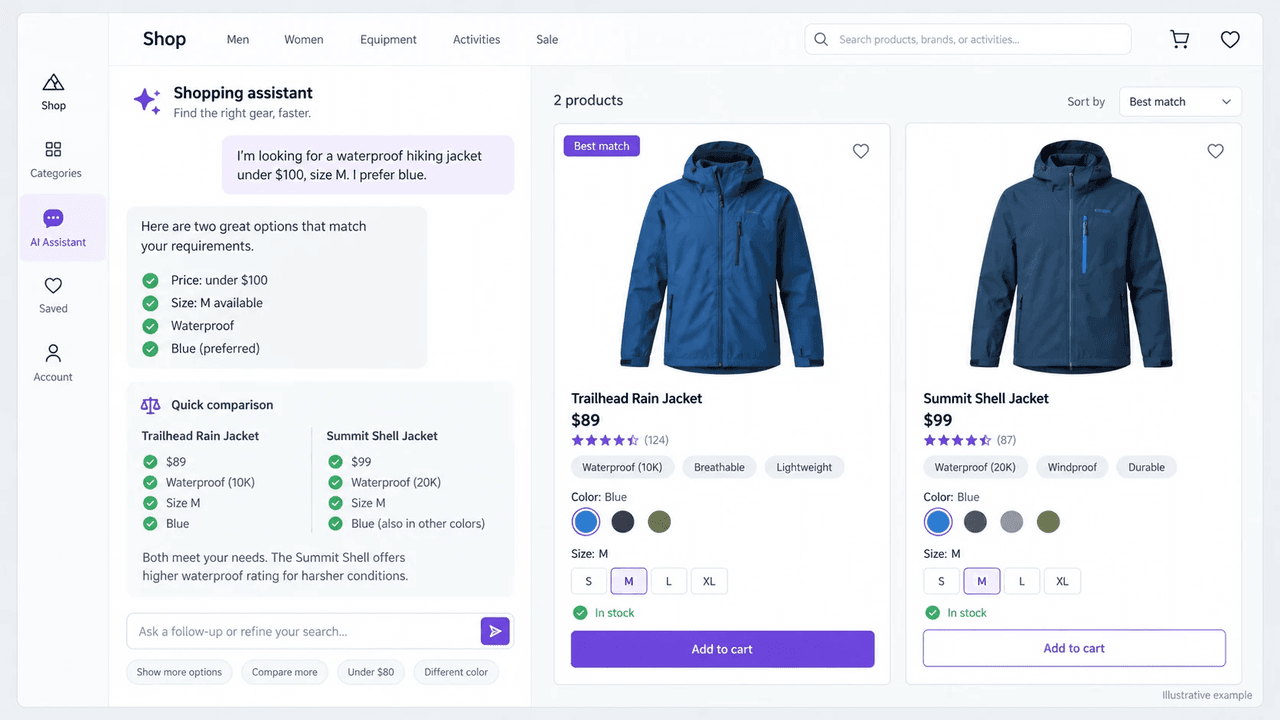
AI shopping assistant capabilities include product discovery, recommendations, comparisons, answers to buying questions, and cart assistance. They help shoppers find suitable products and take the next step toward buying. At Upsello, we focus on connecting product guidance with selling and customer support. This guide explains the main capabilities, the store data behind them, and how you can evaluate their impact.
What Are the Core AI Shopping Assistant Capabilities?
An AI shopping assistant helps shoppers describe what they need, find suitable products, compare options, and continue toward a purchase. Depending on the integration, it may also answer policy questions, suggest compatible accessories, and pass the conversation to your team.
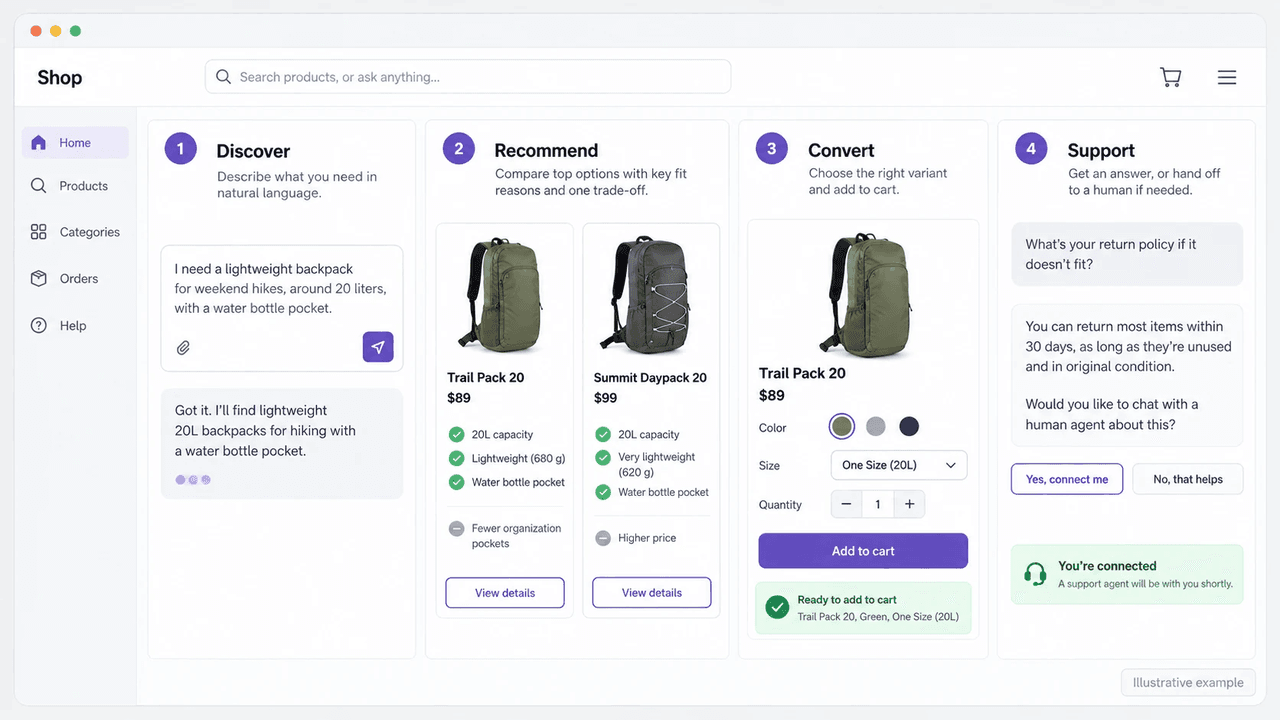 Illustrative example: discovery, recommendation, cart action, and human support appear as one connected shopping journey.
One assistant may handle several of these tasks during the same conversation. The table separates the shopper task, store input, and benefit for each capability.
| Capability | Shopper task | Store input | Benefit |
|---|---|---|---|
| Discovery | Narrow the product set | Catalog, search, variants, and stock | Reduces browsing. |
| Recommendation | See why an item fits | Attributes and product relationships | Builds confidence. |
| Conversion support | Resolve a buying question | Cart context and action rules | Removes purchase interruptions. |
| Human handoff | Get help with exceptions | Policies and the responsible team | Creates a smoother service path. |
Shopify provides separate storefront tools for predictive search, product recommendations, and cart context. An AI shopping assistant can connect those tools with natural-language questions, product explanations, and a clear next step.
How Does an AI Shopping Assistant Help Shoppers Find Products?
An AI shopping assistant helps shoppers find products by identifying their requirements and asking useful follow-up questions. It then searches your catalog for matching options. Customers may describe an occasion, problem, budget, or style instead of using the exact product name in your catalog.
What does the shopper need?
The assistant should identify the details that affect the product list. Common details include intended use, budget, size, color, material, and compatibility. Destination, delivery timing, and items already in the cart may also matter. The assistant should separate hard requirements, such as “under $100,” from preferences, such as “ideally blue.” For example, a shopper might ask, “I need a waterproof hiking jacket under $100 in size M, ideally in blue.” The assistant should check waterproofing, price, and size first, then prioritize blue options that meet those requirements.
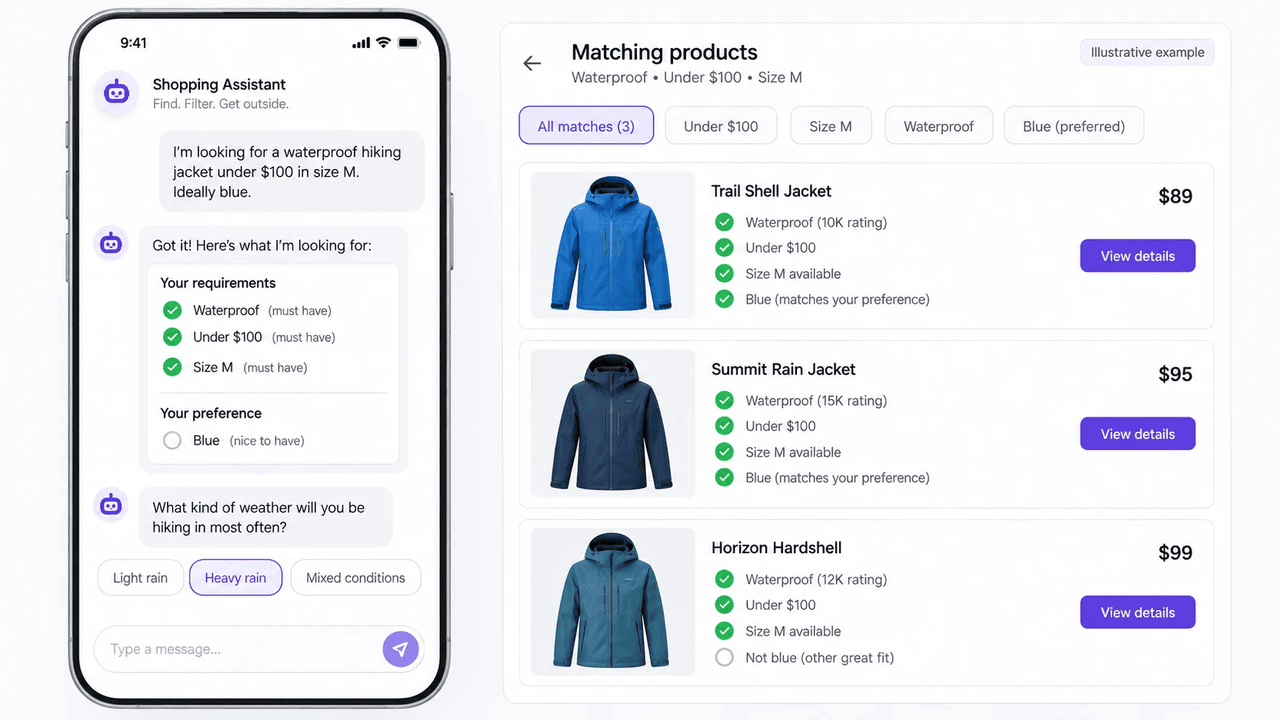 Illustrative example: hard requirements stay in place while a follow-up question narrows the matching jackets.
Which follow-up question helps?
A follow-up question earns its place when the answer changes the product list. If the shopper asks for “a gift for a hiker,” the assistant might ask about budget or whether they want to avoid gifts that need a clothing or shoe size. It does not need to begin with a long lifestyle questionnaire. Good discovery usually follows this pattern:
- Repeat the request in plain language.
- Ask one question if an important choice is still unclear.
- Show a short list using the information already available.
- Let the shopper refine the list without starting over.
How does it find matching products?
Natural-language understanding is only the first step. The assistant must find products in your store’s catalog, not invent a plausible item from a description. The search should consider product details, variants, price, local market rules, and current stock. For Shopify stores, useful inputs include product titles, descriptions, tags, metafields, and variant options. Prices, stock, collections, product relationships, and cart context can also shape the answer. Shopify predictive search can support storefront search. The assistant still needs accurate product data and clear rules for deciding which results fit the request. If an important product field is missing, the assistant should ask a follow-up question, narrow its answer, or offer help from your team.
How Should It Recommend and Compare Products?
An AI shopping assistant should recommend products that meet the shopper's requirements and compare the differences that affect their choice. Each recommendation should explain why the product fits and any limitation the shopper needs to consider.
How should it rank matching products?
The assistant should rank products by how well they meet the shopper’s requirements. Popularity, stock, and business rules can help order the options that already qualify. For example, margin may help choose between two suitable jackets, but a jacket that fails the waterproofing requirement should be excluded.
How should it explain the trade-off?
An explanation should connect a product detail to the shopper’s request. Consider this example: “This waterproof jacket costs $89 and is available in size M in black. I couldn’t find a blue option that meets all three requirements. Would you like to see blue jackets above $100?” The shopper can keep the original budget or choose to raise it to see blue options. That is more useful than saying one product is “a great match” without showing the reason.
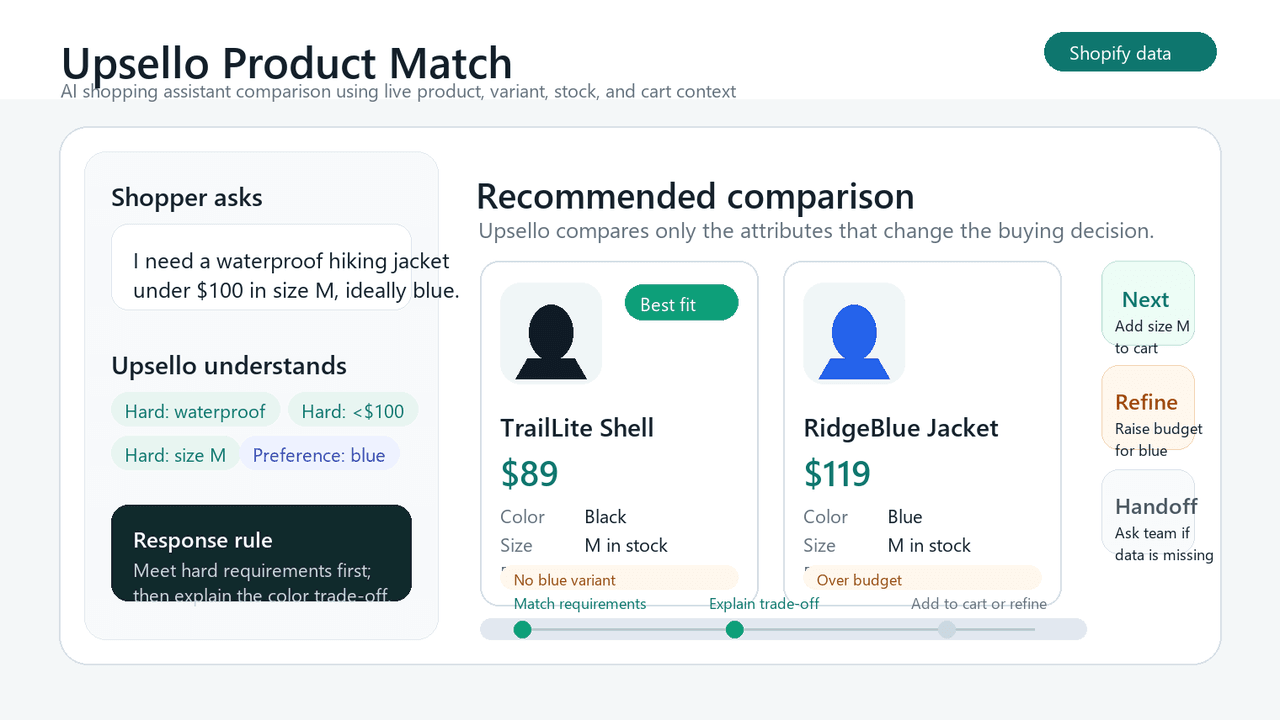 Illustrative example: an Upsello product comparison showing price, size, color, and key trade-offs.
The same approach works for product comparison. The assistant can compare dimensions, material, capacity, warranty terms, and compatibility. It should use the fields that matter to the shopper’s decision, not display every attribute in the catalog. Our AI product comparison guide uses a simple process. Recognize when a shopper is weighing similar products, clarify the priority, compare meaningful differences, and present a purchase path.
What should it do when nothing matches?
No-match behavior is one of the most important AI shopping assistant capabilities. If no product meets the budget, size, or compatibility requirement, the assistant should say so. It can ask whether the shopper wants to change the budget or a non-essential preference, such as color. Compatibility requirements should remain in place unless the shopper confirms that their needs have changed. It might also capture a stock alert or hand the question to a person.
How Can It Help Shoppers Complete a Purchase?
It helps shoppers complete a purchase by answering delivery and return questions, linking the correct variant, and guiding them to the cart or checkout. It should also make clear which actions it can and cannot perform.
How does it link the right variant?
At minimum, the assistant should send the shopper to the correct product and preserve the selected variant. If the integration supports cart updates, it should confirm the product, size, color, and quantity before adding anything. If the action fails, it should say so rather than imply that the cart changed.
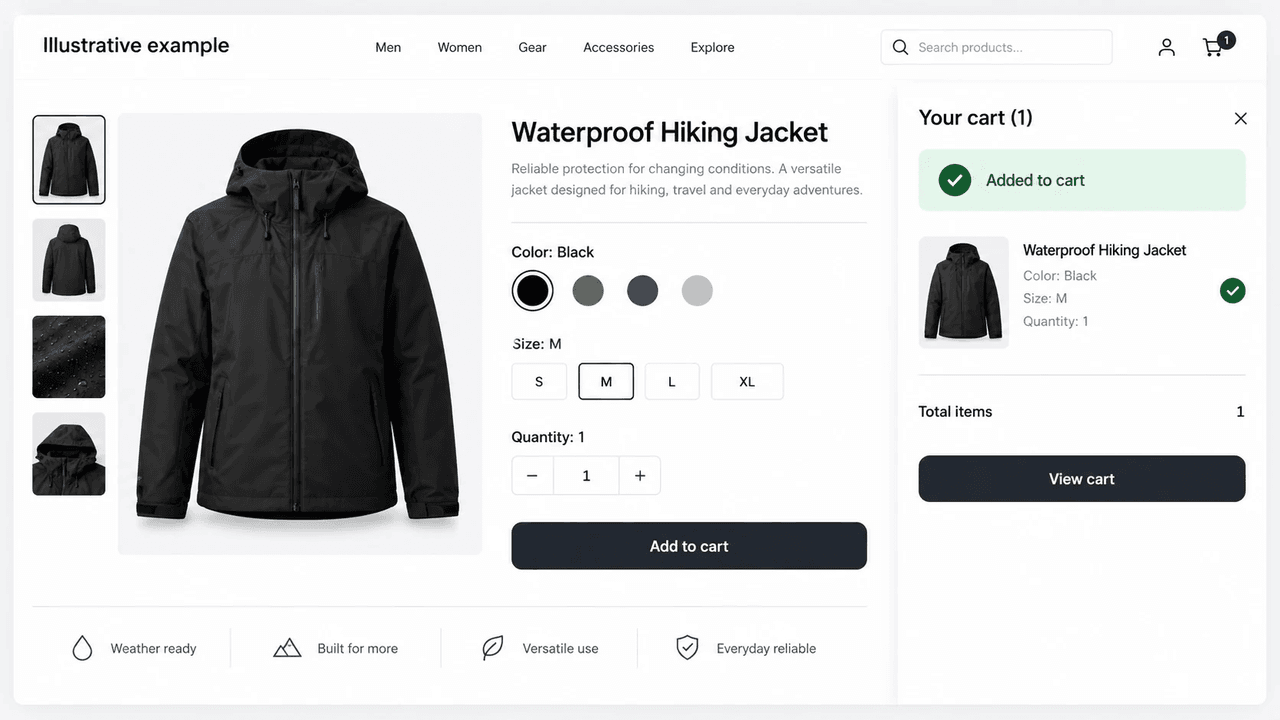 Illustrative example: the selected product variant added to a shopping cart.
Shopify’s Cart object can provide cart lines, estimated costs, and a checkout URL. That context can help an assistant explain the visible cart and guide a shopper toward checkout. Cart updates and discount applications depend on the integration. The assistant should confirm successful changes and direct the shopper to checkout to complete payment.
How does it answer a buying question?
A shopper may already like the product but still wonder, “Will it arrive by Friday?” The assistant should use the destination, the store’s shipping information, and any available delivery estimate. If it cannot confirm the date, it should explain the limitation and offer to connect the shopper with your team. The same principle applies to returns, fit, compatibility, payment, and warranty questions. Give the shopper the specific information that affects the decision, including an important condition when one applies.
When should it upsell or recover a cart?
Suggest an upgrade or accessory after the shopper has chosen a suitable product. Begin cart recovery when a shopper leaves without completing the purchase, using the channels and timing your store has enabled. A compatible accessory, an item that completes an outfit, or a product that helps a basket reach a shipping threshold can be useful. An unrelated item chosen only because its price fits the cart gap can weaken trust. When the shopper has shared a concern, the recovery message can address it directly. For example, it can clarify delivery timing instead of immediately offering a discount. Learn more in our cart recovery guide.
When Should It Hand a Customer to a Human?
A human handoff is useful when the shopper needs judgment, permission, or information the assistant cannot confirm. Common examples include a refund exception or an unclear fit question. Conflicting stock or price data and a direct request for a person also call for a handoff.
The handoff does not need a long technical record. It should preserve three things:
- The shopper’s question and goal.
- The products or policy information already discussed.
- The unresolved point that needs a person.
For example, if a shopper asks for a refund beyond the published return period, the assistant can explain the documented policy and route the request. It should not promise a refund simply because the customer asked. The support team can then review the order and make the exception decision under the store’s rules.
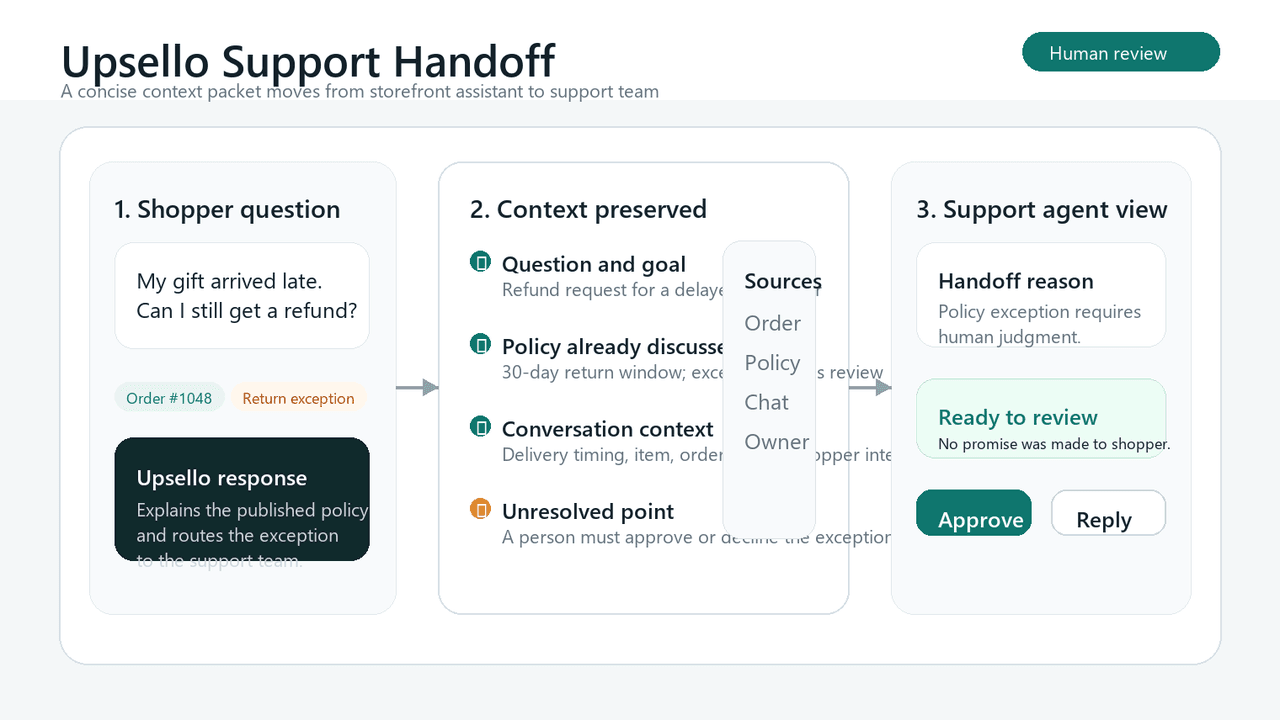 Illustrative example: a customer support handoff with the shopper's question and conversation context.
This approach also helps your team improve the assistant. Repeated handoffs about whether a laptop fits inside a bag, delivery timing, or return rules reveal a pattern. A product field or policy explanation may need attention.
What Store Data Does an AI Shopping Assistant Need?
An AI shopping assistant needs product details, variant prices, stock, store policies, and cart information. Product relationships also matter when you enable bundles, accessories, or related items. Before comparing tools, map each common customer question to its source and owner.
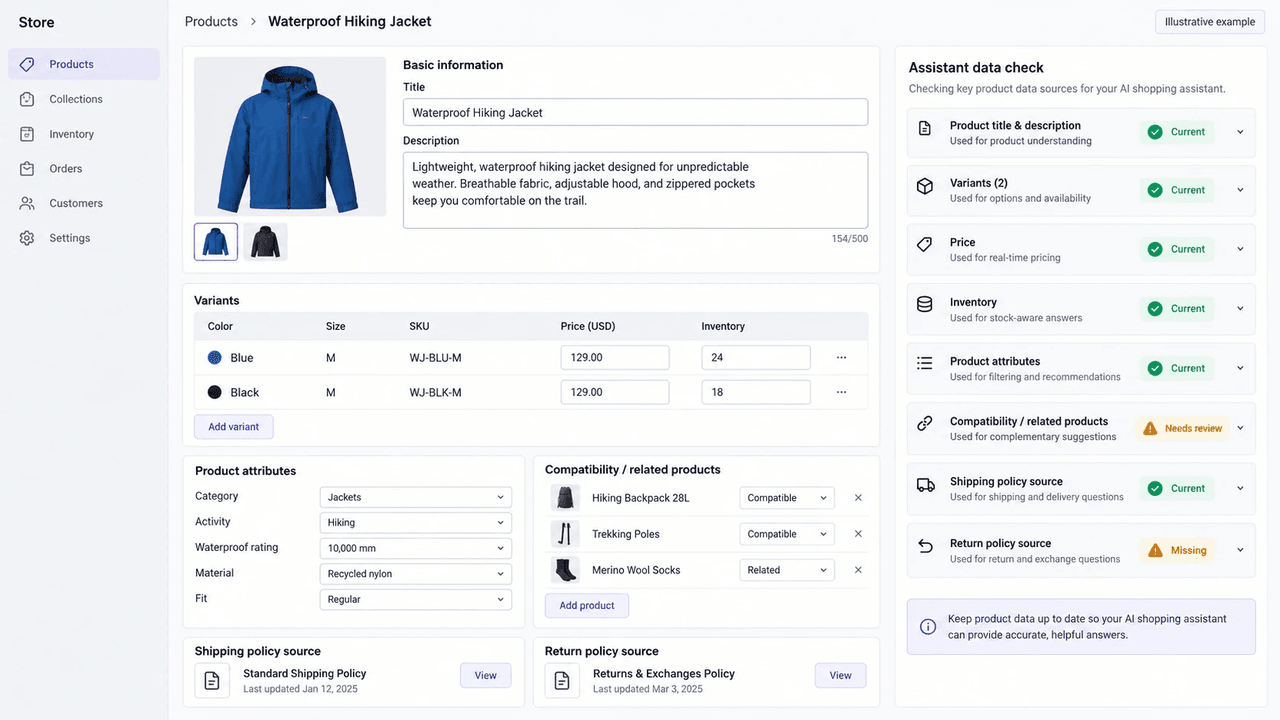 Illustrative example: product, variant, inventory, relationship, and policy sources need current owners and status.
| Store data | Question it answers | Keep current |
|---|---|---|
| Product attributes and variants | Fit, use case, and compatibility | Keep required fields and variant status current. |
| Price and market data | Budget and regional eligibility | Check the price source, currency, and market rules. |
| Inventory | Whether an item can be recommended | Update stock and no-stock responses. |
| Product relationships | Accessories, bundles, and related items | Review compatibility and merchandising rules. |
| Cart and promotion rules | Thresholds and offers | Check eligibility and failure messages. |
| Shipping, return, and warranty policies | Purchase reassurance | Keep conditions and dates current. |
How Do You Test AI Shopping Assistant Capabilities?
Choose one shopper journey before you test every possible feature. For example: “Help a shopper compare waterproof hiking jackets under $100.” Name the product fields, data sources, action boundaries, and handoff route for that journey. Use a scorecard that separates errors from correct handoffs. The table treats a reasonable handoff as a valid result.
| Test | Pass condition | Failure | Appropriate handoff |
|---|---|---|---|
| Product comparison | Uses current product details | Invents or misstates a feature | Required details need confirmation. |
| Cart action | Adds the correct variant and confirms success | Reports success after a failed action | An unresolved issue needs support. |
| Delivery question | Uses a supported delivery estimate | Promises an unsupported arrival date | A person must confirm timing. |
Add typos, conflicting requirements, changed catalog data, a retired variant, a price mismatch, and a request for human help. Review the conversation from the first question to the final action: the shopper’s request, the product fields used, the explanation shown, and the action or handoff. Change a product price or mark a variant unavailable, then repeat the same shopper question. Check that the assistant reflects the update before you expand the rollout.
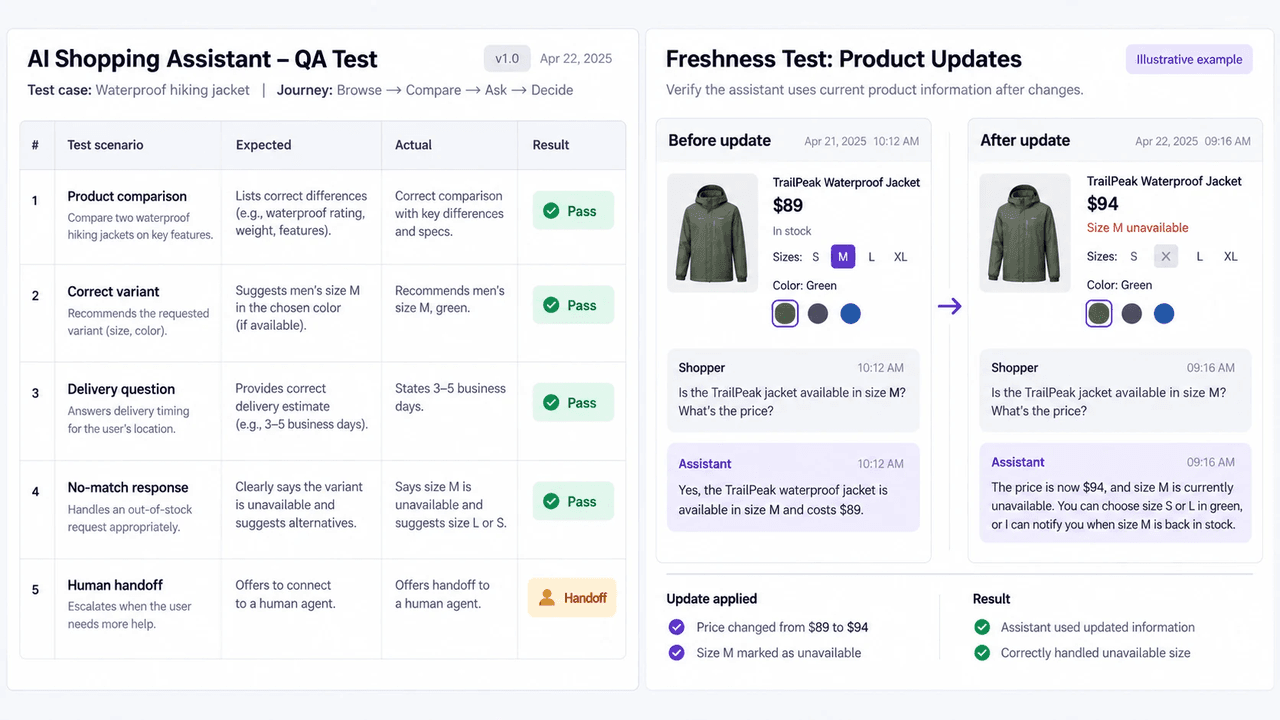 Illustrative example: the same shopper question is repeated after price and availability change to verify a fresh answer.
How Do You Measure Its Conversion Impact?
Track how often recommendations lead to product clicks, cart additions, and purchases. Use the following definitions to keep your results consistent:
- Recommendation click-through rate: Divide sessions with a recommended-product click by sessions that displayed at least one recommendation.
- Recommendation-to-cart rate: Divide sessions that added a recommended product to the cart by sessions that displayed at least one recommendation.
- Assisted conversion rate: Divide sessions that purchased after an assistant interaction by all sessions with an assistant interaction.
Multiply each ratio by 100 to report it as a percentage. Use the same session definition and reporting period for each comparison.
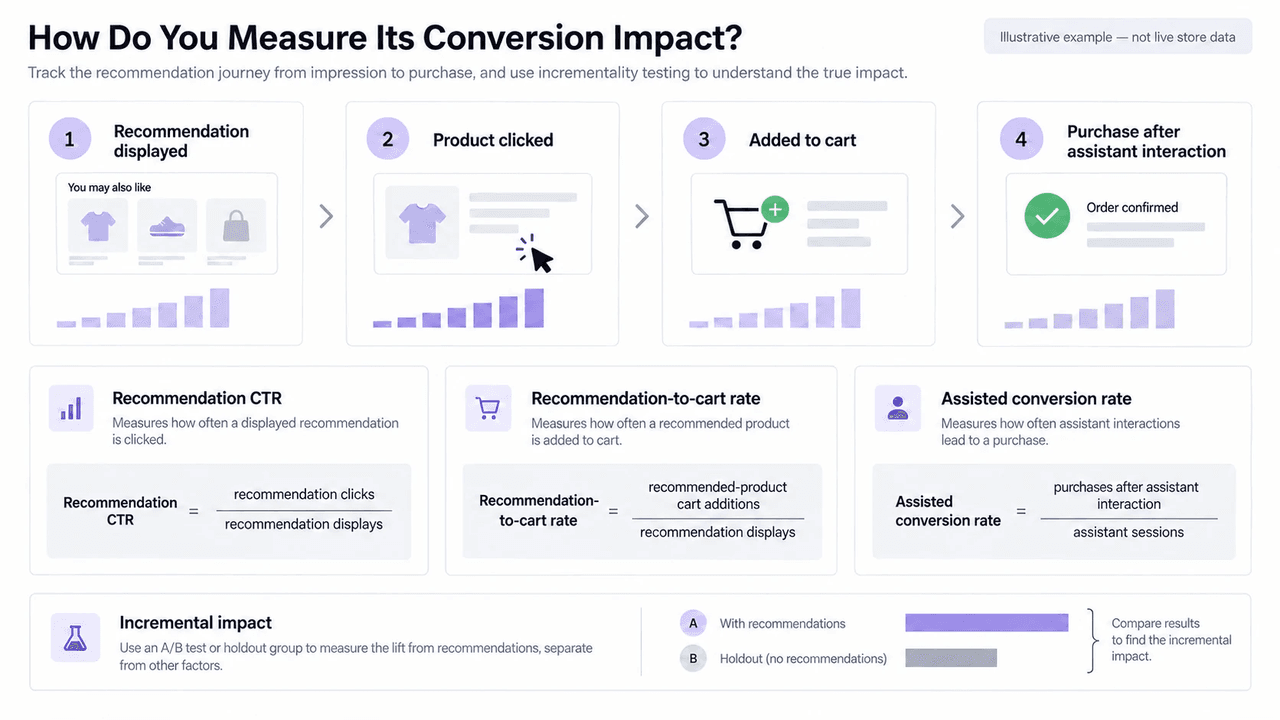 Illustrative example: recommendation clicks, cart additions, and purchases use consistent denominators; incremental impact requires a test or holdout.
Then add measures that fit your goal. These may include average order value, contribution margin, return and cancellation rate, no-match accuracy, human handoff rate, and customer satisfaction. Assisted conversions show purchases that followed an assistant interaction. To measure how many additional purchases the assistant generated, use an A/B test or holdout group. Where traffic allows, segment results by category, device, market, and new versus returning shopper. Our AI shopping assistant guide explains why this distinction matters.
When Should You Consider Upsello?
Consider Upsello if your Shopify shoppers need help choosing products and resolving questions before buying. We connect product guidance, upsell and cross-sell, cart recovery, and customer support within that shopping journey. You can explore these capabilities on our features page and choose a starting point based on the questions your shoppers ask most often.
With Upsello, you can use an AI shopping assistant to:
- Guide product discovery and explain why a recommendation fits.
- Compare products and suggest relevant bundles or accessories.
- Use shopper behavior and cart context for timely upsell and cross-sell suggestions.
- Answer routine order, shipping, return, and policy questions.
- Support cart recovery after a shopper leaves without buying.
- Support multilingual conversations, with language coverage varying by plan.
- Review performance in a live dashboard.
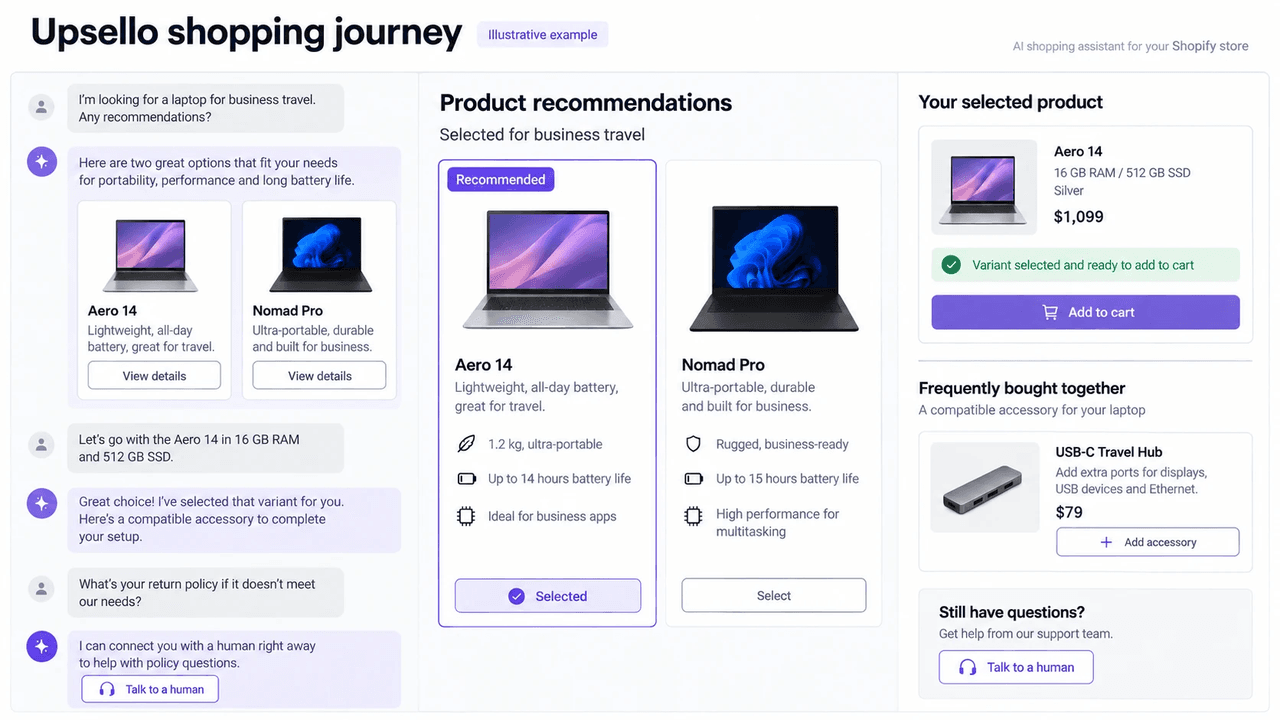 Illustrative example: Upsello connects product recommendations, variant selection, a compatible accessory, cart action, and human support in one shopping journey.
The value comes from connecting these moments in one shopping journey. A shopper may first need help narrowing the catalog and comparing two products. Next, they may choose a compatible add-on and confirm delivery before buying. Upsello can also support cart recovery if the shopper leaves without buying.
What Should You Do First?
A useful AI shopping assistant helps shoppers find suitable products, understand the differences, and take the next step toward buying. Accurate product data and a clear route to your team support that journey. Start with one product category and a few common buying questions. Start free with Upsello to explore how the assistant can support your store.
Talk to experts
Design an AI growth workflow for your store
Book a working session with our team to map support automation, product guidance, and recovery flows around your catalog.
