

TL;DR for Shopify merchants
- Separate abandoned carts from abandoned checkouts before you pick a message or channel. Anonymous carts usually cannot receive outbound recovery.
- Give one workflow ownership of the next contact. Stop or replace it when checkout starts, an order completes, or eligibility ends.
- Answer buying questions on-site while the shopper is still there. Use a permitted reminder only after they leave.
- Treat discounts as a contribution cost on every redeeming order--not only on orders a report appears to add.
- Use a holdout to judge lift. Attributed recovery revenue alone is not proof that a flow caused the purchase.
Recover abandoned Shopify carts by answering unfinished buying questions while shoppers are still on your store. After they leave, help eligible shoppers return with a useful reminder. Test whether any offer leaves enough contribution to cover its cost.
Start with the stage: did the shopper leave items in a cart, or start checkout without placing an order? That tells you which details and recovery options you can use. Review Shopify's native flows and any third-party tools before adding messages. Give one workflow the next reminder, and check that queued contacts stop when a purchase completes or the shopper no longer qualifies.
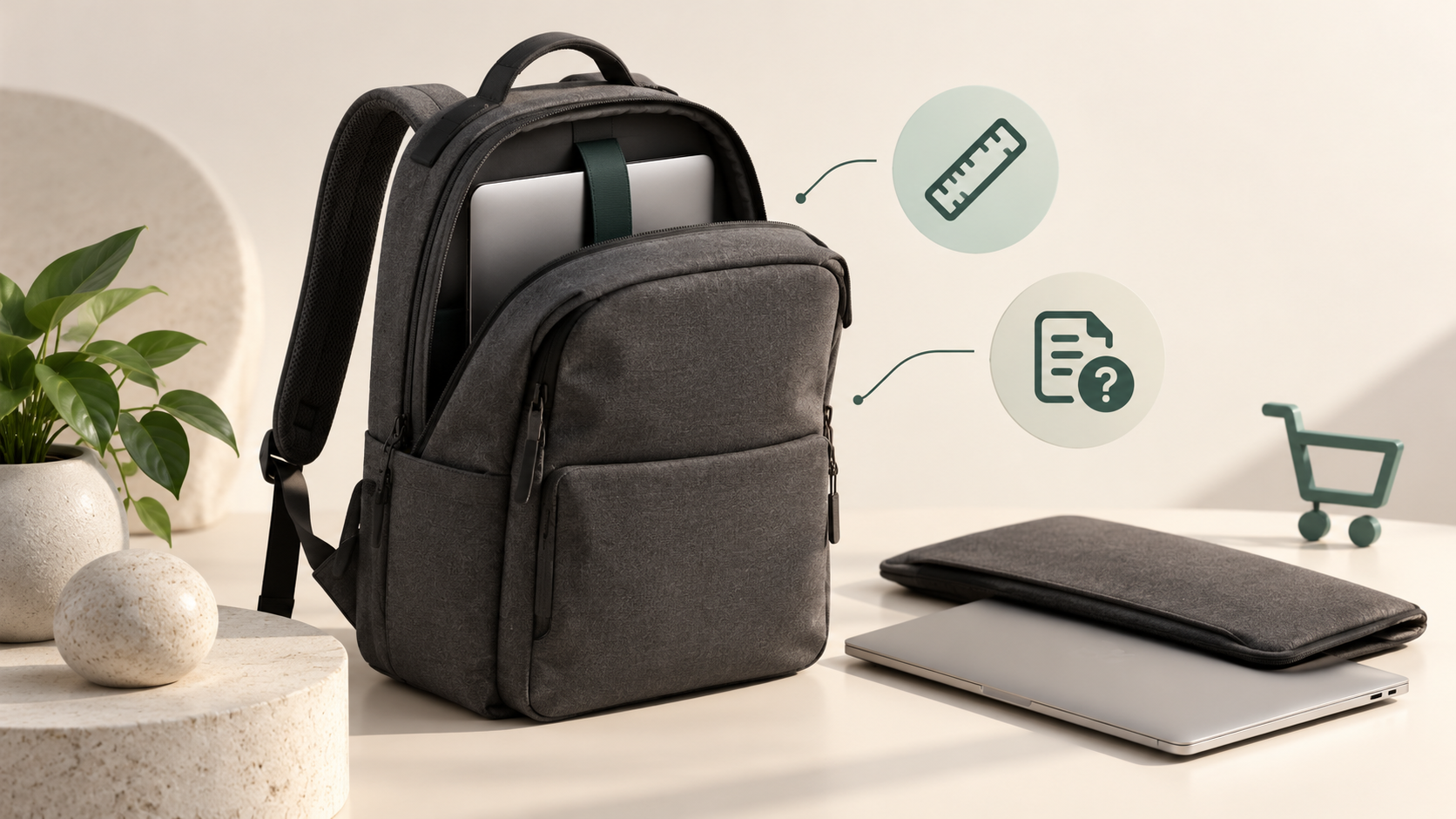
Hypothetical example (illustrative only): A shopper adds a backpack for the commute, then pauses over laptop fit and returns. A discount would change the price, but those questions would remain. Checking compartment dimensions against their laptop and case, then explaining the applicable return conditions, gives them something concrete to decide on. The products, questions, and dialogue below are illustrative--not a store result or product promise.
Build one recovery workflow before adding channels
Choose one active recovery owner for each identifiable shopping journey. Here, "owner" means the workflow responsible for the next recovery contact. A human program lead maintains the rules and checks the systems that carry them out.
Shopify distinguishes a cart where products were added without starting checkout from a checkout that began without an order. These stages have different templates and available customer context. An anonymous active cart also gives you no basis to assume an outbound recipient exists. Shopify documents separate automations for these stages in its marketing automation guide.
Use a simple priority policy like the illustrative one below. It describes rules for your team to configure and test.
| Current state | Active owner | Next useful action | Stop or replace when |
|---|---|---|---|
| Anonymous shopper with an active cart | On-site assistance | Offer relevant help during the visit | The shopper dismisses help or leaves. |
| Identified cart eligible for follow-up | Assigned cart flow | Send the permitted cart reminder | Checkout starts or another stop rule applies. |
| Eligible incomplete checkout | Assigned checkout flow | Restore the checkout and address a known issue | Purchase completes or eligibility changes. |
| Completed purchase, opt-out, or unavailable item | No recovery send | Stop recovery or route an appropriate service task | A separately valid journey begins. |
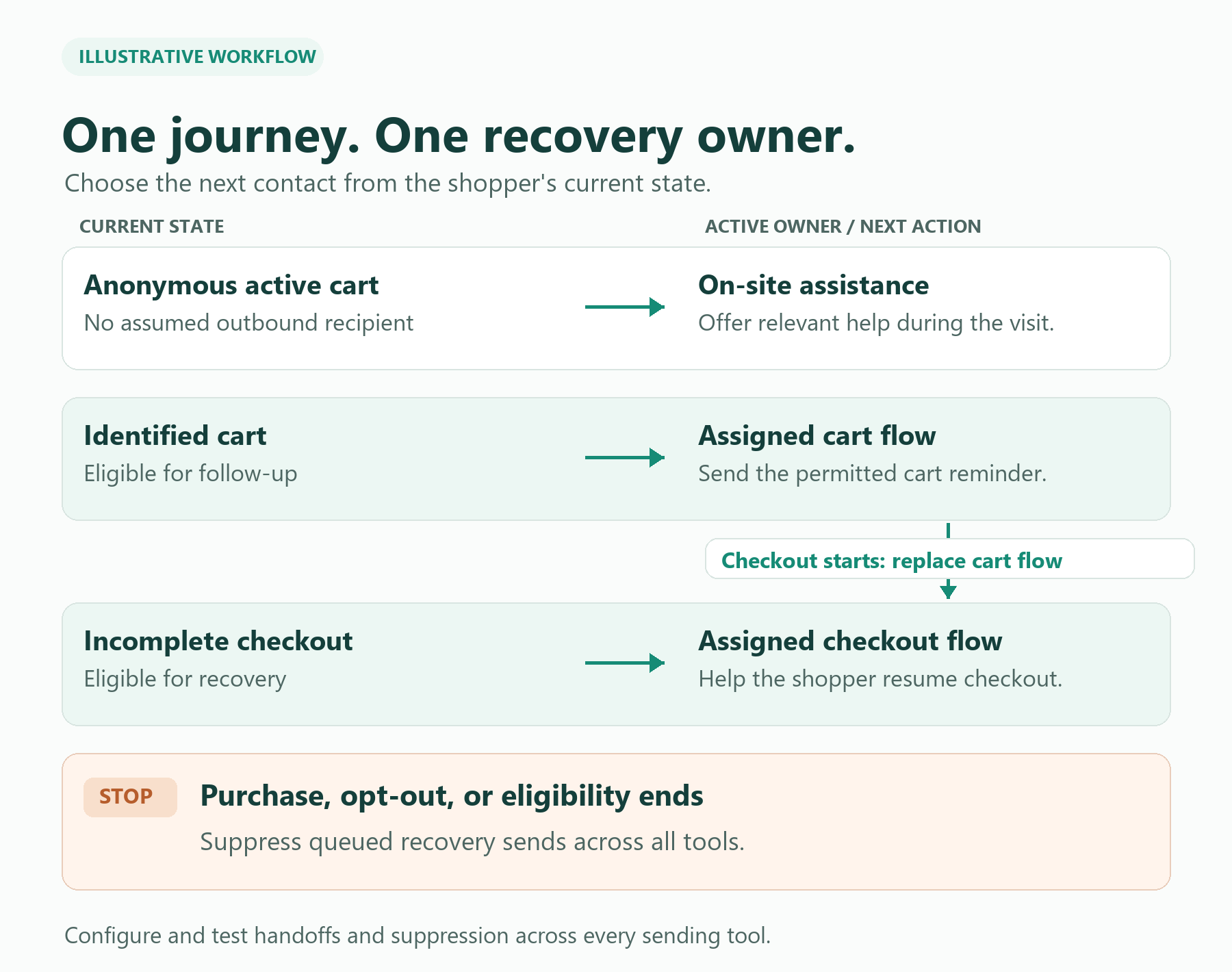
Example: A shopper adds a product, then starts checkout before the cart reminder sends. Under this policy, the checkout flow takes priority. Check and suppress the earlier cart reminder so the shopper is not pulled into two recovery sequences. If an order arrives during the next wait, confirm that every queued recovery flow recognizes the purchase.
Where tools cannot share a reliable stop signal, simplify the live program: let one system send while you repair and test the handoff.
Find out what is stopping the purchase
Investigate the blocker before you choose the message or the offer. A payment error gives you a specific issue to check. A pause after viewing shipping information gives you a hypothesis to investigate. Looking at a delivery page alone does not establish why they paused.
In the backpack example, start by asking for laptop dimensions and whether they use a case. Compare that with the bag's verified compartment measurements. A general label such as "large laptop backpack" may leave the detail they need unresolved. Next, explain the return policy as it applies to this purchase. If an important condition is unclear, give your team a route to confirm it.
Use the same approach for other concerns you have actually observed:
| What the shopper tells you | Useful next step |
|---|---|
| "Will this fit what I carry?" | Check the relevant measurements and ask about their daily load. |
| "What will shipping cost?" | Explain the current cost and any conditions that apply to their destination. |
| "My payment did not work." | Route them to the store's supported payment help. Keep payment credentials out of the conversation. |
| "I need more time." | Offer an easy way to return or ask a question later. |
When the shopper says nothing, a simple invitation such as "Is there anything about the size, product, or delivery that I can help with?" leaves room for their answer.
Use on-site help while the shopper is still there
On-site help is the right first owner for an anonymous cart and for buying questions during the visit. If your store gets the same fit and returns questions throughout the day, on-site AI help is one option to assess. Upsello describes AI chat and guided selling, with product and policy/FAQ knowledge bases listed in its product and plan information.
Prepare the facts the conversation needs: compartment dimensions, capacity, product differences, and return conditions. Check whether those facts are present and clear before asking an assistant to explain them. If a customer asks about an exception, give the team a route to review it.
A useful product demonstration starts with the shopper's actual question: Can the response identify the relevant product detail, explain the applicable policy, and make the next step understandable? Also try a question whose answer is missing. That shows you what still needs a clearer source or a human response.
For conversation design detail, see the AI chat recovery guide. A product recommendation becomes useful when the answer reveals a specific need the selected item cannot meet.
Recommend an upgrade only when it solves the problem
Upsell and cross-sell belong in recovery only when they resolve a stated need. Suppose the measurements show that the selected backpack cannot hold the customer's laptop and case. A larger, higher-priced model may be worth discussing if its verified dimensions meet that need. Explain the relevant difference, the price, and any tradeoff such as added weight.
One suggested question is, "Apart from your laptop, what do you carry on a normal day?" A larger compartment may solve laptop fit while adding bulk the shopper dislikes. Compare both points. If the customer mainly wants a light work bag, explain that tradeoff plainly instead of treating the larger model as an automatic improvement.
That is an upsell: a more capable, higher-priced alternative offered for a reason. Suggesting a compatible accessory, such as an organizer for the same bag, is a cross-sell. Helping the shopper complete an unfinished purchase is cart recovery. These actions can occur in one conversation, but each answers a different question.
Upsello lists behavior-based upsell and cross-sell among its product features. Assess whether a recommendation explains how the alternative matches the customer's stated needs and gives enough detail to compare options. If the original bag fits, keep helping the customer evaluate it. A higher price alone is not a reason to move them.
If the shopper leaves, make the next reminder useful
After they leave, use a permitted follow-up that continues a known question--or makes return and asking easy when the reason is unknown.
For an eligible incomplete checkout, Shopify offers a native recovery email with a link that lets the customer continue. That may cover a store's basic email-reminder need. Check the actual recipient settings and eligibility before enabling it. Someone who added a bag anonymously has not necessarily given you an address for a later message. Shopify explains its abandoned-checkout email and recipient settings here.
An illustrative message, used with a valid return link, could read:
Still considering this backpack? Return to your checkout here, or reply if you would like help checking the size or delivery options.
Choose timing around your store's buying cycle and other messages. Before adding another reminder, look at what Shopify and any other tool already send. Shopify documents that its abandoned-checkout email stops when the customer completes a purchase before it sends. Check each separate tool too, so a purchase does not leave a second reminder queued. See Shopify's delivery conditions.
The division is simple: on-site help addresses a question during the visit; a permitted follow-up helps the shopper return afterward. Choose tools around the help you need at each point.
Upsello plan note: Check the live Upsello pricing page for current cart recovery features, channel availability, and plan limits. Confirm email or SMS eligibility and your live account and tool settings before enabling follow-up.
Before offering a discount, check what the order leaves you
Set an offer limit from the money an order leaves after its variable costs. For this calculation, contribution means revenue after discount minus the stated order-level costs. It is not net business profit.
Here is a hypothetical example in US dollars, not a merchant result. A backpack order sells for $100 and has $70 in combined product, payment, fulfillment, and shipping costs. Hold those costs fixed for this illustration; exclude taxes, fixed overhead, and acquisition costs.
| Order calculation | No discount | $10 discount |
|---|---|---|
| Revenue after discount | $100 | $90 |
| Variable costs, held fixed | $70 | $70 |
| Contribution per order | $30 | $20 |
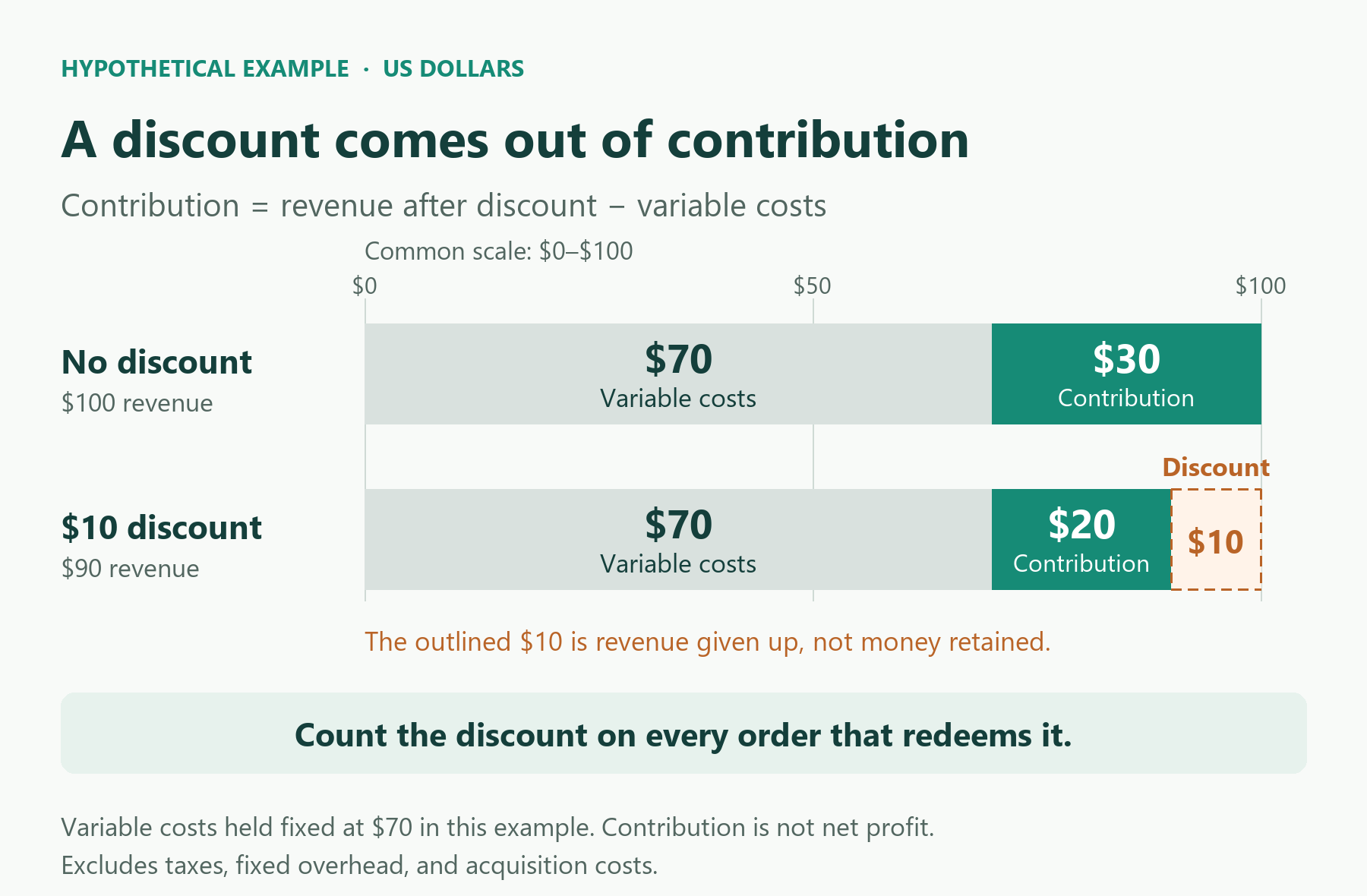
The $10 discount leaves $20 instead of $30 per order. Under these same assumptions, 100 orders without the discount leave $3,000; even 120 discounted orders leave only $2,400. More completed orders can leave less money.
Count the discount on every order that uses it, including purchases that might have happened anyway. Replace the example's cost assumptions with your own records. For a shipping offer, include the actual subsidy once. The free-shipping threshold guide covers that separate choice.
Check whether the change helped, then improve one part
Shopify can mark a checkout recovered after an email even if the shopper returns on their own. Use recovery reports to see what happened after contact. To learn what a change caused, compare against shoppers who did not receive that step. Shopify describes this recovery status in its delivery guidance.
If you have enough eligible shoppers and can assign them reliably, test one changed step against the existing approach. Randomly assign comparable shoppers, keep other contacts and the observation window the same, and compare completed orders and contribution. A difference in a small sample can be due to chance. With limited traffic, report what you observed and keep that limit clear.
Also review the questions shoppers asked, what help they received, and whether they completed the purchase. If the same laptop-fit question keeps appearing, improve the product information that prompted it.
Who this approach is for--and who should wait
Use this path if you can name an owner for the next recovery contact, you can verify native Messaging (or your lifecycle tool) stop rules, and you are willing to answer buying questions before defaulting to discounts.
Wait or simplify if you only need a ticket inbox with no guided selling, your catalog and policy facts are too thin for useful answers, or you cannot yet assign one workflow ownership across Shopify and a second tool. Fix ownership and product facts first.
FAQ
What is the difference between a Shopify abandoned cart and an abandoned checkout?
An abandoned cart means products were added but checkout did not start. An abandoned checkout means checkout started without an order. Shopify provides separate recovery templates for these stages.
Can I email someone who only added items anonymously?
Often no. Without a captured, eligible contact for that channel, you have no reliable outbound recipient. On-site help during the visit is the practical owner for that case.
Why did two reminders go out after one purchase?
Usually two tools each queued a send, or a stop rule did not see the order in time. Pick one owner for the next contact and verify suppression when checkout starts or an order completes.
Does "recovered" in Shopify mean the email caused the order?
No. Shopify can mark a checkout recovered after an email even when the customer completes the order independently. Use a holdout when you need cause, not only attribution.
Where does Upsello fit?
Assess on-site guided selling and support against your real buying questions first. Confirm current recovery features, channels, and plan limits on the pricing page. Do not treat homepage recovery percentages as proof for your store.
Next step
Choose one buying question your store receives often. Verify the product or policy answer, then try that question when assessing Upsello's guided selling and support. Use a second question that needs a product comparison. That gives you a concrete basis for deciding how on-site assistance would fit, before expanding reminders or offers. Review current plans on Upsello pricing, or start from the Shopify App listing.


