
 Language
How to Create a Shopping Bot for Online Shopping: A Practical Guide
Learn how to create a shopping bot for online shopping. Explore AI shopping assistants, product recommendations, Shopify integration, and best practices.
By Upsello Team

How to Create a Shopping Bot for Online Shopping: A Safe, Practical Guide
Online shoppers often leave when they cannot quickly find the right product, compare options, or get a clear answer about delivery, sizing, and availability. A shopping bot solves this problem by guiding customers through product discovery and support conversations while helping your business convert more qualified visitors.
The best shopping bots do not try to bypass retailer security or automate unauthorized purchases. Instead, they act as intelligent shopping assistants: they recommend products, answer questions, send stock alerts, and connect shoppers with a real person when needed.
This guide explains how to create a shopping bot for online shopping, from choosing a use case to testing, launching, and improving it over time.
What Is a Shopping Bot?
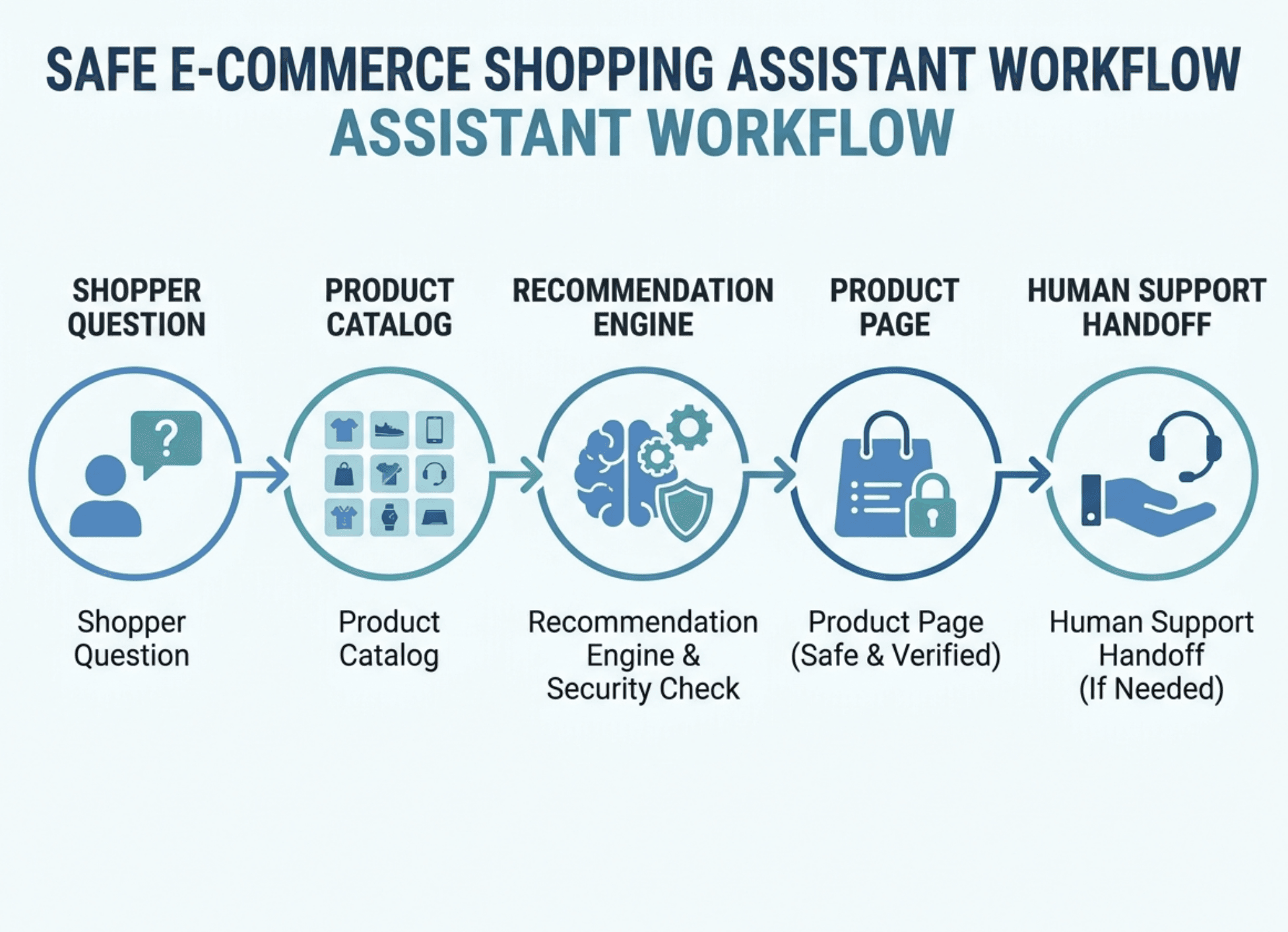
An Ecommerce chatbot or AI-powered assistant that helps people shop online. It can answer product questions, recommend items, compare options, track stock availability, and guide shoppers toward the right product page.
For an e-commerce business, the purpose is simple: reduce the effort required to make a purchase.
When customers need to search through dozens of products manually, they may become frustrated and leave. A bot shortens that process by asking relevant questions, such as budget, size, style, use case, or product preference, then showing suitable options.
For example, a customer might type:
“I need black running shoes under $100.”
A useful shopping bot can ask for shoe size, preferred brand, and running surface. It can then recommend available products and link directly to the relevant product pages.
What a Shopping Bot Should and Should Not Do
A legitimate shopping bot should improve the buying experience for customers and simplify repetitive work for support teams.
What a shopping bot can do
- Help users find products faster
- Recommend products based on needs or preferences
- Answer frequently asked product questions
- Compare prices, sizes, features, or variants
- Share stock availability and delivery information
- Send opt-in back-in-stock or price-drop alerts
- Help customers track an existing order
- Transfer complex questions to a human support agent
What a shopping bot should not do
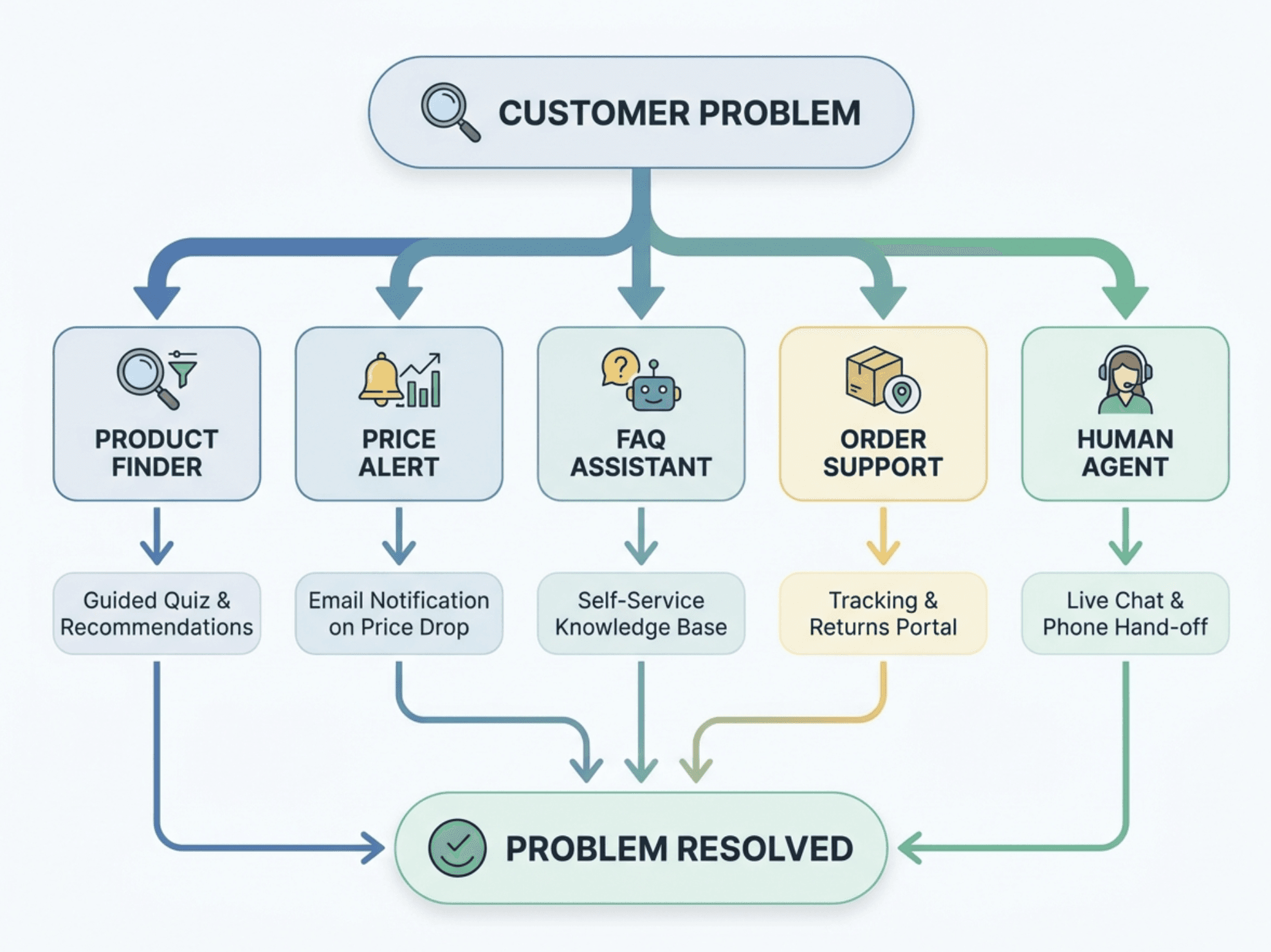
A shopping bot should not be built to bypass CAPTCHAs, retailer limits, waiting rooms, or anti-bot systems. It should also not place purchases automatically on third-party websites without clear merchant authorization and customer confirmation.
The reason is straightforward: automated actions that bypass platform rules can cause account restrictions, payment disputes, privacy issues, and reputational damage. Build your bot around customer assistance, transparent recommendations, and approved integrations instead.
Why Businesses Use Shopping Bots
Shopping bots are valuable because online stores often have more products, questions, and support requests than a small team can manage in real time.
When a visitor cannot find an answer immediately, the business loses a potential sale. When the same support questions arrive repeatedly, agents spend less time on high-value conversations.
A well-designed shopping bot helps solve both problems.
Faster product discovery
A large product catalog can overwhelm customers. Filters help, but they do not always understand natural questions such as “Which laptop is best for university?” or “Which moisturizer is suitable for dry skin?”
A bot can turn these broad questions into a guided conversation. As a result, customers see fewer irrelevant options and can make decisions faster.
Better product recommendations
Many shoppers do not know the exact product name they need. They know the problem they want to solve.
For example:
- “I need a gift for a coffee lover.”
- “Which jacket works for winter travel?”
- “I want a budget-friendly office chair.”
- “What phone case fits this model?”
A shopping assistant can recommend products based on intent, budget, compatibility, features, and availability. This makes the experience more personal without forcing customers to browse every category.
Reduced support workload
Support teams often receive the same questions every day:
- Is this product in stock?
- What size should I buy?
- When will my order arrive?
- What is your return policy?
- Does this item work with my device?
When a bot answers approved, accurate questions, support agents can focus on refunds, payment issues, complaints, and high-value sales conversations.
More opportunities to recover a sale
Some customers leave because a product is out of stock, too expensive, or difficult to compare. A bot can offer alternatives, capture alert preferences, or recommend a similar product.
This creates a second chance to convert a customer instead of losing them permanently.
Choose the Right Shopping Bot for Purchasing
Before choosing software or building anything, decide what customer problem your bot will solve first.
Trying to create a bot that handles every use case at once often leads to confusing conversations and inaccurate answers. A smaller, focused first version is easier to launch, measure, and improve.
Product finder bot
A product finder helps customers narrow down a catalog based on their needs.
For example, a skincare store could ask:
- What is your main skin concern?
- What is your skin type?
- Do you have a preferred budget?
- Do you need fragrance-free products?
The bot can then recommend a small list of relevant products.
This works well for stores with many similar products, such as fashion, electronics, beauty, furniture, supplements, or home goods.
Product recommendation bot
A recommendation bot goes beyond basic category filtering. It suggests products based on the customer’s use case, preferences, previous behavior, or stated requirements.
For instance, a bot could help someone choose between three laptops by asking about budget, battery needs, screen size, and whether they need the device for gaming, work, or study.
The result is a more guided shopping experience, which can increase customer confidence before purchase.
Stock and price-alert bot
A stock-alert bot helps customers stay informed when a product is unavailable or when its price changes.
This is especially useful for:
- Seasonal items
- Limited inventory
- High-demand products
- Premium products with price-sensitive buyers
- New product launches
The shopper chooses to receive an alert, and the bot sends a notification when the selected condition is met. Always make alerts opt-in and provide a simple unsubscribe option.
Customer support shopping bot
A support-focused bot answers common questions about shipping, returns, product compatibility, order status, warranty information, and store policies.
This type of bot is useful when customer-service teams receive repetitive questions that already have clear answers in a knowledge base.
Build vs. Buy: Which Option Is Right?
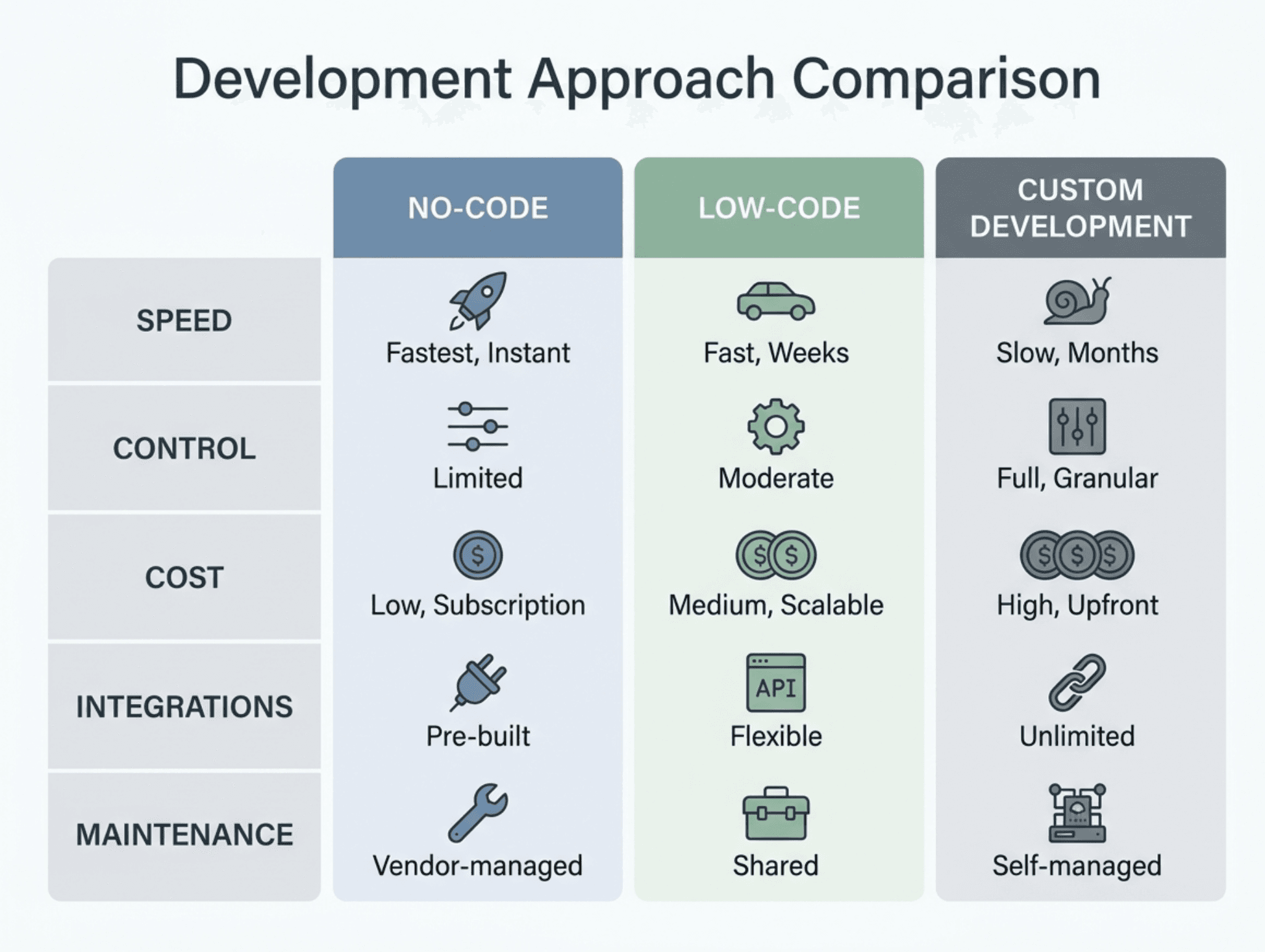
There are three common ways to create a shopping bot: use a no-code platform, choose a low-code solution, or build a custom bot.
The right path depends on your catalog complexity, budget, team skills, and integration requirements.
| Option | Best for | Main advantage | Main limitation |
|---|---|---|---|
| No-code platform | Small businesses and simple use cases | Fastest to launch | Less customization |
| Low-code platform | Growing stores with integrations | Better flexibility | Needs technical setup |
| Custom-built bot | Complex or enterprise requirements | Full control | Higher cost and maintenance |
Use a no-code platform for a fast launch
No-code shopping bots are useful when you need common features such as FAQs, product links, lead capture, basic recommendations, and human handoff.
This approach is usually best for small businesses that want to validate demand before investing in a custom solution.
The main limitation is that advanced workflows such as real-time product availability, complex recommendation logic, or custom CRM actions may require additional integrations.
Use a low-code solution for better integration
Low-code tools are a strong option when your bot needs to connect to an e-commerce platform, product catalog, inventory system, CRM, or analytics tool.
For example, you may want the bot to show live stock information, create support tickets, or log customer preferences for future follow-up.
As your store grows, this flexibility becomes more important because disconnected data creates inaccurate answers and poor customer experiences.
Build a custom bot for complex needs
A custom shopping bot is suitable when you have a large catalog, unique business rules, multiple sales channels, or strict data requirements.
Custom development gives you more control over how the bot understands questions, retrieves product data, ranks recommendations, and handles sensitive workflows.
However, more control also means more responsibility. Your team must maintain integrations, monitor quality, secure customer data, and update the bot as your catalog changes.
If you want to explore AI-powered product discovery and customer conversations,
Upsello AI can be a relevant starting point for evaluating how conversational assistance can support an online sales journey.
How to Create a Shopping Bot Step by Step
Step 1: Define One Clear Goal
Start by identifying the biggest shopping problem your customers face.
Examples include:
- Customers cannot find the right product
- Customers ask the same questions repeatedly
- Customers leave when an item is out of stock
- Customers need help comparing products
- Support agents spend too much time answering basic questions
Choose one primary goal for the first version of your bot.
For example, instead of saying, “We want an AI bot for our store,” define a measurable goal:
“Help customers find the right product in under two minutes.”
A clear goal affects every decision that follows, including your conversation flow, product data, integrations, and success metrics.
Step 2: Choose Where the Bot Will Appear
Your shopping bot should be available where customers already ask questions.
Common channels include:
- Your e-commerce website
- Product pages
- Mobile app
- Facebook Messenger
- Instagram direct messages
- Live-chat widget
- Help center
For most businesses, the website is the best place to start because it connects directly to product browsing and purchase intent.
Place the bot where it is visible but not disruptive. A small chat icon on the bottom corner of the screen is common, but product pages may also benefit from a contextual prompt such as:
“Need help choosing the right size?”
Step 3: Prepare Your Product Data
Your bot is only as useful as the information it can access.
If product titles, specifications, prices, and inventory levels are outdated, the bot may recommend unavailable or unsuitable products. That damages trust quickly.
At a minimum, organize the following data:
- Product name
- Category
- Price
- Available variants
- Stock status
- Product images
- Key specifications
- Compatibility details
- Sizing information
- Shipping details
- Return policy
- Product-page URL
For stores using AI, product descriptions should be clear and structured. The more accurate your catalog data is, the less likely the bot is to provide vague or incorrect answers.
Step 4: Design the Conversation Flow
A good shopping bot should feel helpful, not interrogative.
Avoid asking too many questions before showing value. In many cases, two or three useful questions are enough to recommend products.
A simple product-finder flow might look like this:
- Customer explains what they need
- Bot identifies the product category
- Bot asks one or two clarifying questions
- Bot recommends a small number of relevant options
- Bot explains why each option fits
- Bot links to the product page
- Bot offers human help if needed
For example:
Customer: “I need headphones for work calls.”
Bot: “Do you mainly need them for home, office, or travel?”
Customer: “Office and travel.”
Bot: “Do you prefer noise cancellation, or is budget the main priority?”
Customer: “Noise cancellation.”
Bot: “Here are three noise-cancelling options that work well for calls and travel.”
This approach works because the bot uses customer intent to reduce the number of choices.
Step 5: Add Product Recommendations Carefully
Recommendations should be useful, explainable, and based on real data.
Do not simply show random bestsellers. Instead, explain why a product is relevant.
For example:
- “Recommended because it is compatible with iPhone 15.”
- “Recommended because it is under your stated budget.”
- “Recommended because it is available in your selected size.”
- “Recommended because it has the features you requested.”
- “Recommended because it is suitable for beginner-level use.”
When customers understand why they are seeing a recommendation, they are more likely to trust it.
A platform such as Upsello AI can fit naturally into this part of the journey when your goal is to make product discovery, recommendations, and upsell opportunities more conversational and relevant.
Step 6: Set Up Human Handoff
Not every customer question should be handled by a bot.
A shopping bot should transfer the conversation to a human when:
- The customer has a payment issue
- The request involves a refund or complaint
- The bot is uncertain about the answer
- The customer asks for a human
- The product is highly technical or customized
- The conversation involves sensitive personal information
Human handoff prevents frustration. It also protects your brand from giving incorrect or overly confident answers.
When a handoff happens, pass the conversation history to the agent. This prevents the customer from repeating the same information and makes support feel more professional.
Step 7: Add Privacy and Safety Guardrails
Shopping bots often handle customer names, contact details, order information, preferences, and sometimes delivery data. That means privacy cannot be an afterthought.
Use the following guardrails:
- Collect only the information needed for the task
- Ask for permission before sending alerts or promotional messages
- Do not request payment details in a chat unless your approved payment system handles them securely
- Limit access to product, CRM, and order data
- Remove sensitive information from logs where possible
- Clearly explain when users are interacting with an automated assistant
- Give customers an easy way to speak with a human
These controls reduce risk because they prevent the bot from accessing or exposing information it does not need.
How to Test a Shopping Bot Before Launch
A bot can work perfectly in a demo and still fail in a real customer journey. Testing must include product accuracy, mobile experience, privacy, and handoff workflows.
Run an Initial Leak Test
An initial leak test checks whether the bot exposes data that customers should not see.
Test for:
- Internal product notes
- API keys
- Private customer information
- Order details from another customer
- Hidden instructions
- Staff-only policies
- Incorrect discounts or pricing rules
Use test accounts and dummy data whenever possible. The goal is to identify information leaks before real customers use the bot.
Run a Chrome Test
Your shopping bot should work properly in Chrome because many customers browse stores through Chrome on desktop and mobile devices.
Check the following:
- Does the chat widget load quickly?
- Does it cover important buttons on mobile?
- Can users close and reopen it easily?
- Does it work with keyboard navigation?
- Does it conflict with cookie banners?
- Are product links opening correctly?
- Is the text readable on smaller screens?
- Does the handoff option work?
A technically correct bot can still fail if the interface is difficult to use. The Chrome test helps catch experience issues that affect conversion.
Test Real Customer Questions
Create a list of real questions customers ask your team. Then test whether the bot can answer them accurately.
Include questions such as:
- “Do you have this in my size?”
- “Which one is best for beginners?”
- “Does this work with my device?”
- “When will this be back in stock?”
- “Can I return this item?”
- “What is the difference between these two products?”
- “I need help with my order.”
Track where the bot fails. These failures reveal gaps in your product data, knowledge base, conversation design, or integrations.
Measure Shopping Bot Performance
Launching a bot is not the final step. A shopping bot improves when you review customer conversations and use the results to update it.
Track metrics such as:
- Product-find success rate
- Recommendation click-through rate
- Assisted conversion rate
- Add-to-cart rate after bot interaction
- Human-handoff rate
- Unanswered-question rate
- Customer satisfaction score
- Stock-alert signups
- Support-ticket deflection
For example, if many users ask for a product the bot cannot find, the problem may be weak product tags or missing synonyms. If many users ask for human help immediately, the opening message may be unclear or the bot may not be solving the right problem.
The best improvement process is simple:
- Review failed conversations weekly
- Identify recurring questions or errors
- Update the bot’s data or flow
- Test the improvement
- Measure whether the failure rate decreases
Common Shopping Bot Mistakes to Avoid
Trying to automate everything
A bot does not need to replace every part of customer service. Trying to automate complaints, complex technical advice, and sensitive payment issues can create a poor customer experience.
Start with repetitive, low-risk tasks. Expand only after the bot consistently performs well.
Using outdated product information
Outdated prices, availability, and product specifications destroy trust. Connect the bot to an approved product source and define how often information updates.
Showing too many recommendations
Customers want help making a decision, not another long list to review.
Show a small number of relevant products and explain why each one is a match.
Hiding the human support option
Customers become frustrated when they cannot reach a person. Always make human handoff clear and accessible.
Measuring only chatbot conversations
A high number of chats does not automatically mean success. Measure whether the bot helps customers find products, click through, add items to cart, and complete purchases.
Frequently Asked Questions
What is a shopping bot?
A shopping bot is a digital assistant that helps customers find products, get answers, compare options, receive alerts, and navigate an online store. It improves the shopping journey when it uses accurate product data and offers a human handoff when needed.
Can I create a shopping bot without coding?
Yes. No-code chatbot platforms can help businesses create basic product-finder, FAQ, and support flows without development experience. More complex functions, such as live inventory, custom recommendations, and CRM automation, may require technical integrations.
Are shopping bots legal?
Shopping bots are appropriate when they follow privacy rules, customer-consent requirements, website terms, and merchant-approved integrations. Problems occur when automation attempts to bypass security systems, access restricted data, or act without user permission.
Can a shopping bot complete purchases automatically?
For most public e-commerce experiences, the customer should remain in control of payment and order confirmation. A bot can guide the shopper to the correct product and checkout page, while the customer completes the final purchase securely.
What is the best shopping bot for an online store?
The best shopping bot is one that connects to your product catalog, provides accurate answers, supports human handoff, and helps you measure business outcomes. Start with the tool that fits your current use case rather than choosing the platform with the most features.
Build a Better Shopping Experience
A shopping bot should make online buying simpler, faster, and more personal. It should not add friction, overwhelm customers with options, or create risks through unapproved automation.
Start with one high-value use case, such as product discovery or customer support. Connect reliable catalog data, design short conversations, test the experience in real browsing conditions, and measure the impact after launch.
When implemented thoughtfully, an AI-powered shopping assistant can turn product questions into helpful conversations and helpful conversations into more confident purchases.
Talk to experts
Design an AI growth workflow for your store
Book a working session with our team to map support automation, product guidance, and recovery flows around your catalog.
