This guide explains what ecommerce chatbots are, how the main types differ, what they do for a store, what data they need, when to hand off to people, how Shopify Inbox fits in, and how to measure results. Platform details are current as of October 2026.
The quick answer
An ecommerce chatbot is automated software that holds conversations with shoppers on an online store. It answers common questions, shares order status, explains policies, and can recommend products. Some follow fixed scripts; others use AI to understand open-ended questions. Good ones pass complex or emotional cases to a human.
01What an ecommerce chatbot is (and isn't)
An ecommerce chatbot is a chat tool that handles routine conversations so your team doesn't have to. IBM defines it as an "automated software application that simulates conversations with users and manages basic tasks in online retail environments." In practice, that means answering FAQs, giving real-time support, recommending products, and sharing order status.
Shopify describes the basic loop in three steps: the shopper types a message (input), the bot works out what the shopper wants (intent), and the bot replies (response). Every chatbot, simple or advanced, runs some version of that loop.
What a chatbot is not is a fully independent worker. IBM draws a useful line: "while chatbots mostly respond, AI agents can act beyond the scope of the initial prompt." IBM also notes the line between the two is fuzzy, and marketing labels blur it further.
What this means for you: When you evaluate a tool, ignore the label at first. Ask what it can answer, what it can do (look up an order, add to cart), and where it hands off.
02Rule-based vs AI chatbot vs AI shopping assistant vs conversational commerce
These four terms get mixed up often. They are related, but they are not the same thing.
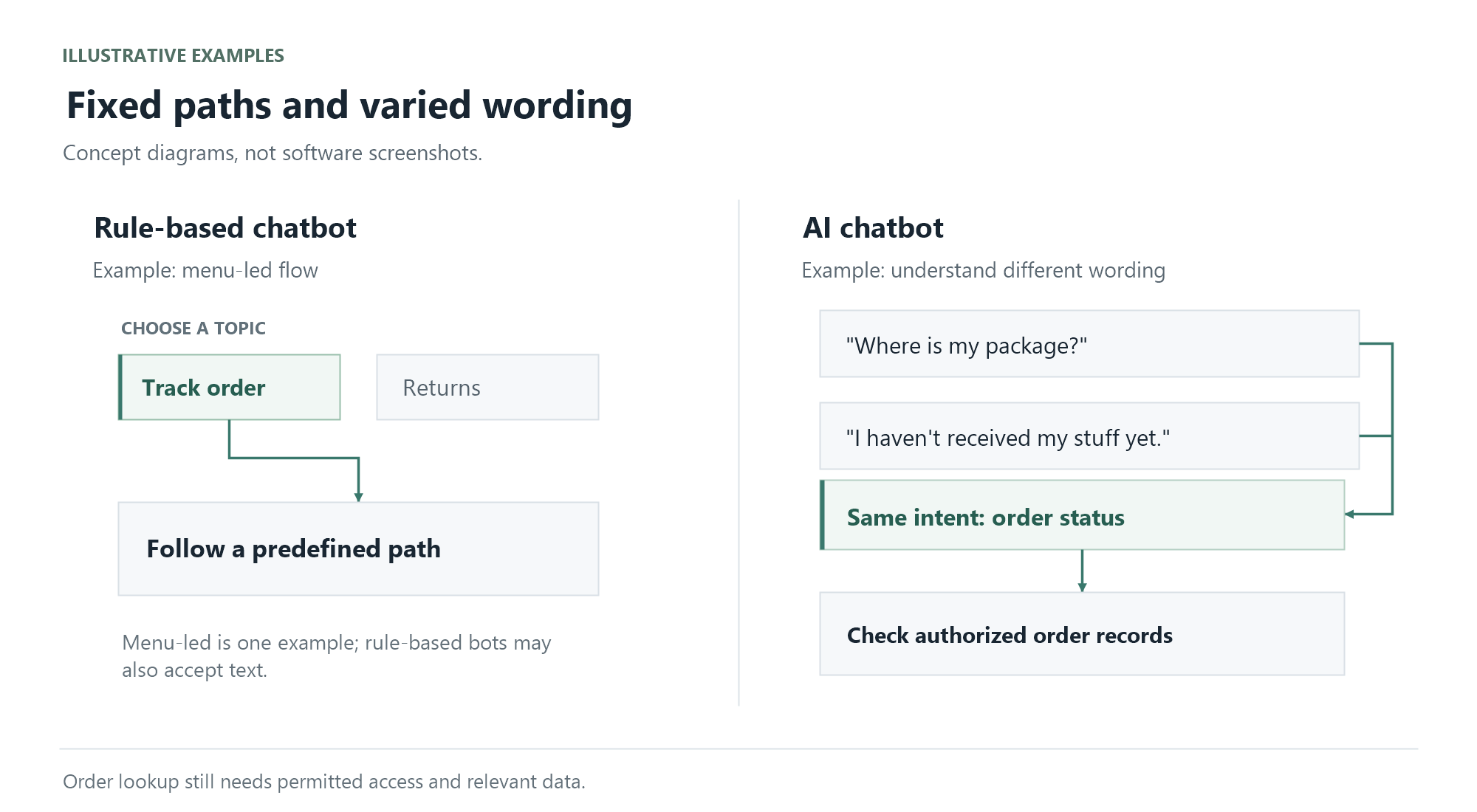
Rule-based chatbots use predefined scripts and decision trees, such as if/then logic and buttons. According to IBM and Shopify, they work best for FAQs, order status, and policy questions, but they struggle when shoppers type open-ended questions.
AI chatbots work differently. Google Cloud describes AI chatbots as "apps or interfaces that can carry on human-like conversation using natural language understanding (NLU) or natural language processing (NLP) and machine learning (ML)." NLP is the field of computing that helps software work with human language; Google Cloud explains that NLU is a subtopic of NLP "used to comprehend what a body of text really means." Google Cloud adds that AI chatbots "leverage LLMs versus traditional conversation flows and pre-programmed responses." An LLM (large language model) is an AI model trained on large amounts of text to understand and generate language. By contrast, Google Cloud notes that non-AI chatbots can't generate answers that weren't pre-programmed.
IBM gives a simple example: an AI bot can tell that "Where is my package?" and "I haven't received my stuff yet" mean the same thing. A rule-based bot may not.
Many stores use hybrid bots. IBM and Shopify both describe hybrids that combine buttons with AI understanding and hand complex emotional or technical issues to humans.
AI shopping assistants sit closer to sales. BigCommerce offers one framework for this: a chatbot answers questions; an AI shopping assistant helps a shopper decide on the merchant's own site, grounded in the catalog; and an AI shopping agent shops across sites on the shopper's behalf. Note that BigCommerce uses "chatbot" to mean the scripted kind, while IBM, Shopify, and Google Cloud include AI chatbots under the same word. As BigCommerce itself admits, "vendors don't use these labels consistently." Its advice is to judge a tool by where it runs and who owns the conversation.
Conversational commerce is not a product at all. Shopify defines it as the use of chatbots, messaging apps, and voice assistants to facilitate shopping and customer interactions. It is the umbrella practice; chatbots and assistants are tools inside it.
Concept
What it is
Best for
Needs live store data?
Typical autonomy
Rule-based chatbot
Scripted flows, menus, if/then logic
FAQs, order status, policies
Some (order lookup, policy text)
Low: follows fixed paths
AI chatbot (NLP/LLM)
Understands open-ended language and generates replies
Varied support questions, light product guidance
Yes, to stay accurate (see grounding below)
Medium: picks answers, within limits
AI shopping assistant
On-site helper grounded in the merchant's catalog (BigCommerce's framing)
Product discovery, comparisons, cart help
Yes: catalog, inventory, pricing
Medium: guides buying, may take store actions
Conversational commerce
The practice of selling and serving through dialogue (Shopify's definition)
Strategy across chat, messaging, voice
Depends on the tools used
Not a tool, so not applicable
Footnote on AI shopping agents (as of October 2026): BigCommerce describes shopper-side agents that shop across many sites for the buyer. It contrasts these with on-site assistants, where the merchant keeps brand voice, shopper signals, the customer record, and checkout. This space moves fast, so expect definitions to shift.
03Ecommerce chatbot use cases for online stores
Ecommerce chatbots cover two broad jobs: support and sales. IBM lists use cases across both, from FAQs and order tracking to product discovery and checkout help.
Support-oriented use cases
Answering FAQs about shipping, returns, and pricing
Order status, often called WISMO ("Where is my order?") questions
Routing returns and exchanges
Explaining store policies in plain language
Sales-oriented use cases
Product discovery and recommendations
Suggesting complementary items or bundles based on what the shopper is viewing (cross-sell and upsell)
Answering questions that block checkout (sizing, delivery, payment)
Answering last-minute questions for shoppers who hesitate at cart or checkout, before they abandon
Cart and checkout help
Lead qualification for higher-consideration purchases
How do you pick the right type? Shopify suggests rule-based bots for repetitive questions, conversational AI for varied ones, and a combination when scripts handle the basics and then hand off. In its Shopify Inbox article, Shopify reports that 70% of Inbox conversations involve customers making a purchasing decision. This is Shopify's own reported figure; the article does not disclose the sample or measurement period, and it is not a conversion rate or an expected result for every store.
What this means for you: Most stores need both jobs. Tools differ in which side they optimize, so decide which side matters more for your first launch.
04Ground your chatbot in catalog, orders, and policies
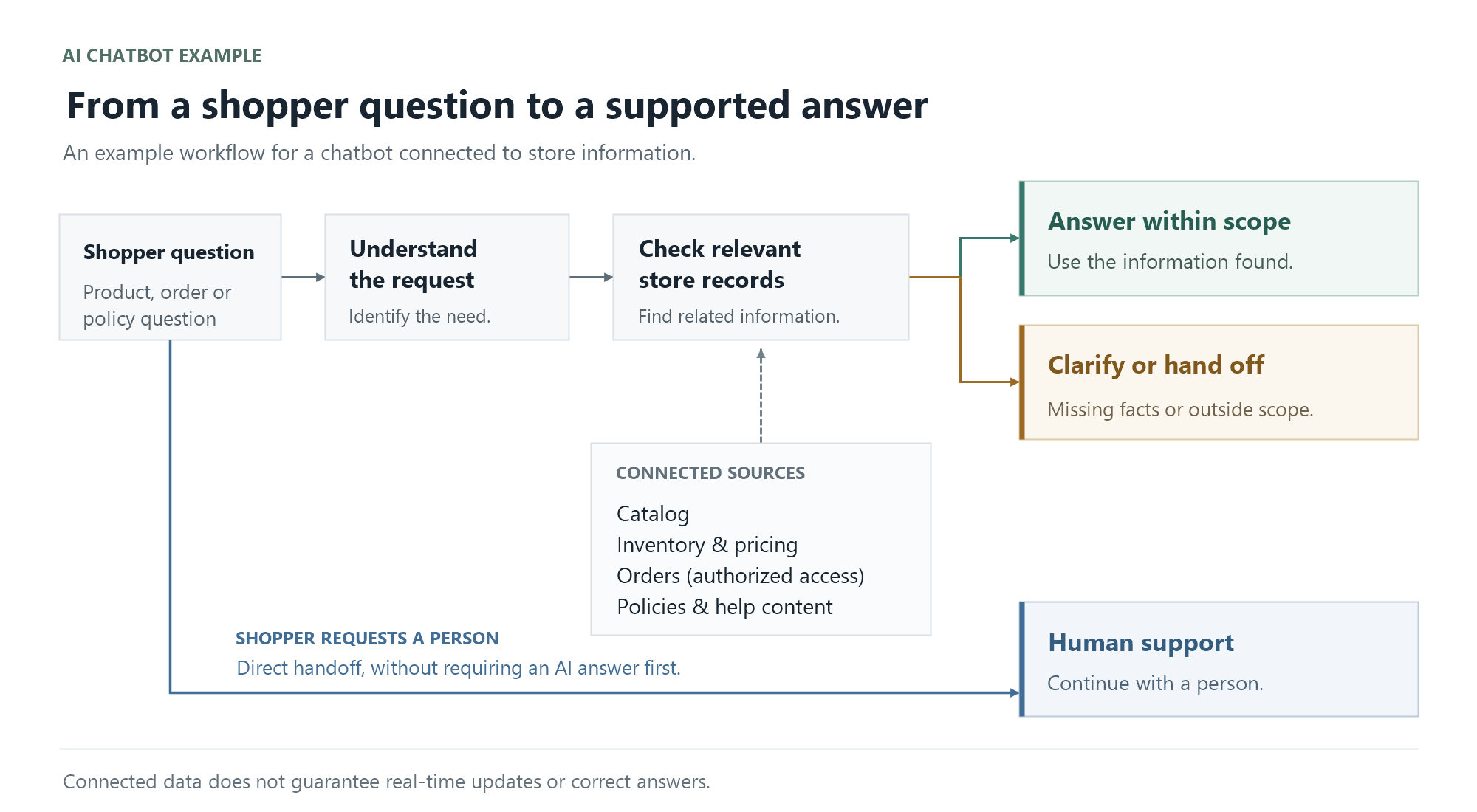
A chatbot is only as good as the data behind it. IBM puts it plainly: chatbots are "only as effective as the information they're built on." Outdated product data, wrong policies, or incomplete connections lead to wrong answers.
"Grounding" means the bot answers from your store's real records instead of guessing. Google Cloud explains that some chatbots use retrieval-augmented generation (RAG): before answering, the bot searches your knowledge base or documents for information relevant to the question, then uses it in the reply.
BigCommerce recommends connecting the bot to catalog, inventory, pricing, and order data rather than a static FAQ export, loading shipping, returns, and warranty policies as source documents, and scoping the first release to questions the bot can verify.
☐ Inventory and availability (live, not cached, if possible)
☐ Order and fulfillment status
☐ Shipping, returns, refund, and warranty policies
☐ Size guides, care instructions, and other product content
☐ Help center or knowledge-base articles
☐ Brand voice rules and a list of things the bot must never promise
Grounding is not a one-time task. IBM calls ongoing content maintenance "a core operational requirement." When your policy or catalog changes, the bot's sources must change too.
05Human handoff rules that protect the customer experience
Even a well-grounded bot needs a clear exit to a person. IBM notes that chatbots struggle with complaints, disputes, and refunds. Shopify advises escalating out-of-scope chats, such as a refund dispute or a frustrated shopper, to a human.
BigCommerce suggests four core triggers: the shopper asks for a person, the question can't be answered from your data, a refund goes above a threshold you set, or the shopper shows frustration.
Handoff triggers (BigCommerce)
The shopper asks for a person
The question can't be answered from your data or policies
A refund request goes above a threshold you set
The shopper shows frustration or repeats the same question
Many stores also add their own:
Additional handoff triggers (store-defined)
Disputes, damaged or lost orders, and other high-emotion cases
Safety, medical, or legal gray areas (your judgment call)
Signs of abuse or fraud
When the bot hands off, BigCommerce recommends passing the transcript and cart along, so the shopper doesn't have to repeat themselves. Harvard Business School's report describes an experiment with human agents at one meal-delivery company using AI response suggestions. The researchers advise treating AI as a complement to people and note that results varied by customer intent. This does not establish the same outcome for every ecommerce store or for a fully autonomous chatbot.
What this means for you: Write handoff rules before launch, not after the first angry review. Set staff hours and decide what the bot says when no one is online. Decide in advance what the bot may only explain (for example, your refund policy) and what only a person can approve (refunds, exceptions, goodwill credits).
06How to choose AI agent
Neutral criteria for any tool, native or third-party (adapted from BigCommerce's vendor questions):
Does it read live or cached inventory and pricing?
Can it handle promotions and cart actions?
How much control do you have over tone?
Does handoff carry full context to your team?
Where is conversation data stored, and can you export it?
Which channels does it cover?
How does it disclose that it's AI?
What is the pricing model?
Does it train on your data, and can you control that?
Add your own: Do you mainly need FAQ deflection or guided selling? What analytics does your team need? How much setup time can you give it?
07Launch checklist: first intents, data, and tests
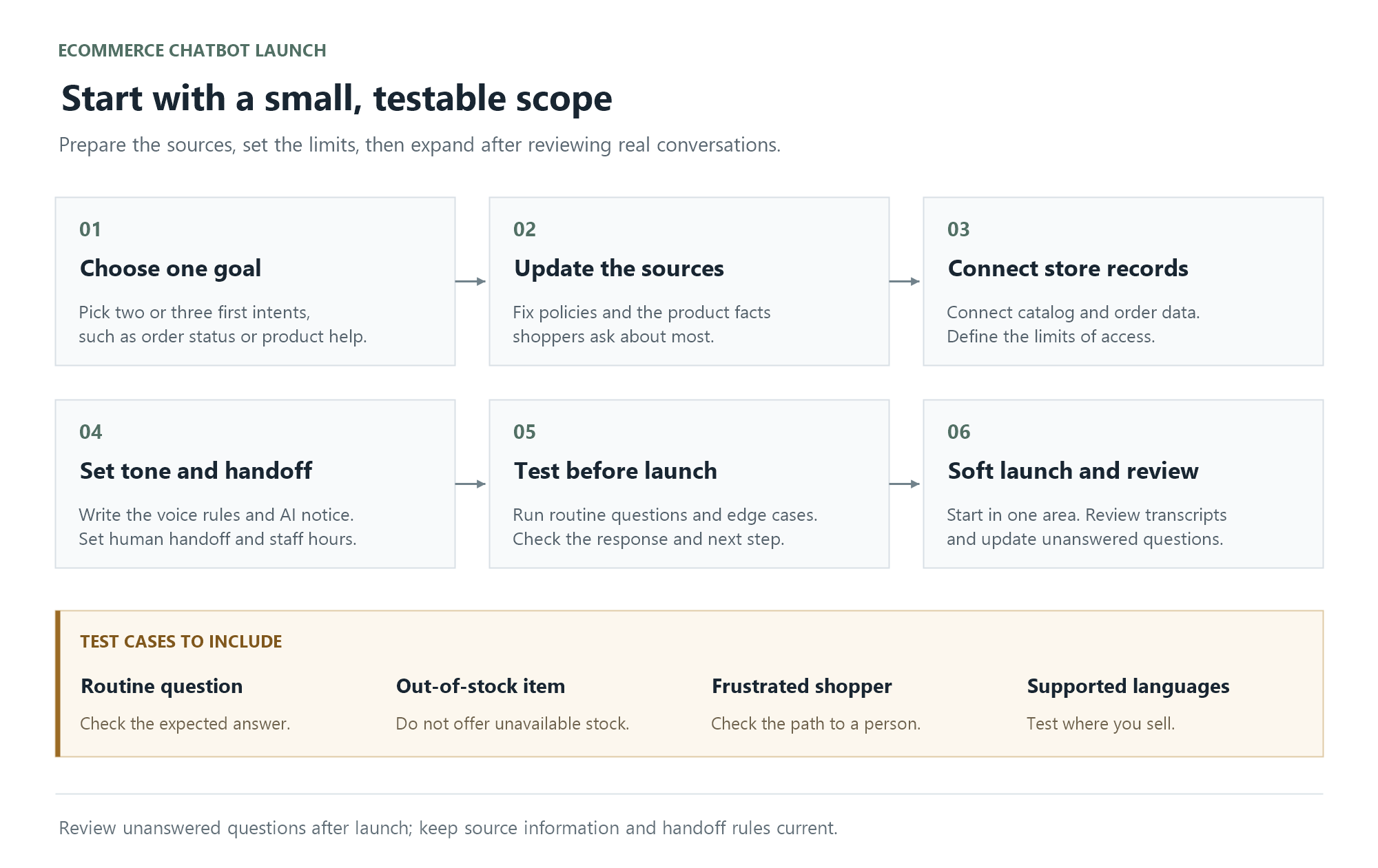
IBM suggests a sequence: set an objective, check platform fit, design flows (including escalation), build the knowledge base, test edge cases, and monitor. IBM notes many stores start rule-based and layer AI on top. Here is that sequence adapted for a store team:
Pick one objective and two or three first intents. For example: WISMO, shipping FAQ, and "help me choose."
Clean your sources. Update policies and fill in the top product attributes shoppers ask about.
Connect catalog and order data. Define what the bot says when a question is out of scope.
Write a voice guide. Include claims the bot must never make, such as delivery dates your policy doesn't support. Disclose that shoppers are talking to AI.
Set handoff rules and staff hours if you run a hybrid model.
Test before launch. Run happy paths, edge cases, out-of-stock items, angry messages, and other languages if you sell internationally.
Soft launch in one area. BigCommerce recommends starting on your highest-traffic category and reviewing results over 60–90 days before expanding.
Review transcripts often, especially in the first weeks, and update sources based on unanswered questions.
For setup specifics on a particular tool, read its documentation. For Upsello specifically, see the Upsello documentation.
FAQ
What is the difference between rule-based and AI ecommerce chatbots? Rule-based chatbots follow fixed scripts and buttons, so they suit predictable questions. AI chatbots use NLP and LLMs to understand open-ended questions and generate replies. Many stores combine the two in a hybrid setup.
Is an AI shopping assistant the same as a chatbot? Not exactly. In BigCommerce's framework, a chatbot answers questions, while an AI shopping assistant helps shoppers decide on your site using your catalog. Vendors use these labels inconsistently, so compare what each tool actually does.
What is conversational commerce? Shopify defines conversational commerce as using chatbots, messaging apps, and voice assistants to support shopping and customer interactions. It is a practice, not a single tool.
What can an ecommerce chatbot do for an online store? It can handle FAQs, order tracking, returns routing, product discovery, recommendations, and checkout questions. Support and sales use cases often live in the same bot.
What data should a chatbot connect to? Connect it to your product catalog, inventory, pricing, order data, and policies, plus help-center content. Keep those sources up to date, because the bot is only as accurate as its data.
08Next step
The right chatbot depends on whether you need FAQ deflection, guided selling, or both. Whatever you choose, start with clean data, clear handoff rules, and one metric that matches your goal.
Upsello is the AI sales assistant for Shopify that turns support conversations into revenue — answering pre-purchase questions with real product data, recovering abandoned carts, and handing off to your team with full context when judgment is needed.
Product guidance and comparisons grounded in your catalog
Cart recovery woven into the same conversation
Multilingual support across your markets
Clean human handoff with transcript and order context