

AI shopping assistants use product knowledge bases to answer customer questions with accurate store information. They match requests to products and variants, check relevant pricing and availability, and explain what they can confirm.
But what happens when information is missing or a shopper changes their mind? Let's look at how these assistants use product data and how your team can check their answers.
How Do AI Shopping Assistants Use Product Knowledge Bases?
AI shopping assistants use product knowledge bases to find relevant product information and answer questions based on approved store data.
A product knowledge base may contain product descriptions, specifications, variant details, compatibility information, and store policies.
For example, when enabled, the Inbox agent in Shopify Inbox uses product catalog information, store policies, Knowledge Base facts and files, and published storefront content to answer customer questions. It can also personalize recommendations using available customer preferences, sizes, and purchase history.
Klaviyo's Customer Agent documentation makes a similar distinction between static knowledge, such as product information and policies, and tools that retrieve current data or perform actions during conversations.
A typical workflow involves five steps:
- Understand the Question: Identify the shopper's needs, including product type, budget, size, and color.
- Find Relevant Products: Search the connected catalog for suitable items.
- Match the Correct Variant: Check the exact SKU and selected options.
- Verify Current Information: Check relevant prices, availability, and store policies.
- Generate an Answer: Explain what the available information confirms or ask for missing details.
For example, a customer asks, "Does this jacket come in medium, and can it arrive by Friday?"
The assistant needs to identify the medium variant, check its availability, and find the relevant shipping information. A product description alone cannot confirm the delivery date.
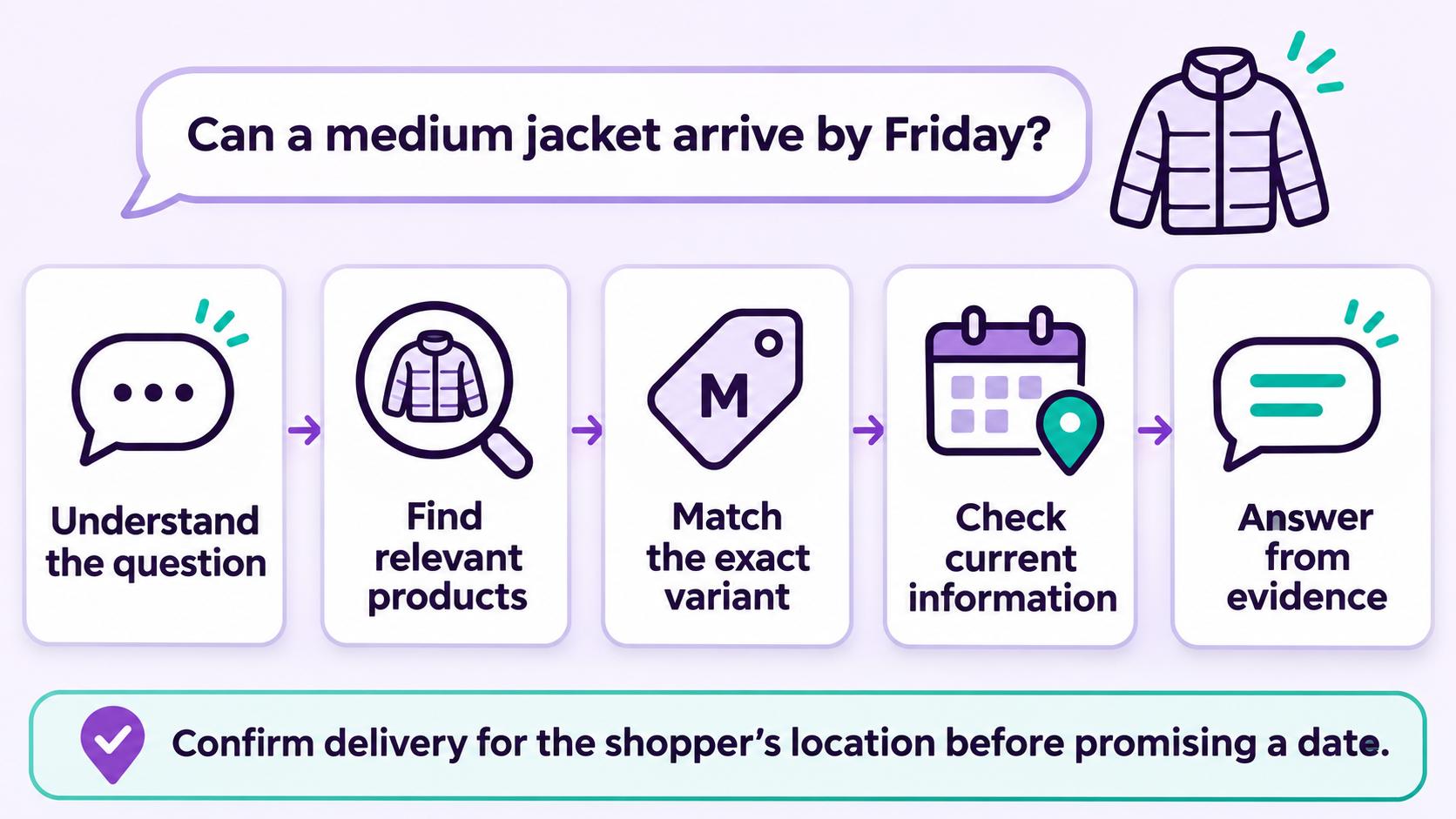
The product record supplies product facts, while the conversation provides the shopper's requirements. Both are needed for a useful answer.
For a broader overview, read our guide on how AI shopping assistants work.
What Product Data Does an AI Shopping Assistant Need?
An AI shopping assistant needs several types of product and store information to answer customer questions accurately.
| Data Type | Example Information | Customer Question |
|---|---|---|
| Product Details | Material, dimensions, features | "Is this bag waterproof?" |
| Variant Data | SKU, size, color | "Does this shirt come in size M?" |
| Price and Availability | Current price, currency, stock status | "Is this version under $100?" |
| Store Policies | Shipping, returns, warranty | "Can I return this item?" |
| Product Relationships | Compatible accessories, bundles | "Which filter fits this model?" |
Product Details vs. Variant Data
Product details describe an item, while variant data identifies a specific version customers can purchase.
For example, a shirt may come in three colors and four sizes. Each combination can have its own SKU and availability.
Shopify's ProductVariant API documentation explains how variants represent different product options, such as size and color.
If a shopper requests a blue shirt in size M, the assistant must check that exact combination. Finding a blue option and a separate medium option does not confirm that the blue medium is available.
Current Offers and Product Relationships
Some information, such as product dimensions, rarely changes. Other details, including prices, inventory, and promotions, need current data.
Shopify's Cart Storefront API documentation explains how buyer identity affects international pricing and how estimated cart costs can change at checkout. Similarly, commercetools Product Projections can return store- and locale-specific product data and select prices by country, customer group, and sales channel.
Product relationships also need clear labels. Adobe Commerce distinguishes related products, up-sells, and cross-sells. Algolia's Looking Similar model uses product images to identify visually related items.
A similar-looking accessory is not necessarily compatible with the item a customer owns. The assistant needs approved compatibility information before recommending it as a confirmed match.
How Does an AI Shopping Assistant Match Products and Handle Missing Data?
An AI shopping assistant matches products by comparing customer requirements with product and variant records. It should only recommend items that meet the shopper's required conditions.
Consider a customer who asks:
"I need black running shoes in size 9 for under $90. Lightweight would be ideal."
The assistant should separate requirements from preferences:
- Required Conditions: Black color, size 9, and a price below $90.
- Preferences: Lightweight design or a preferred brand.
A lightweight pair priced at $95 does not meet the budget. The assistant should not present it as a matching product unless the shopper changes that requirement.
Algolia's recommendation rules provide examples of how category and inventory conditions can refine product recommendations, including excluding items with zero inventory.
What Happens When Product Information Is Missing?
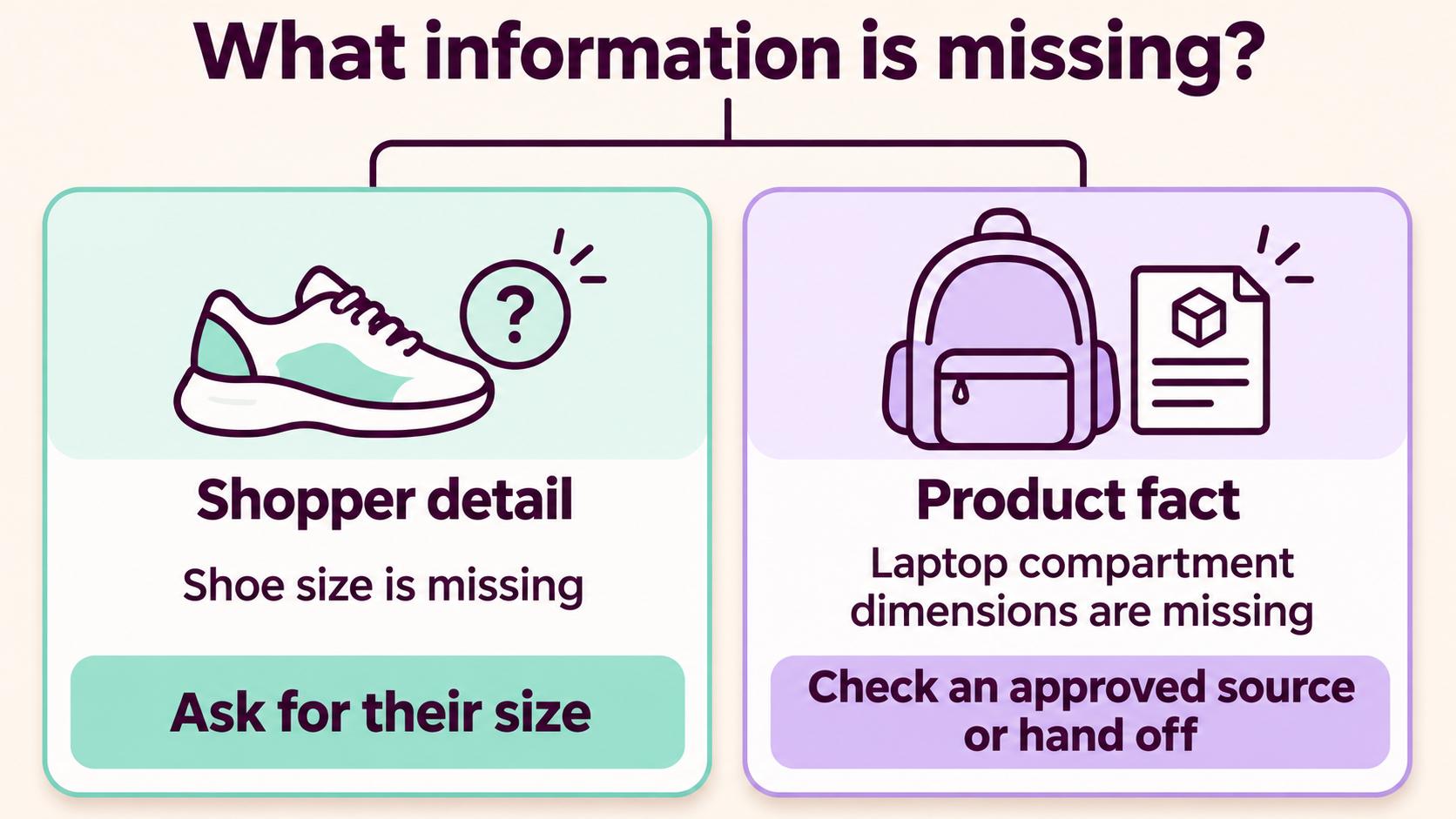
There are two common situations:
1. The Shopper Has Not Provided Enough Information
If a customer asks for running shoes without specifying a size, the assistant can ask for their size before recommending variants.
2. The Product Catalog Does Not Contain the Required Information
If a customer asks whether a backpack fits a 15-inch laptop, but the product record does not include laptop compartment dimensions, the assistant cannot confirm compatibility.
Your team needs to verify the specification or provide another approved source. Asking the shopper more questions will not fix missing product data.
Follow-up questions also change the shopping context, not the underlying catalog. If a shopper switches from black to blue, the assistant should update the requested color while keeping other requirements, such as budget and size, unless the shopper changes them too.
For more guidance on organizing product sources and handling conflicting information, read From Product Data to Trusted Recommendations: What an AI Sales Agent Needs to Know.
How Can You Check an AI Shopping Assistant's Answer?
You can check an AI shopping assistant's accuracy by comparing its answer with the exact product, variant, and source information it used.
Consider a hypothetical store with two backpack variants:
| Variant | SKU | Color | Price |
|---|---|---|---|
| Black Backpack | BAG-01-BLK | Black | $90 |
| Blue Backpack | BAG-01-BLU | Blue | $85 |
The approved product records do not contain laptop compatibility information.
Now follow the conversation:
| Shopper's Request | What the Assistant Can Confirm |
|---|---|
| "I need a black backpack under $100 that fits my laptop." | The black version costs $90, but laptop compatibility is unconfirmed. |
| "Show me the blue one instead." | The blue version costs $85 and meets the color and budget requirements. Compatibility remains unconfirmed. |
| "Keep it below $80." | Neither listed variant meets the new budget. Another product or a revised requirement is needed. |
Notice that the shopper changes the color and budget, but the missing compatibility information remains unresolved. The assistant should not invent an answer just to complete the recommendation.
Checks for Accurate Product Answers
Your team can use this checklist when testing an AI shopping assistant:
- Product Identity: Does the answer refer to the correct product?
- Variant Accuracy: Do the SKU, size, and color match the request?
- Source Support: Can you verify each important product claim?
- Current Information: Are the price and availability accurate?
- Product Link: Does the link open the exact variant described?
These checks help you identify incorrect product matches, outdated records, and unsupported claims before they affect customer purchases.
Final Thoughts
AI shopping assistants need accurate product details, variant records, current offer information, and clear store policies to answer customer questions.
Start by organizing your product data, connecting the right information sources, and testing real customer questions. Pay special attention to variant matching, compatibility claims, and missing information.
Want to improve how shoppers discover and choose products? Explore Upsello's AI shopping assistant features to see how product knowledge and customer conversations can work together.


