
 Language
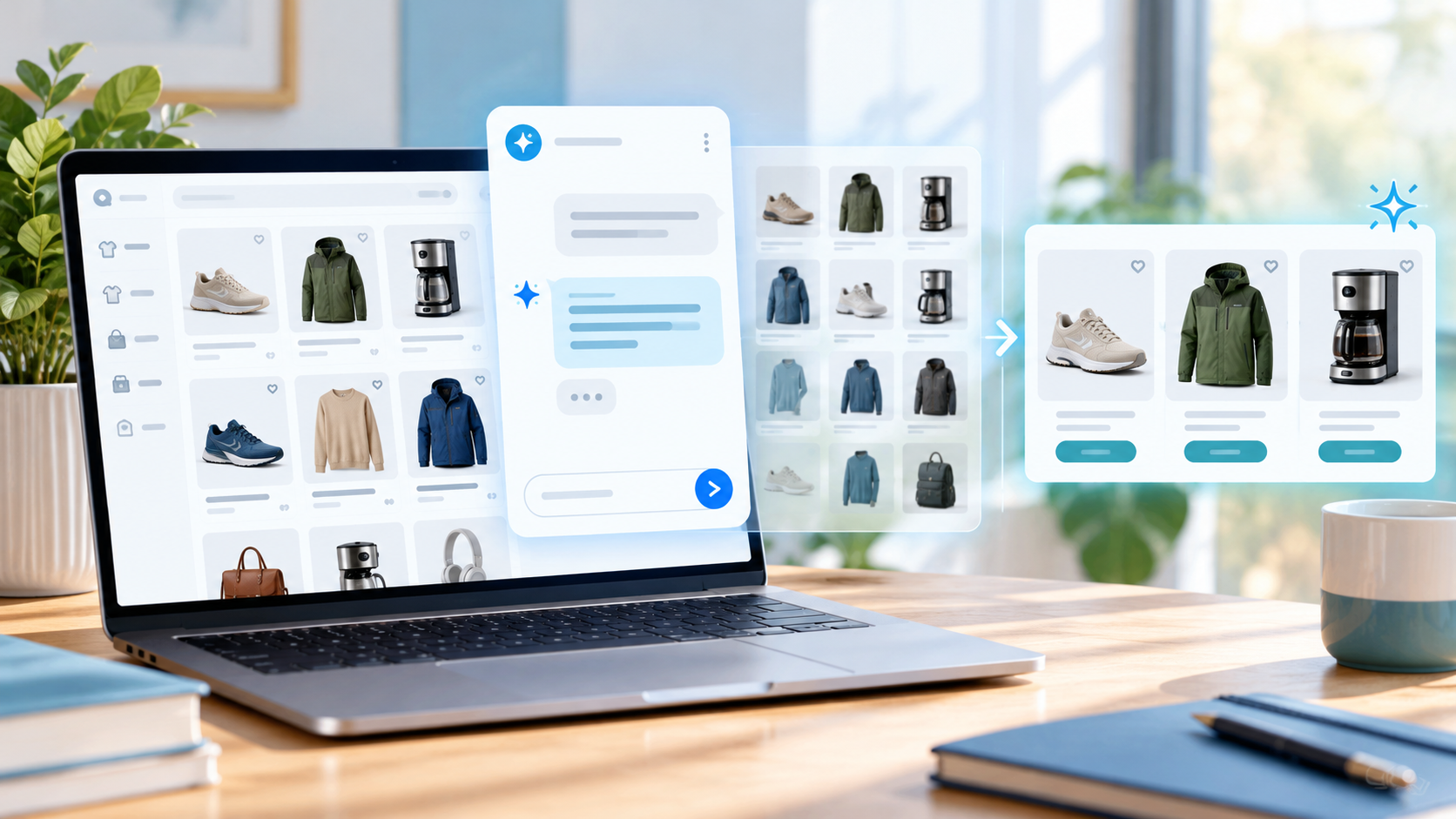
AI shopping assistants personalize experiences in real time by using a shopper's latest questions, browsing activity, and cart contents to adjust the next recommendation or response. A new budget may narrow the shortlist; a delivery question may shift the conversation toward shipping information.
At Upsello, we bring guided selling, upsell and cross-sell, cart recovery, and support together for Shopify stores. This guide explains how personalization works across those interactions, which data it needs, and how you can test its accuracy.
What Does Real-Time Personalization Mean in Ecommerce?
Real-time personalization uses the shopper's current goal, requirements, and actions to guide the next response. When someone changes their budget, chooses a product, or asks about delivery, the assistant should update its guidance while keeping relevant details from the conversation.
Imagine a shopper looking for a carry-on suitcase. They first care about size and price. After adding one to the cart, they ask whether it fits a specific airline and can arrive before Tuesday. The assistant should not repeat the original recommendations. It should preserve the chosen product, check the suitcase dimensions against the airline's current baggage limits, and verify delivery options using the store's shipping information.
A practical distinction helps:
| Personalization layer | Example | How it affects the current session |
|---|---|---|
| Long-term profile | Prior purchases or saved preferences | May inform context when permitted; it is background to the current request. |
| Segment | “Returning customer” or “gift shopper” | Can change when segment rules or new signals update. |
| Session state | Current query, product views, filters, and cart | Can influence the next interaction directly. |
| Live commerce state | Price, variant, inventory, market, and shipping eligibility | Must be checked against current store data before a claim or action. |
A mature assistant uses these layers together but does not confuse them. A past purchase may be useful context, while the latest stated constraint may be more important for the current decision. Stock availability determines whether a product can be purchased. Price becomes a hard filter when the shopper sets a firm budget; otherwise, it may remain a comparison factor.
Which Signals Shape a Personalized Experience?
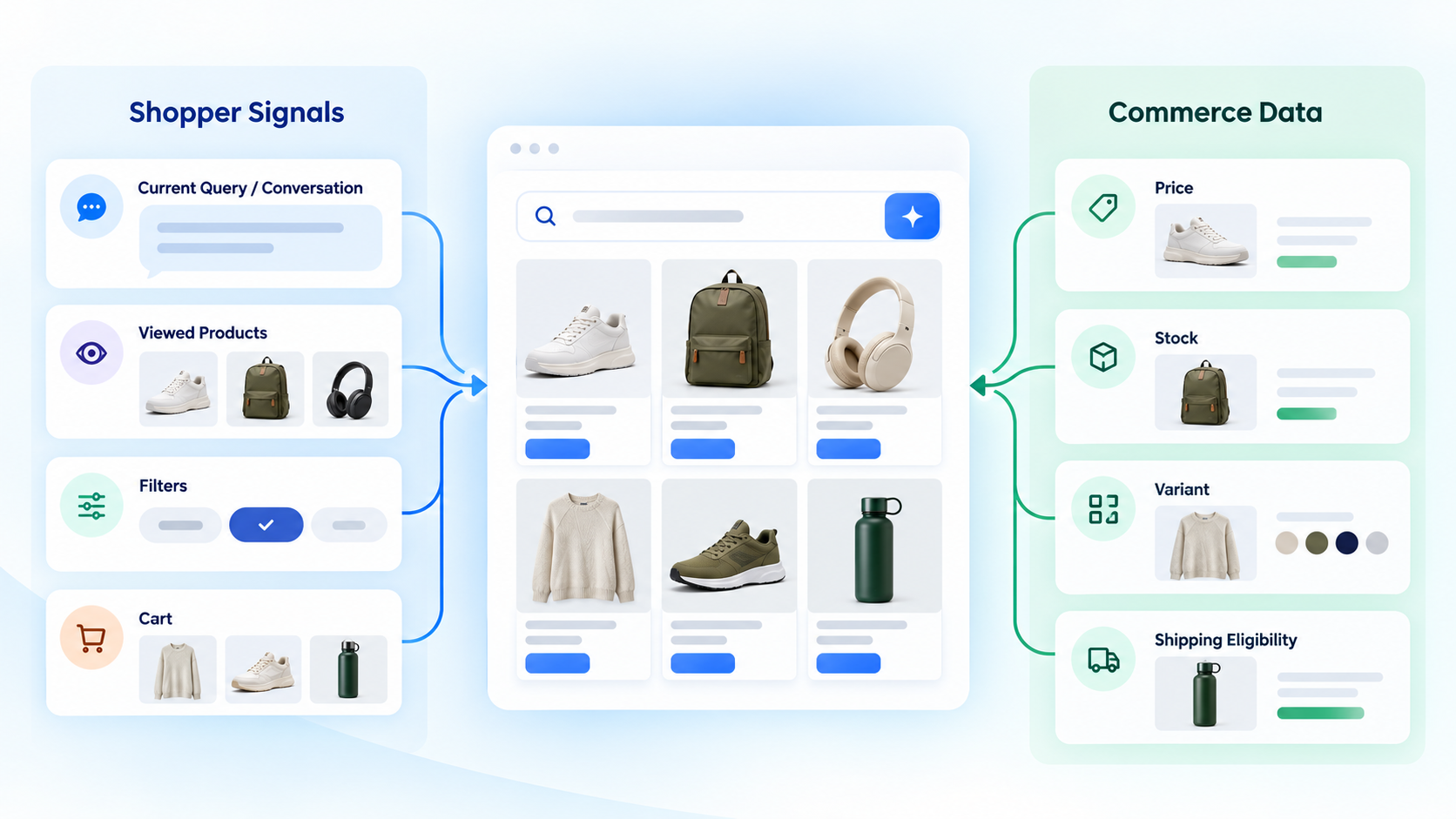
AI shopping assistants can use stated preferences, conversation history, browsing activity, cart contents, and relevant account information. Current product and shipping data helps determine which options meet the shopper's requirements.
Explicit intent and constraints
The clearest signals are the ones shoppers state directly: budget, size, color, material, use case, compatibility, delivery timing, dietary requirement, or intended recipient. The system should separate hard constraints from flexible preferences. “Under $100” is different from “I would prefer to stay near $100.”
This distinction is central to a trustworthy recommendation. A popular product that violates a required size or compatibility condition should not be ranked above an eligible product merely because it is popular.
Conversation history
Each turn can refine the shopper's goal. A correction such as “I meant a gift for a teenager” should update the current intent. The assistant should preserve relevant context while allowing the shopper to restart or remove an assumption.
Good personalization is selective. It keeps the details that affect the product decision and drops details that no longer matter. Otherwise, the assistant can become anchored to an early guess.
Session behavior
Searches, product views, filters, comparisons, dismissals, add-to-cart events, and repeated questions provide additional context. These signals are useful because they show what the shopper is doing, not only what they said.
Behavior should still be interpreted carefully. A product view may indicate curiosity, comparison, or accidental navigation. It should be combined with stronger signals rather than treated as proof of preference.
Product and commerce data
The assistant needs current product, variant, price, inventory, promotion, policy, and shipping information. These fields determine which products are eligible and which claims the assistant can safely make.
Before testing recommendations, confirm which catalog fields, market rules, and shipping sources are connected and how stale values are handled. Our AI shopping assistant buying guide explains the data and control questions merchants should review.
Permitted customer context
Account history, prior purchases, loyalty status, and saved items can help when they are relevant, permitted, and explained by the store's privacy practices. Anonymous-session behavior can still support a session-level experience, but it should not be described as a complete customer profile.
The safest design starts with data minimization: collect and retain the signals needed for the stated shopping task, define who can access them, and provide a clear route to human help when the context is incomplete or sensitive.
How Does Personalization Change During a Shopping Session?
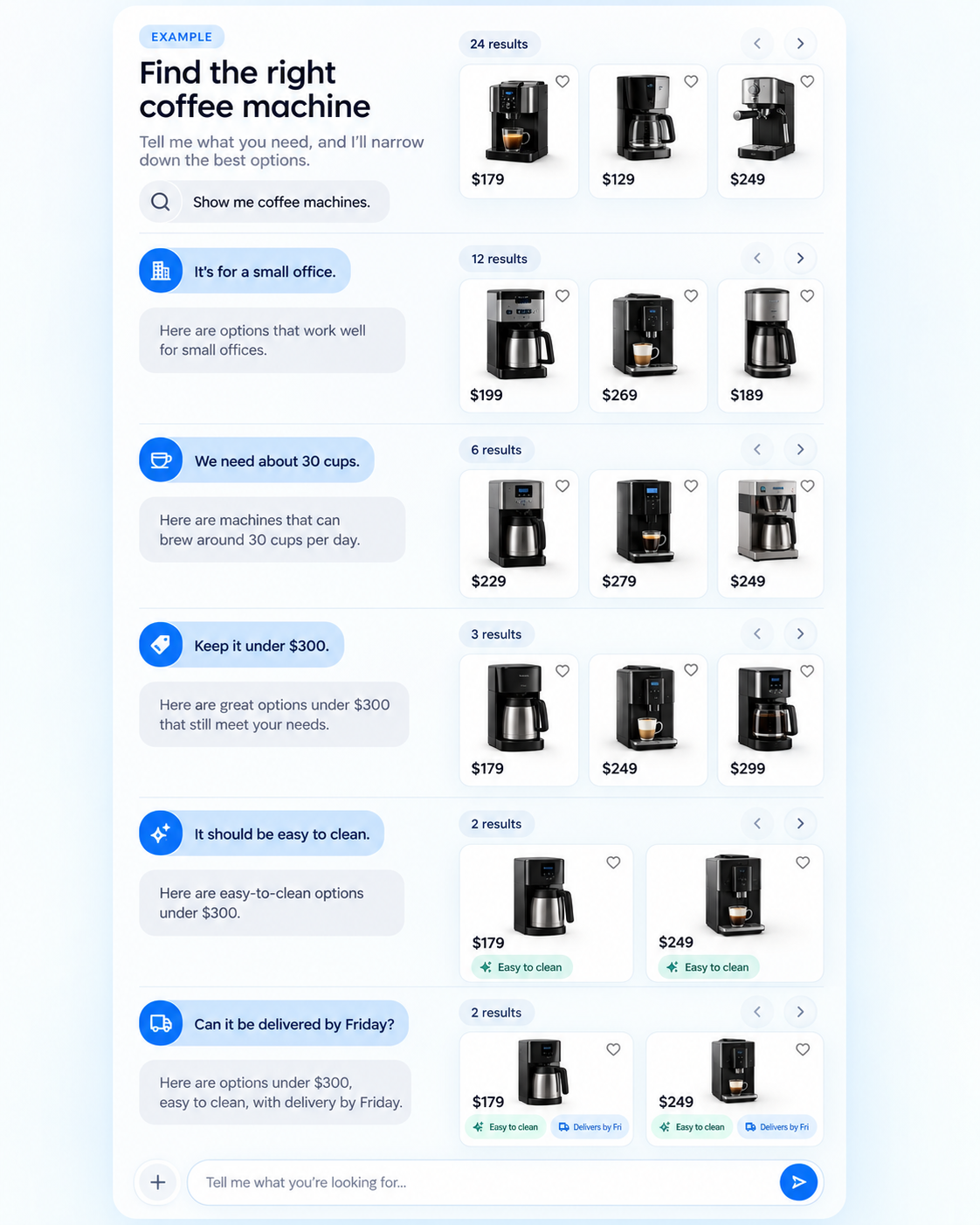
Real-time personalization changes the products an assistant recommends, the details it compares, and the questions it asks as the shopper adds new information. Consider this hypothetical shopping session:
| Shopper’s latest input | How the assistant should adapt |
|---|---|
| “I need a coffee machine for a small office kitchen.” | Start with compact models and ask about budget or daily use if those details would change the shortlist. |
| “We make about 30 cups each morning.” | Reassess the shortlist using brewing capacity, refill needs, and cleaning requirements. |
| “Keep it under $300.” | Remove higher-priced options and explain any compromises among the remaining models. |
| “That model looks difficult to clean.” | Compare cleaning steps and maintenance needs before suggesting another option. |
| “Can it arrive by Friday?” | Check delivery information for the shopper’s destination before making a delivery claim. |
Each new answer changes the current shopping task. The assistant should carry forward the shopper’s requirements and explain why its recommendations changed.
How Does Upsello Support Personalization Beyond Product Recommendations?
Upsello extends personalization beyond the shortlist by applying connected Shopify data and merchant rules to sales and support interactions. The capabilities available to a store depend on its connected data, permissions, and configuration. Explore Upsello's features.
One assistant across buying and support questions
Upsello brings product guidance, cart recovery, order questions, and human replies into one assistant. During testing, check which conversation details remain available when the shopper changes tasks or moves to human support.
Proactive help at high-intent moments
Behavior-based workflows can respond when a shopper compares products or hesitates at checkout. Configure the assistant to address the identified blocker with approved product information, policy guidance, a relevant suggestion, or human help rather than defaulting to a discount.
Merchant control over recommendations and actions
Merchants can configure brand tone, restricted topics, greetings, escalation conditions, and offer rules. Test these controls against ambiguous requests, conflicting data, and promotion eligibility before expanding the workflow.
Multilingual conversations
Upsello supports multilingual conversations. Confirm the languages and channels needed for your store during setup.
What Happens Between a Shopper Request and a Recommendation?
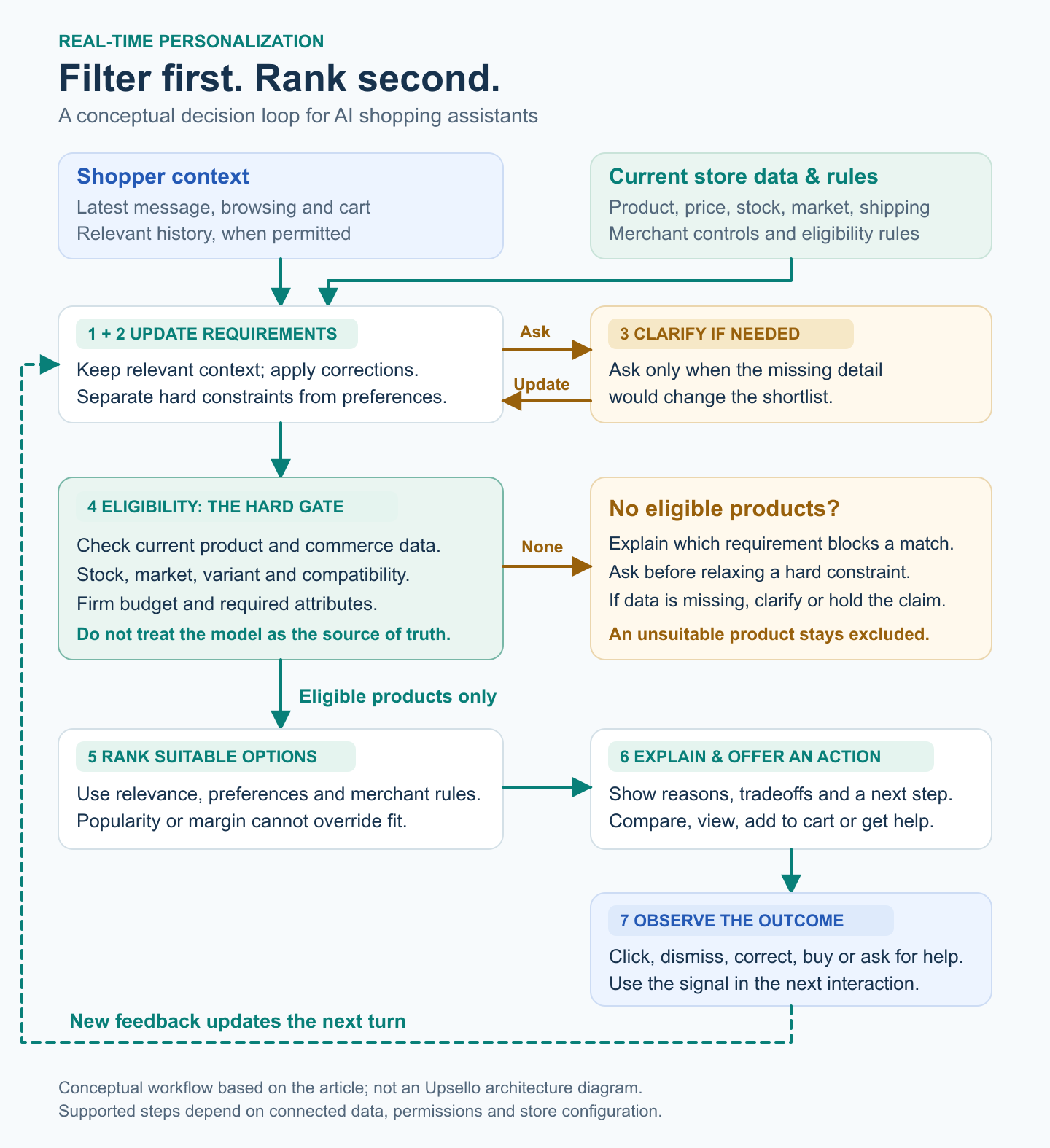
The assistant updates the shopper’s requirements, checks eligible products, and adjusts its next recommendation or answer. The steps it supports depend on its catalog, event, and cart integrations.
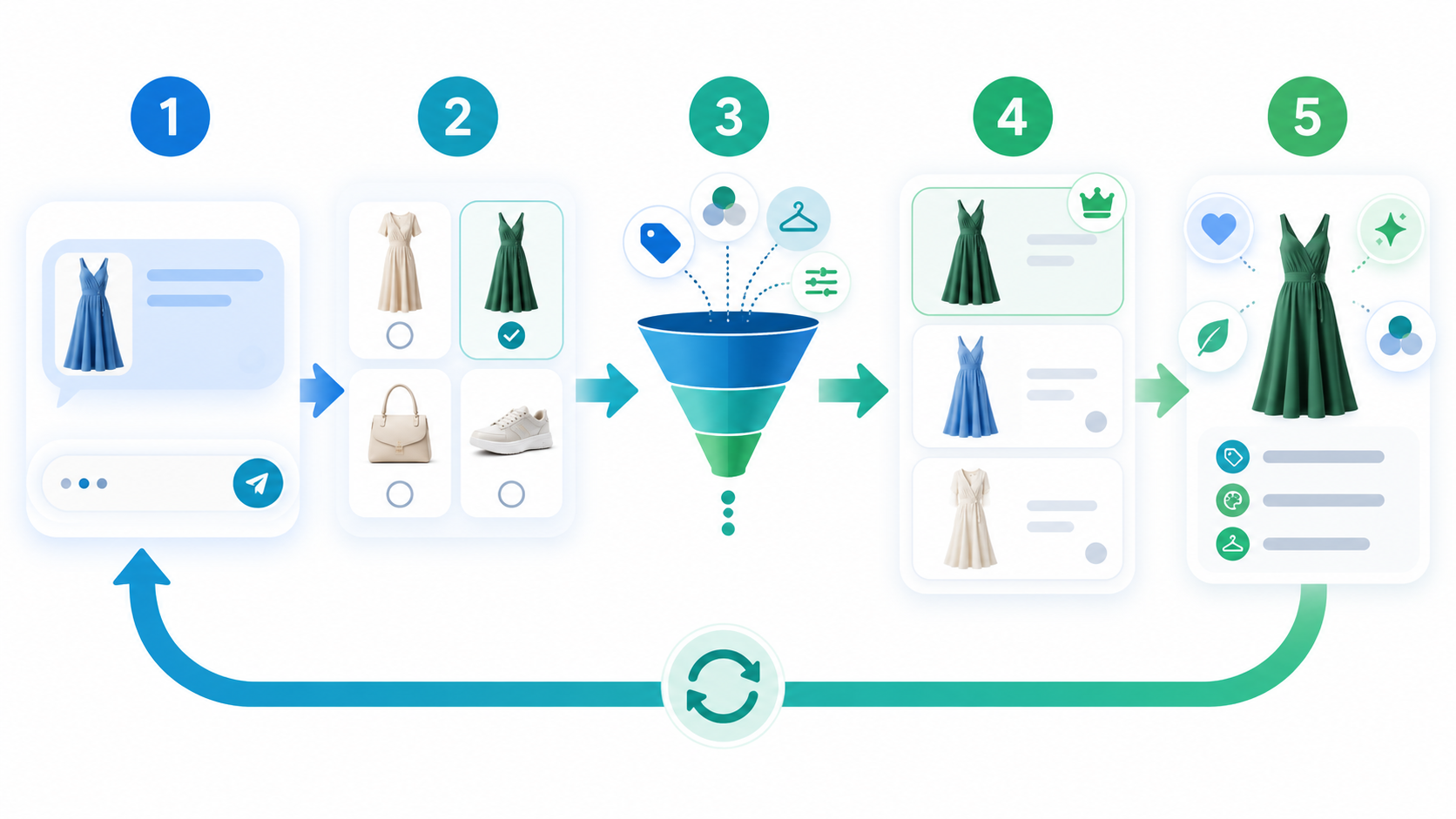
Interpret the latest request
The system converts the shopper's latest message, search, filter, or action into structured intent. It identifies the goal, hard constraints, flexible preferences, and unresolved questions.
Combine current and permitted context
The assistant adds relevant session state, cart contents, live catalog data, and permitted customer context. It should prefer current, decision-relevant information over an old or weak signal.
Ask only decision-changing questions
A clarifying question is useful when its answer would change the shortlist. A shoe assistant may need size and activity. It probably does not need a long lifestyle interview before showing any products.
Retrieve eligible products
The system filters the candidate set before the language model writes its explanation. It can remove products that are unpublished, out of stock, outside the buyer's market, over budget, incompatible, or missing a required attribute.
This is one of the most important controls in the loop. A generative model can explain a product, but it should not be the source of truth for current availability or variant eligibility.
Rank for relevance and business fit
Ranking can use semantic fit, product relationships, shopper context, popularity, inventory position, reviews, or merchant rules. Commercial inputs require boundaries. Margin may help break a tie between two suitable products; it should not push an unsuitable product to the top.
Shopify's Storefront API includes buyer-facing product, search, cart, and checkout capabilities, and its productRecommendations query can return related products for a product context. These are platform primitives, not a complete personalization system. An AI layer still needs to interpret intent, apply store-specific rules, and explain tradeoffs. Shopify Storefront API, Shopify productRecommendations
Explain the match and provide a next action
The response should show a small set of eligible products, explain why each one fits, disclose important tradeoffs, and offer a useful next action: compare, view the correct variant, add to cart, ask a person, or restart the search.
Use the outcome as a new signal
A click, dismissal, comparison, purchase, correction, or handoff can inform the next interaction and later evaluation. Merchants should define which events the assistant uses to update recommendations, how long it retains them, and how shoppers can correct remembered preferences.
What Makes Personalization Trustworthy?
Trustworthy personalization uses current product information, explains recommendations, and lets shoppers correct or reset their preferences.
Freshness. Product, price, inventory, and shipping inputs should have a defined update path. Ask a vendor how changes reach the assistant, how long synchronization can take, and what happens when the fresh value is unavailable.
Transparency. Explain the practical reason a product was shown: it meets the stated budget, fits the requested size, or is available in the shopper's market. Avoid vague claims such as “this is perfect for you” when the evidence is only a weak behavioral signal.
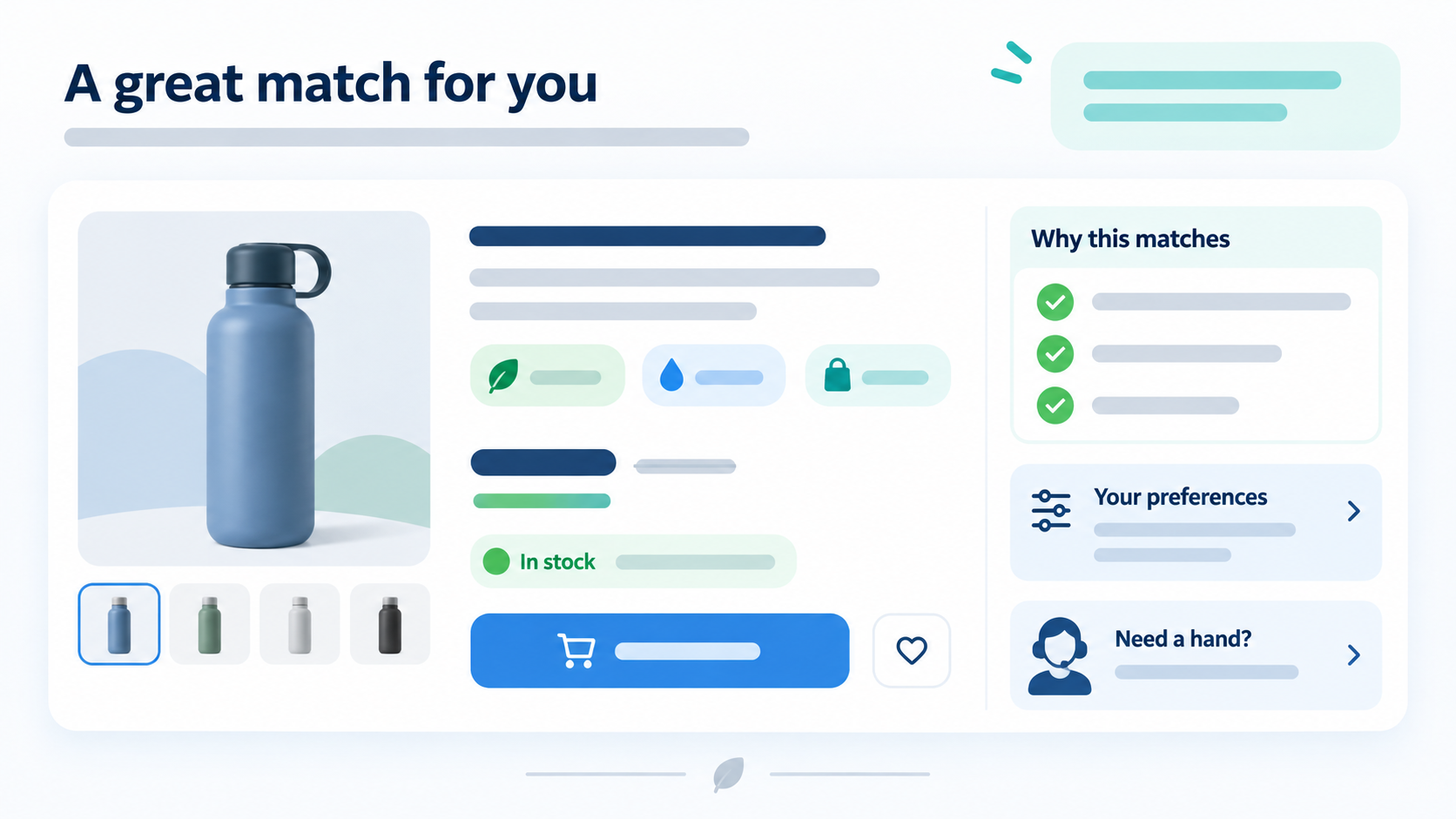
Uncertainty handling. When no product meets every required condition, explain which requirement prevents a match. Ask whether the shopper wants to adjust it before showing alternatives. For example, offer to search above $100 only after the shopper agrees to increase the budget.
Shopper control. Let people correct the assistant, remove a remembered constraint, restart the search, or request a human. Consequential cart and checkout actions should require clear confirmation.
Governance. NIST's AI Risk Management Framework is a voluntary framework for managing AI risks and promoting trustworthy development and use. Its emphasis on validity, reliability, transparency, explainability, privacy, and fairness offers a useful checklist for ecommerce teams, although it is not legal advice or a substitute for jurisdiction-specific requirements. NIST AI Risk Management Framework
How Can You Measure Real-Time Personalization?
Measure whether recommendations meet shopper requirements and help shoppers complete the task, then compare commercial outcomes with a suitable baseline.
| Measurement area | Useful questions |
|---|---|
| Relevance | Did the shortlist satisfy hard constraints? How often did the shopper refine or reject it? |
| Experience | Did the shopper reach a product page, complete a comparison, or request human help? |
| Commerce | Did add-to-cart rate and conversion rate improve compared with the control group? |
| Quality | How often were answers unhelpful, stale, unavailable, or inconsistent with store policy? |
| Trust | Did shoppers opt out, complain, return products, or correct the assistant? |
| Operations | What was response latency, handoff rate, and correction time for catalog issues? |
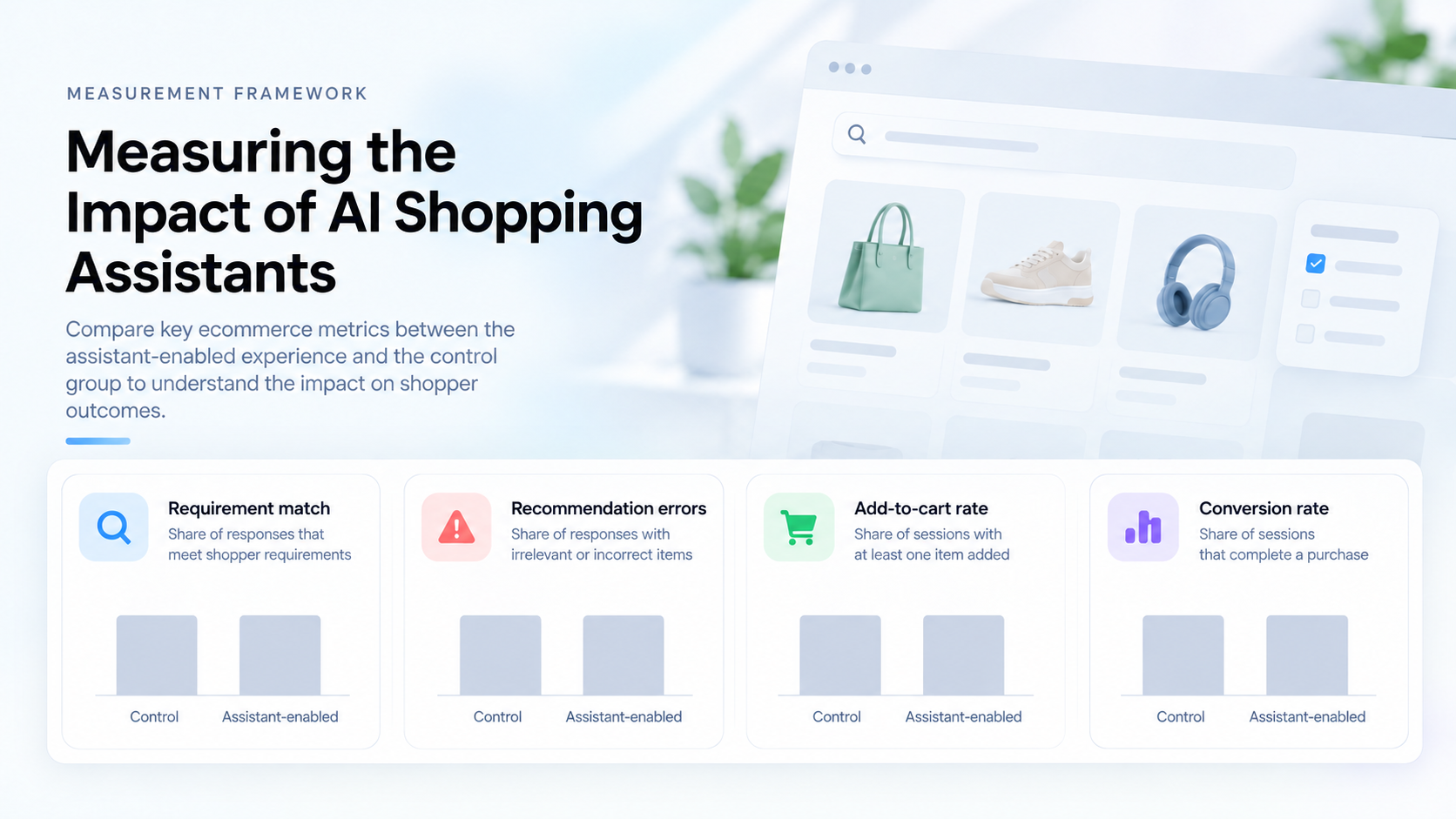
To evaluate the journey, define which recommendation, cart, purchase, recovery, and handoff events your setup records. Review those events alongside your store's analytics. When possible, compare an assistant-enabled group with a control group using the same eligibility rules and measurement period. Define each metric before the test, and track recommendation errors alongside conversion so you can see whether shoppers are finding suitable products.
How Can Shopify Teams Test Real-Time Personalization?
Start with one shopping problem and one measurable outcome rather than a broad “AI for the store” project.
- Choose one category and one shopper task, such as finding a compatible product or comparing two similar items.
- Define hard constraints, permitted data, excluded products, supported markets, human-handoff rules, and one primary outcome.
- Normalize product attributes, variants, prices, availability, policies, and URLs.
- Connect the catalog, cart, and event sources. Define how price and inventory changes reach the assistant and when stale values should be rejected.
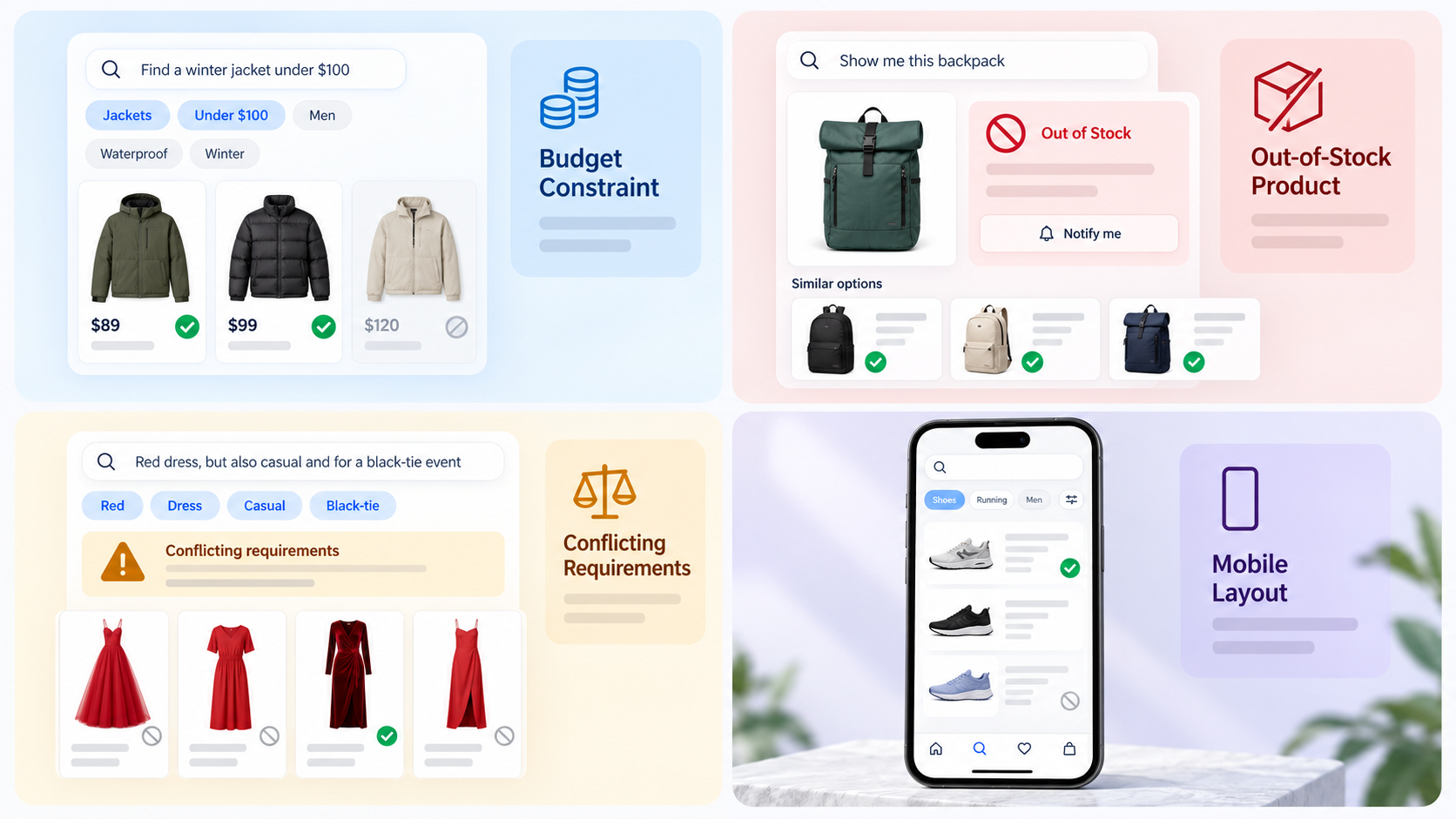
- Test constrained, ambiguous, out-of-stock, contradictory, mobile, and adversarial scenarios.
- Compare the assistant with a suitable baseline and review both commercial and trust metrics.
- Expand only after recommendation quality, freshness, and fallback behavior are stable.
For help planning catalog connections, shopping actions, and testing, read our guide to creating a shopping bot for online shopping.
Additional FAQs for Ecommerce Teams
These questions cover operational decisions that complement the personalization workflow above.
Which product attributes should a store clean first?
Start with the attributes shoppers use to rule products in or out. Size, compatibility, material, capacity, color, price, availability, and delivery eligibility often affect the shortlist directly. Prioritize the fields tied to your chosen shopping task, then expand the data model as you add categories.
When should the assistant hand a conversation to a person?
Define a handoff when the shopper requests human help, the available data cannot support a reliable answer, store policy requires review, or the next action carries financial or account risk. Preserve the shopper’s stated requirements so they do not have to repeat the conversation.
How Should Promotions Affect Personalized Recommendations?
Treat a promotion as an eligibility rule, not a reason to override product fit. Define the eligible products, markets, dates, exclusions, and usage limits, then apply it only after the shopper's requirements are satisfied. Test expired, ineligible, and conflicting offers so the assistant can explain when a promotion does not apply.
Can AI shopping assistants personalize recommendations without an account?
Yes. A shopper’s current conversation can guide recommendations without an account profile. Browsing and cart activity can add context when those signals are available and the store’s privacy settings allow their use.
Conclusion: Personalization Is a Controlled Decision Loop
Real-time personalization works when each new signal changes the next useful response without overriding product eligibility or merchant rules. Start with one shopping task, keep the required data current, and test how recommendations change when shoppers revise their needs.
Want to explore personalization for your store? Contact our team with your store URL and the shopping task you want to improve.


