

To improve AI shopping assistant accuracy before launch, test product facts, shopper requirements, and product-to-cart actions against your store data. A good recommendation must use verified details, stay within the shopper's budget and chosen options, and open the correct product variant.
Start with one Shopify product family, then use a small test set to catch wrong prices, missing fit data, and broken links. This guide shows you how to measure accuracy, fix failures, and decide what's ready to launch.

What Counts as AI Shopping Assistant Accuracy Before Launch?
An accurate AI shopping assistant must pass three checks: its product facts are correct, its recommendations meet the shopper's requirements, and its links or cart actions lead to the right product variant.
Each check covers a different part of the shopping journey.
- Product Fact Accuracy: Check every claimed size, material, feature, and price against the approved source for the selected item.
- Recommendation Accuracy: Confirm that each suggested product meets the shopper's required conditions, including budget, size, color, and compatibility.
- Variant and Action Accuracy: Open the product link or test the enabled cart action. Make sure it keeps the exact variant the shopper selected.
For example, imagine a shopper asks for a black backpack under $100 that fits a 15-inch laptop. Your assistant recommends a black backpack for $89. The price and color are correct, but the product record doesn't confirm laptop fit.
That recommendation shouldn't receive a full pass. The assistant has made a claim your team cannot verify.
You also need to check where the recommendation leads. Shopify's Storefront API defines a product variant as a specific version of an item, distinguished by options like size or color. A small blue shirt and a large blue shirt have different variant IDs.
Record those IDs during testing. They help you catch cases where the assistant describes one option but opens another.
For each test, mark the three checks as Pass, Fail, or Needs Review. If the assistant lacks a fact needed to confirm fit, the expected response may be to explain the missing information rather than promise compatibility.
One more thing: keep purchase results separate from accuracy testing. A completed sale doesn't prove that the recommendation was correct. You still need to inspect the product facts, shopper requirements, and selected options.
Which Product Facts Should You Check Before Launch?
Before launch, verify the product data your AI shopping assistant actually receives and uses. A correct product page won't help if the assistant reads an outdated price, the wrong variant, or a missing specification.
Start with these five areas:
- Product and Variant Details: Check sizes, colors, materials, and features against the correct product and variant records.
- Fit and Compatibility: Confirm measurements and compatibility claims using approved product information. Don't assume an item fits because its name sounds right.
- Price and Market: Check the price and currency shown to shoppers in each market you plan to support.
- Stock and Backorders: Verify whether a variant is in stock, available for backorder, or unavailable for purchase.
- Cart and Product Links: Confirm that the selected variant reaches the correct product page or cart when those actions are enabled.
Assign an approved source and an owner to each area. Your merchandising team might maintain product details, while your commerce team handles prices, inventory, and cart data.
The important part is checking the information the assistant uses, not just the information that exists somewhere in your store.
Check Variants and Stock Status
Shopify stores often have several variants under one product. Each variant may have its own price, available quantity, and selected options.
That creates room for mistakes.
Say your store sells a jacket in three sizes. The product description mentions that the jacket is available in black, but the medium variant is sold out. Your assistant shouldn't recommend that exact option as immediately available just because the product page still exists.
Shopify's Storefront API includes two fields worth checking:
- availableForSale: Indicates whether the variant can be purchased.
- currentlyNotInStock: Can identify an out-of-stock variant that remains available for purchase, including through a backorder.
A variant can be purchasable without being ready to ship immediately. Your assistant should describe the known state without inventing a delivery promise.
Check Prices in the Right Market
A price that's correct in one country may be wrong in another.
Shopify's Cart API provides estimated cart costs that may change at checkout. Buyer identity also affects international pricing.
For example, a shopper in Canada may receive a different price or currency from someone shopping in the United States.
Test the assistant in each market you intend to launch. If your store uses market-specific prices, make sure the recommendation uses the right context.
Here's a useful test: change the price or availability of one selected variant, then ask the same shopping question again. Check whether the assistant receives and uses the new information.
Save the test time, market, source record, and observed answer. If the results don't match, you'll have a better starting point for finding the problem.
For more background on how assistants connect shopper requests with product and store data, see our guide on how AI shopping assistants work.
How Do You Keep Shopper Requirements in Every Recommendation?
Filter out products that fail the shopper's must-have requirements before ranking the remaining options. A good style match cannot make up for the wrong size, an exceeded budget, or unverified compatibility.
Start by separating two kinds of requirements:
- Hard Constraints: Conditions the recommendation must meet, like a price under $100, size M, or confirmed laptop compatibility.
- Soft Preferences: Details the shopper would like but may be willing to change, like a preferred brand or color.
The distinction depends on what the shopper says.
If someone asks for a black backpack and won't accept another color, black is a hard constraint. If they say they'd prefer black but are open to other colors, it's a soft preference.
Test Required Conditions Together
Imagine a shopper needs a black backpack under $100 that fits a 15-inch laptop.
Your assistant finds three options:
| Product | Price | Color | Confirmed Laptop Fit | Result |
|---|---|---|---|---|
| Backpack A | $90 | Blue | Yes | Fail: Wrong color |
| Backpack B | $120 | Black | Yes | Fail: Over budget |
| Backpack C | $95 | Black | Unknown | Needs Review: Fit unconfirmed |
These are hypothetical test products, not actual store results.
None of the three options fully satisfies the request.
The assistant should explain what's missing and ask whether the shopper wants to change a requirement. It shouldn't simply recommend the closest-looking item and claim it meets every condition.
Test your backup recommendations too. Some systems use fallback results when the first search returns too few products. Those fallback results still need to follow the shopper's hard constraints unless the shopper agrees to change them.
Check Missing Information and Follow-Up Questions
There are two different reasons an assistant may lack information.
The shopper may not have provided enough detail. For example, they ask for a laptop bag but never mention their laptop size. A short follow-up question can help.
Or the shopper may have provided the size, but your catalog lacks the measurements needed to confirm fit. That's a product-data problem, not a reason to ask the shopper the same question again.
Your tests should cover both situations.
You should also check whether the assistant remembers requirements across a conversation.
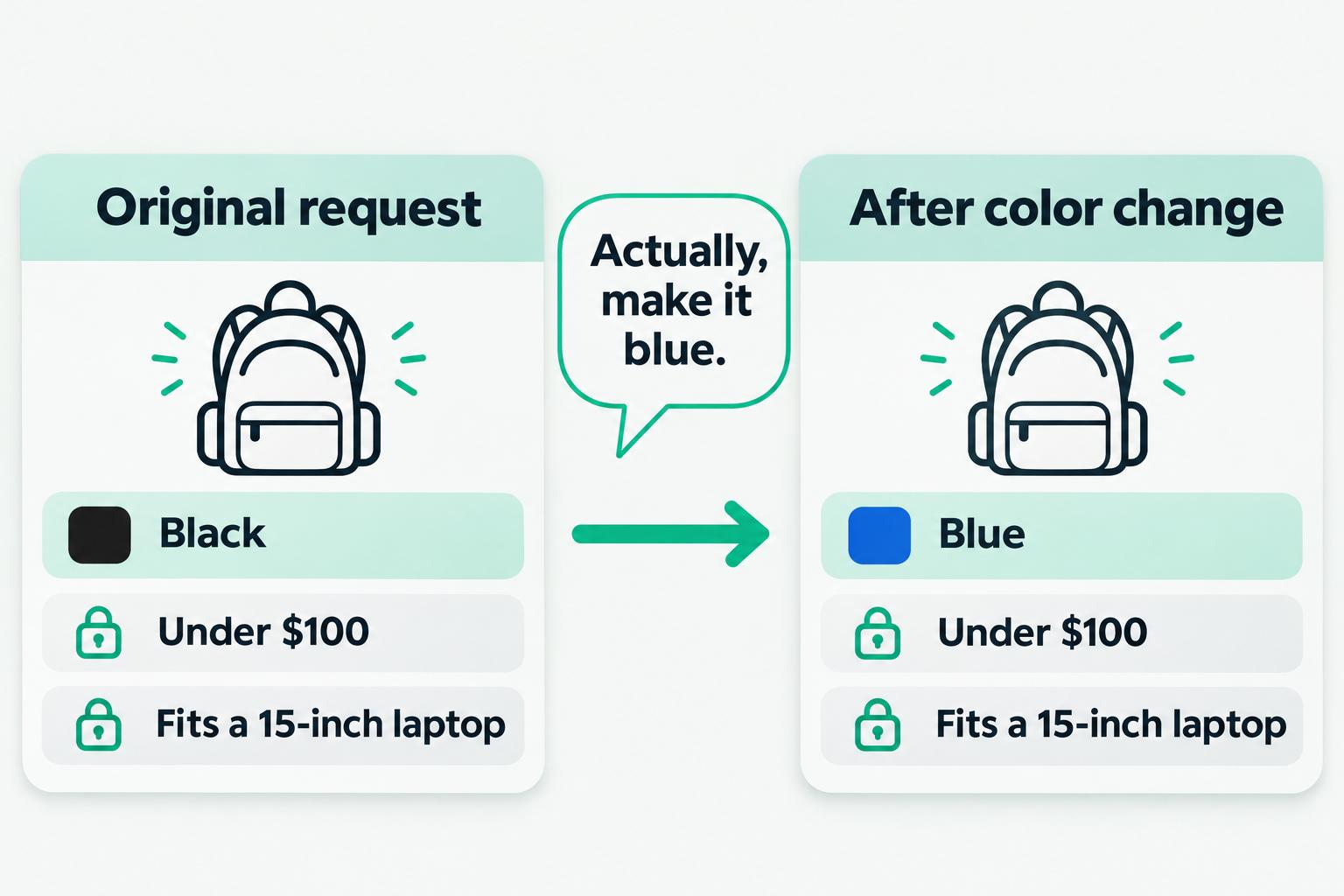
For example, after asking for a black backpack under $100, the shopper says:
"Actually, make it blue."
The assistant should update the color while keeping the original budget and laptop-fit requirements.
This is an important part of product recommendation accuracy. The assistant needs to handle changing preferences without losing requirements the shopper still expects it to follow.
How Do You Build a Prelaunch AI Shopping Assistant Test Set?
Build your test set around the shopping tasks you plan to support at launch. Include normal requests, combined requirements, missing information, product changes, and cases where no suitable item exists.
You don't need to test every product in your catalog on day one. Begin with one product family and include the situations your shoppers are most likely to encounter.
Choose the Test Scenarios
A useful first test set should cover:
- Normal Recommendations: A shopper provides clear requirements, and suitable products are available.
- Combined Requirements: A shopper asks for several conditions at once, like price, size, and compatibility.
- Missing Information: The assistant must ask a question or explain that a product fact isn't confirmed.
- No-Match Requests: No available product meets every required condition.
- Follow-Up Changes: The shopper changes one requirement during the conversation.
- Product and Cart Actions: The assistant must preserve the selected variant when opening a link or updating a cart.
Include different markets and currencies if your store serves international shoppers.
You should also test stock changes and backorders. A recommendation that works with a fixed test catalog may behave differently after inventory changes.
The following table gives you a starting point.
| Test Scenario | What to Verify | Expected Result | Failure to Record | Owner |
|---|---|---|---|---|
| Correct product, wrong variant | Selected option and variant ID | Answer and link keep the requested option | Different size or color opens | Integration team |
| Budget and required attribute | Variant price and required feature | Every recommendation meets both | Budget or feature requirement is ignored | Merchandising team |
| Backorder item | Saleability and stock state | Assistant explains the known availability | Immediate stock or delivery is promised without evidence | Product-data team |
| Different market or currency | Price in selected market | Correct market price and currency appear | Price from another market appears | Commerce team |
| Missing fit information | Approved product specifications | Assistant avoids unverified fit claims | Compatibility is promised without evidence | Product-data team |
| No qualifying product | All hard constraints | Assistant explains the mismatch | Backup recommendations ignore requirements | Recommendation team |
| Follow-up option change | Latest shopper choice and variant ID | Answer and link use the new option | Previous option remains selected | Integration team |
| Cart action, if enabled | Authorized action and variant ID | Cart contains the intended item and option | Wrong item or unauthorized change | Integration team |
This is a proposed testing template. Replace the examples with verified data from your own catalog.
For each case, keep the shopper's request, approved product data, selected IDs, expected result, and actual result together.
A reviewer should be able to repeat the test and see exactly what went wrong.
How Should You Measure Recommendation Accuracy?
Measure accuracy using a few clear metrics. One overall score can hide a serious problem with product fit or variant selection.
We recommend tracking three measures.
1. Scenario Pass Rate
This shows the percentage of completed test scenarios that meet every required check.
Formula:
Scenario Pass Rate (%) = (Fully Passed Tests ÷ Total Completed Tests) × 100
For example, say your team completes 20 tests. Seventeen pass, two fail, and one still needs review.
Your fully passed rate is:
17 ÷ 20 × 100 = 85%
The remaining three cases still need attention. For this measure, a test marked Needs Review isn't counted as a pass.
2. Constraint Compliance Rate
This measures the percentage of tests in which recommendations meet every hard requirement, including budget, size, and confirmed compatibility.
Formula:
Constraint Compliance Rate (%) = (Tests Meeting All Hard Constraints ÷ Tests With Hard Constraints) × 100
Use it to spot recommendations that ignore budget limits, selected options, or confirmed compatibility requirements.
3. Variant and Action Accuracy
This measures the percentage of tested actions that use the exact product variant selected by the shopper.
Formula:
Variant and Action Accuracy (%) = (Correct Tested Actions ÷ Total Attempted Test Actions) × 100
For this measure, test only the actions your assistant is allowed to perform. A correct recommendation with a link to the wrong variant should fail the action check.
These metrics describe different parts of accuracy. Report them separately before combining them into an overall launch review.
How Do You Find and Fix Recommendation Errors?
Fix recommendation errors by finding where the correct information was lost. A wrong answer doesn't always mean the recommendation model itself needs to change.
The problem may start with product data, filtering rules, the generated answer, or the link used after a recommendation.
Trace the Error Step by Step
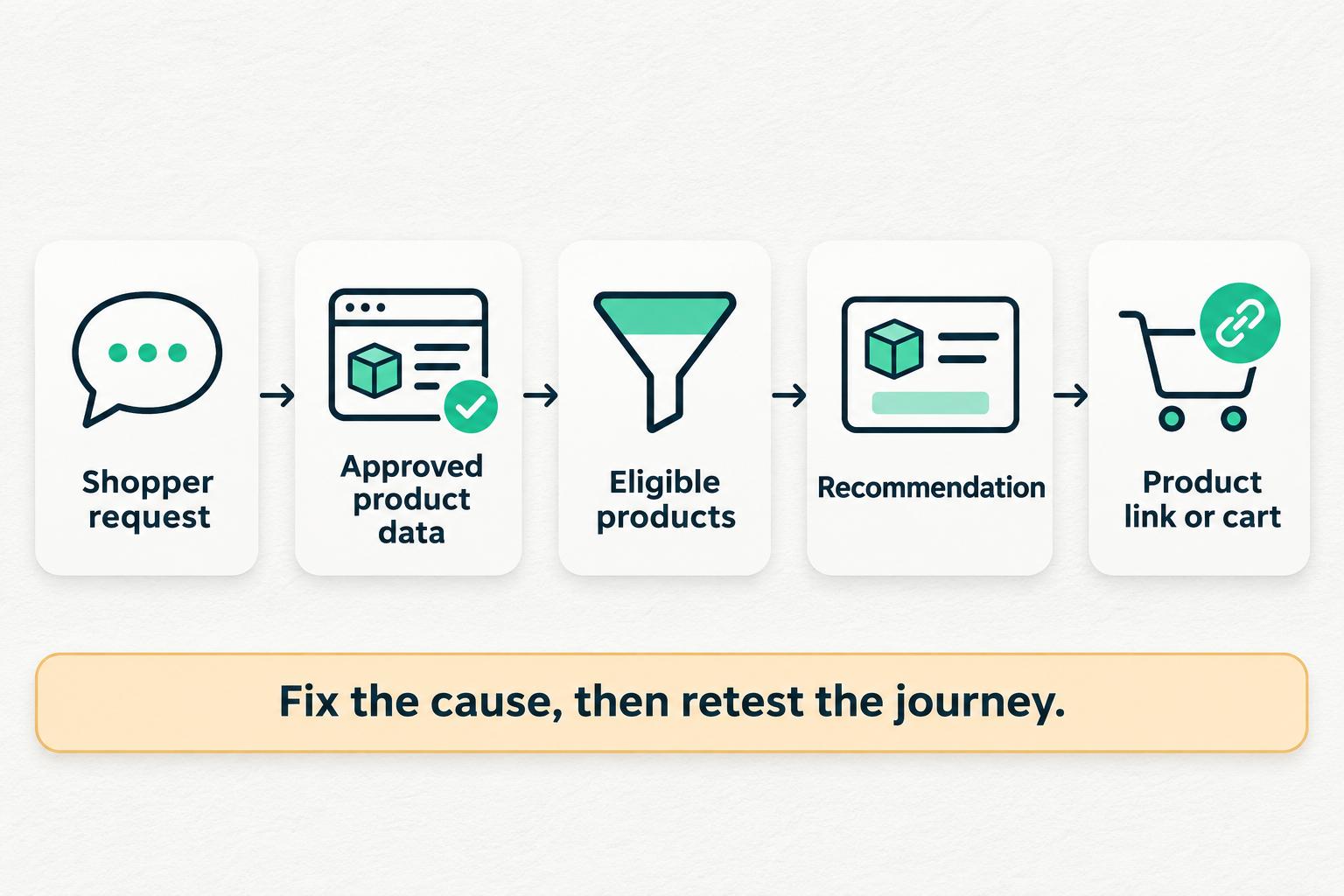
Follow the shopping journey in this order:
- Check the Shopper's Request: Confirm the requirements the assistant should have followed.
- Check the Product Source: Find the approved product facts and variant details available during the test.
- Check the Eligible Products: Confirm that filtering rules excluded products that failed hard constraints.
- Check the Recommendation: Compare the selected product and explanation against the eligible results.
- Check the Final Action: Verify that the product link or cart action kept the correct variant and stayed within the allowed scope.
For example, imagine the assistant recommends a black backpack, but its link opens the blue variant.
Start by comparing the variant IDs.
If the wrong ID appeared in the eligible results, check the product mapping and filtering rules. If the correct ID reached the recommendation but the link changed it, inspect the link or cart integration.
Changing the product description won't fix a broken link.
Match Each Fix to the Problem
The same principle applies to other failures.
| Problem | Likely Area to Check | Next Step |
|---|---|---|
| Incorrect product specification | Product knowledge | Correct the approved source |
| Old price or stock information | Data source or update path | Verify data freshness and synchronization |
| Recommendation exceeds budget | Filters or ranking rules | Check how hard constraints are applied |
| Wrong variant opens | Product mapping or link generation | Compare variant IDs across the journey |
| Assistant invents missing fit details | Product evidence and answer rules | Require verified facts or an explicit limitation |
| Changed shopper preference is ignored | Conversation context | Test how the latest requirement updates earlier choices |
| Cart changes without permission | Action permissions and authorization | Limit the action and enforce authorization checks |
Once you've identified the source of the failure, make the smallest change that addresses it.
Sometimes that means updating product data. Other times, it means fixing a filter, changing how an assistant asks questions, or repairing the connection between a recommendation and the cart.
Retraining a recommendation model is a different task. Don't start there unless the evidence points to a model-level problem.
Retest the Full Shopping Journey
After a correction, repeat the failed test.
Then test a few related scenarios that previously passed.
For example, a fix to size selection should be checked against other sizes and colors in the same product family. A change to fallback recommendations should be tested with both matching and no-match requests.
Otherwise, you may solve one problem while creating another.
Save the new result alongside the earlier failure. Include the change made, the updated configuration or data version, and the person who approved the fix.
This gives your team a record of what improved and what still needs work.
When Is Your AI Shopping Assistant Ready to Launch?
Your AI shopping assistant is ready for launch when the tested journeys meet your acceptance criteria, high-severity failures are resolved, and the team can support the features you plan to release.
That doesn't mean every possible shopping question has been tested. It means you have enough evidence to approve a defined product, market, and action scope.
Check Action Permissions Separately
An accurate product answer doesn't prove that an assistant should be allowed to change a cart or perform another action.
Review those permissions before launch.
The OWASP guidance on Excessive Agency recommends giving systems only the tools and permissions needed for their tasks. It also calls for authorization checks in the systems carrying out actions, rather than trusting the assistant to approve itself.
For a shopping assistant, your review should cover:
- Allowed Actions: Define which actions the assistant may perform.
- Shopper Authorization: Check that each action is permitted for the current shopper.
- Action Confirmation: Require suitable confirmation before actions that need it.
- Verified Results: Check that the action produced the expected result.
- Human Handoff: Provide a route to your team when the assistant cannot safely complete a request.
A shopper asking about a product doesn't automatically authorize every action related to that product.
When a request needs human judgment or information the assistant cannot verify, hand it to the right team member. Our guide on when an AI shopping assistant should hand off to a human explains these situations in more detail.
Complete Your Prelaunch Checklist
Before approving the release, confirm that your team has:
- Defined the product families, markets, and shopping tasks included in the launch.
- Verified the required product facts, variants, prices, and availability.
- Tested hard constraints, missing information, and follow-up changes.
- Checked product links and permitted cart actions.
- Recorded pass rates, unresolved failures, and their severity.
- Retested corrected issues and related scenarios.
- Confirmed action permissions and human handoff rules.
- Assigned an owner to monitor errors and product-data changes after launch.
Carry the accepted test cases into your ongoing review process. When prices, stock levels, product specifications, or assistant settings change, those cases give you a way to check whether the shopping experience still works as intended.
Conclusion: Start With One Product Family
Improving AI shopping assistant accuracy before launch starts with three things: verified product data, recommendations that follow shopper requirements, and links or actions that keep the right product variant.
Test those parts separately. Use realistic shopping requests, record expected outcomes, and measure where failures occur. Fix the source of each problem, then rerun the affected journey before deciding what can go live.
You don't need to verify your entire catalog at once. Start with one product family, a defined test set, and clear launch criteria. Expand when the results support it.
At Upsello, we focus on connecting product guidance, recommendations, and customer support for ecommerce stores. If you're preparing a Shopify shopping assistant, talk to our team. We can help you review the shopper questions you want to support, the store data available, and the scope of your rollout.


