

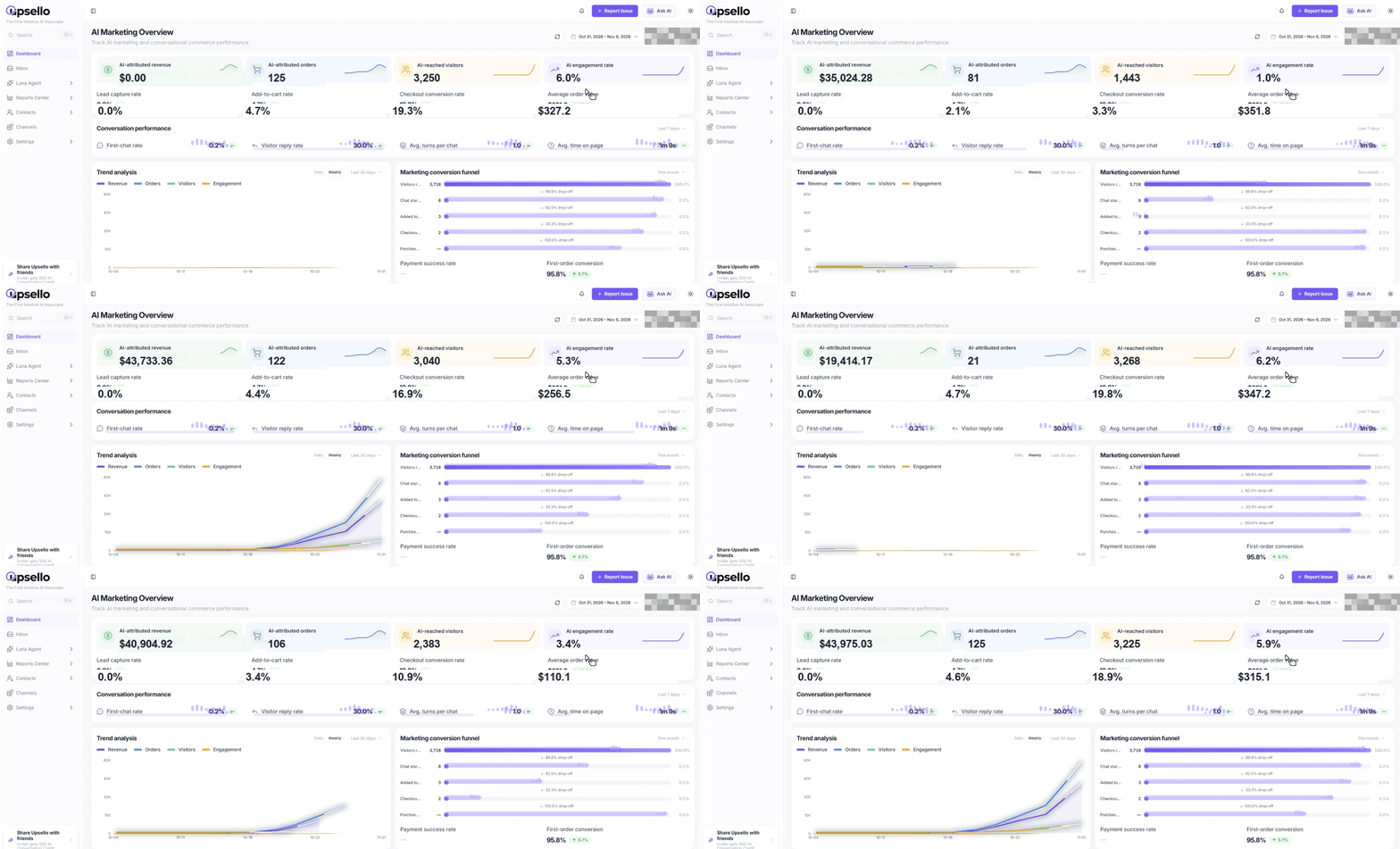
Upsello’s AI marketing dashboard helps Shopify teams review attributed outcomes, shopper engagement, and conversion stages in one workspace. Use it to identify the next question worth investigating—and connect that question to conversations and orders.
Register to explore Upsello for your store →
Key takeaways
- An AI marketing dashboard should connect commercial outcomes with the shopping interactions that precede them.
- Review attributed revenue, engagement, trends, and funnel stages together. No single number explains the whole result.
- Keep the date range and population consistent when comparing performance.
- Attribution links orders to recorded interactions under defined rules. It does not, by itself, prove incremental revenue.
What should you look at after installing an AI shopping assistant?
Your assistant is answering questions. Marketing messages are reaching visitors. Some shoppers are adding products to their carts. The next question is commercial: where is this activity helping, and what should your team change?
A chat count cannot answer that on its own. More conversations could reflect stronger buying interest, a confusing promotion, or customers repeatedly asking a question the assistant has not resolved.
For Shopify teams, an AI marketing dashboard becomes useful when it connects three views: what happened commercially, how shoppers interacted, and where the buying journey lost momentum. Upsello brings these views into one workspace so an operator can move from a performance question to a focused investigation.
This guide explains how to use that workspace. The product animation illustrates the dashboard layout; its animated values are presentation effects, not a customer result or a live performance feed.
Start with attributed revenue, then check the activity behind it
The supplied Upsello dashboard demonstration shows four headline cards: AI-attributed revenue, AI-attributed orders, AI-reached visitors, and AI engagement rate. Together, they give the team a starting point for assessing commercial activity and shopper response.
Read them as a connected set. If reach increases while engagement does not, investigate the relevance or timing of the interaction. If attributed orders change, check the traffic mix, offer, product availability, and comparison period before deciding what caused the movement.
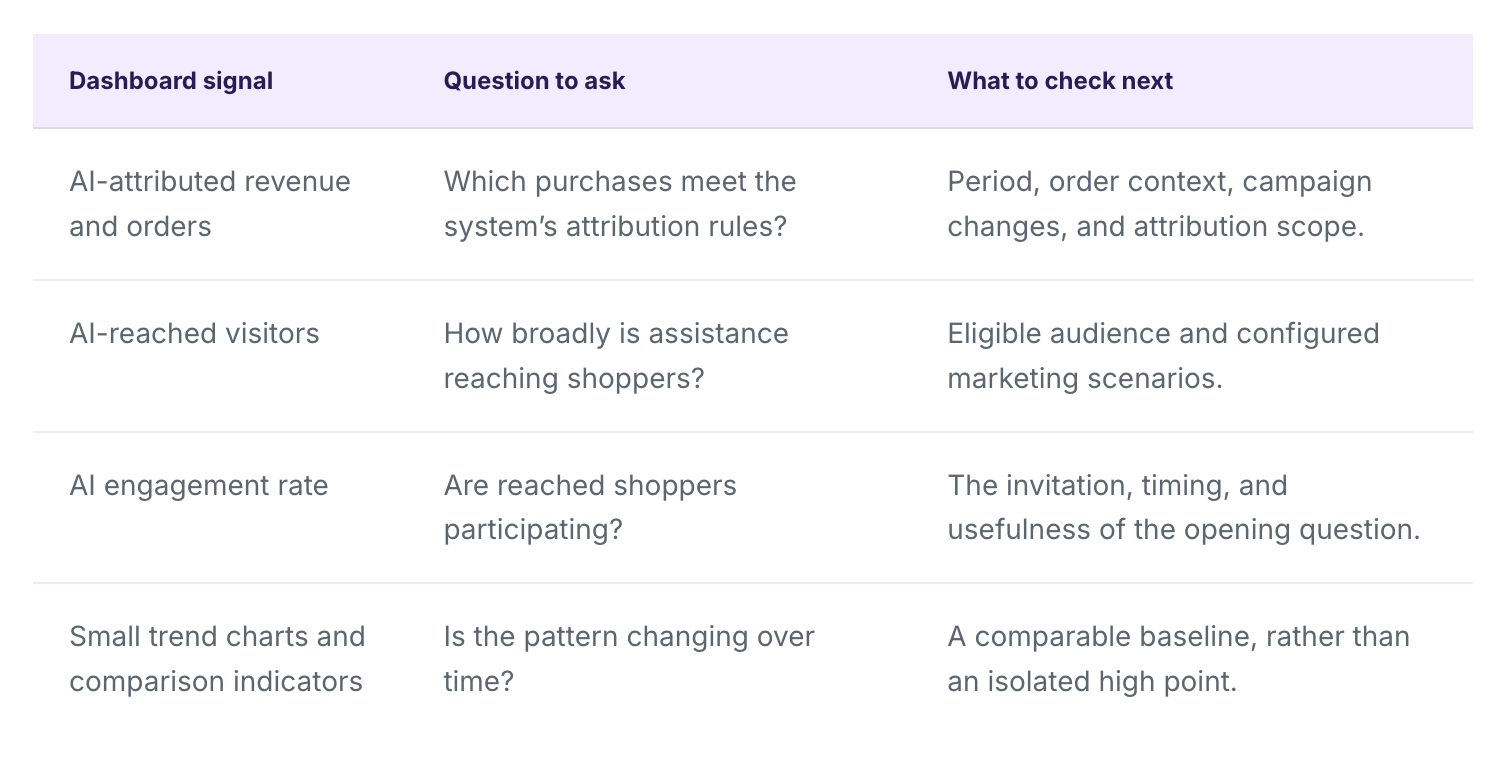
Do not confuse reached visitors with message impressions: one person can receive more than one message. Likewise, a missing comparison shown as a dash is not zero growth. Read the current interface’s definitions before exporting a number into a management report.
Use conversation metrics to find questions worth investigating
Upsello’s conversation-performance area includes measures such as first-chat rate, visitor reply rate, average turns per chat, and average time on page. These help you inspect whether communication begins and continues.
None is a score to maximize blindly. A longer conversation can mean a customer is making a careful comparison. It can also mean the answer remains unclear. Longer time on a page may reflect interest or difficulty finding information.
Suppose a shopper asks whether a device works with their laptop. The assistant asks for the model and intended use, then checks the relevant product information. Several turns may be appropriate. Repeating a generic compatibility answer three times is a different experience, even if the conversation length looks similar.
Pair the metrics with a review of actual conversations. Look for whether the question was resolved, whether the recommended product was appropriate, and whether the next step was clear. Our guide to product knowledge bases for AI shopping assistants explains the information foundation behind dependable answers.
Choose a time range that matches your business question
A launch-day investigation and a monthly review need different views. Upsello’s documented trend-analysis capabilities support hourly, daily, weekly, and monthly granularity, with multiple metrics and dual-axis comparison.
- Hourly: inspect the period around a campaign launch or a change in traffic.
- Daily: review routine performance and operational adjustments.
- Weekly or monthly: assess whether a pattern persists beyond a short spike.
The global date filter updates the dashboard together. Individual modules can also have local time settings. Check both before comparing a headline card with a chart: they may be displaying different periods after a local adjustment.
Use explicit start and end dates for a campaign review. Record what changed during that window, including promotions, traffic sources, inventory, and product pricing. Comparing a holiday sale with an ordinary week can describe a difference; it cannot isolate the assistant’s effect.
A practical review question is narrow: “After changing the opening question on this collection, did eligible shoppers respond more often?” That is easier to investigate than “Did AI improve the store?”
Use the conversion funnel to locate the next investigation
A funnel makes a large performance question smaller. Instead of treating every incomplete purchase as the same problem, inspect the transition where progress slows.
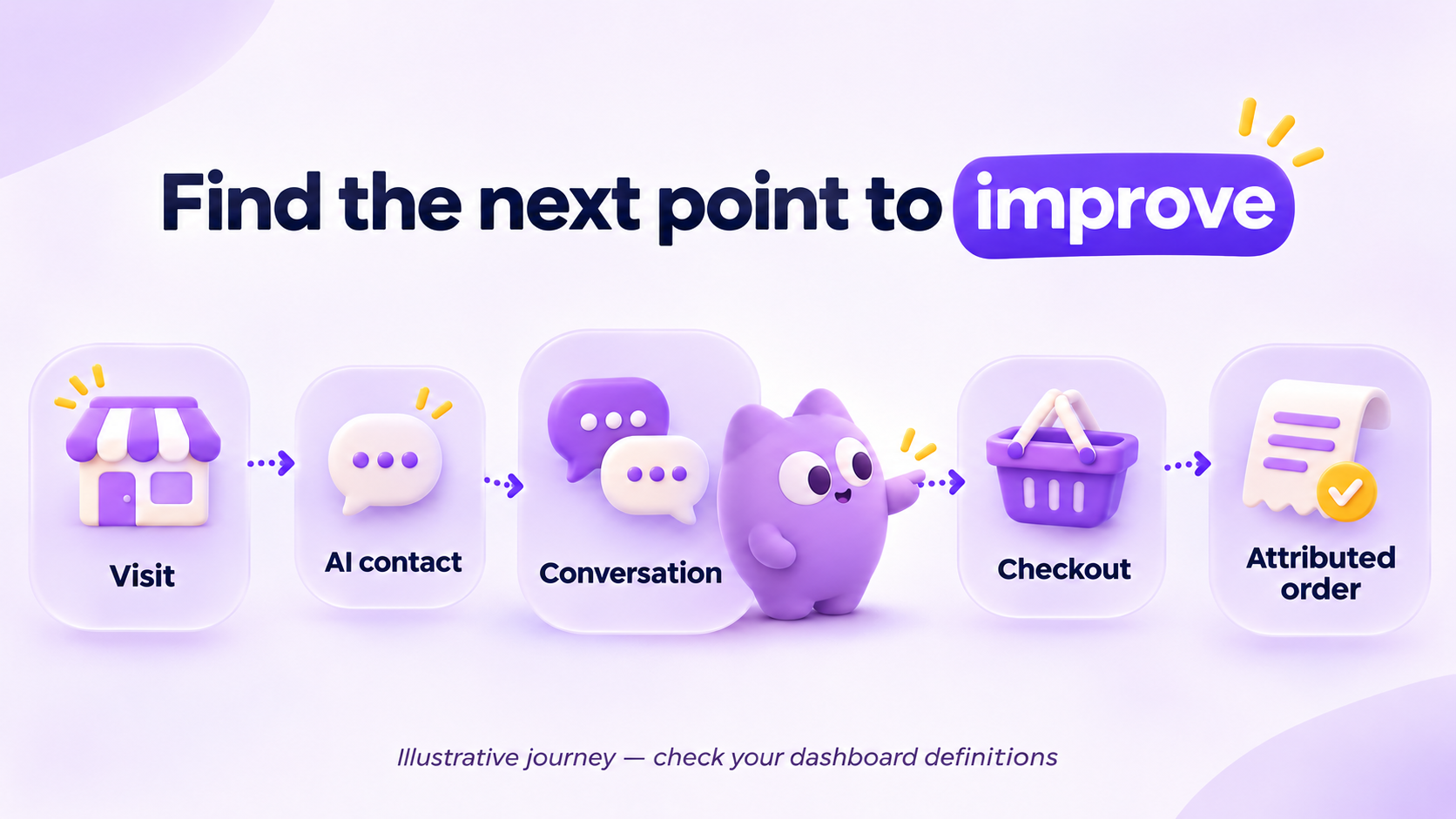
Upsello’s supplied feature specification describes a five-stage sequential model covering store visits, proactive marketing contact, AI interaction, checkout initiation, and completed attributed purchases. Sequential counting requires the earlier qualifying stage before including a later one.
The existing demonstration uses some different stage labels, including chat and cart activity. Treat the illustration as a visual walkthrough; use the current dashboard’s stage definitions for your operational reporting.
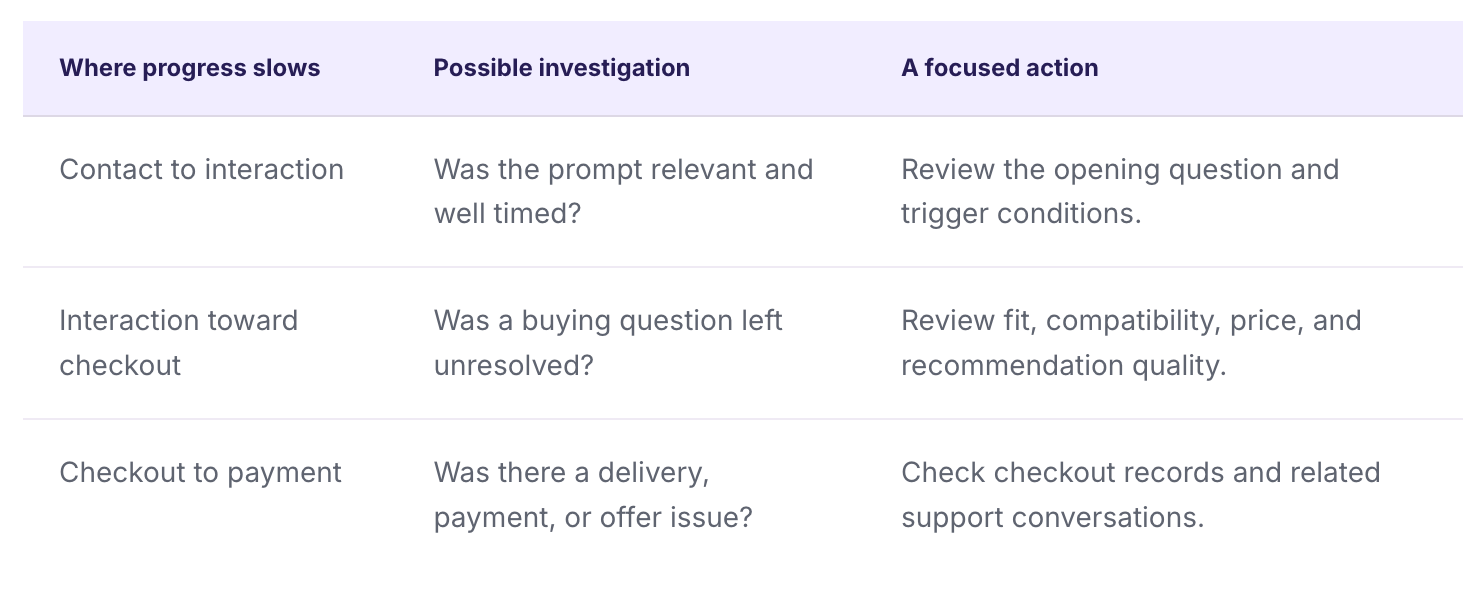
These are investigative directions, not automatic diagnoses. A large drop-off tells you where to look. The order and conversation records help you understand why.
When a question requires a policy exception or an unavailable fact, a human should receive the existing context. See when an AI shopping assistant should hand off to a human for a practical continuation workflow.
Understand what AI order attribution can—and cannot—tell you
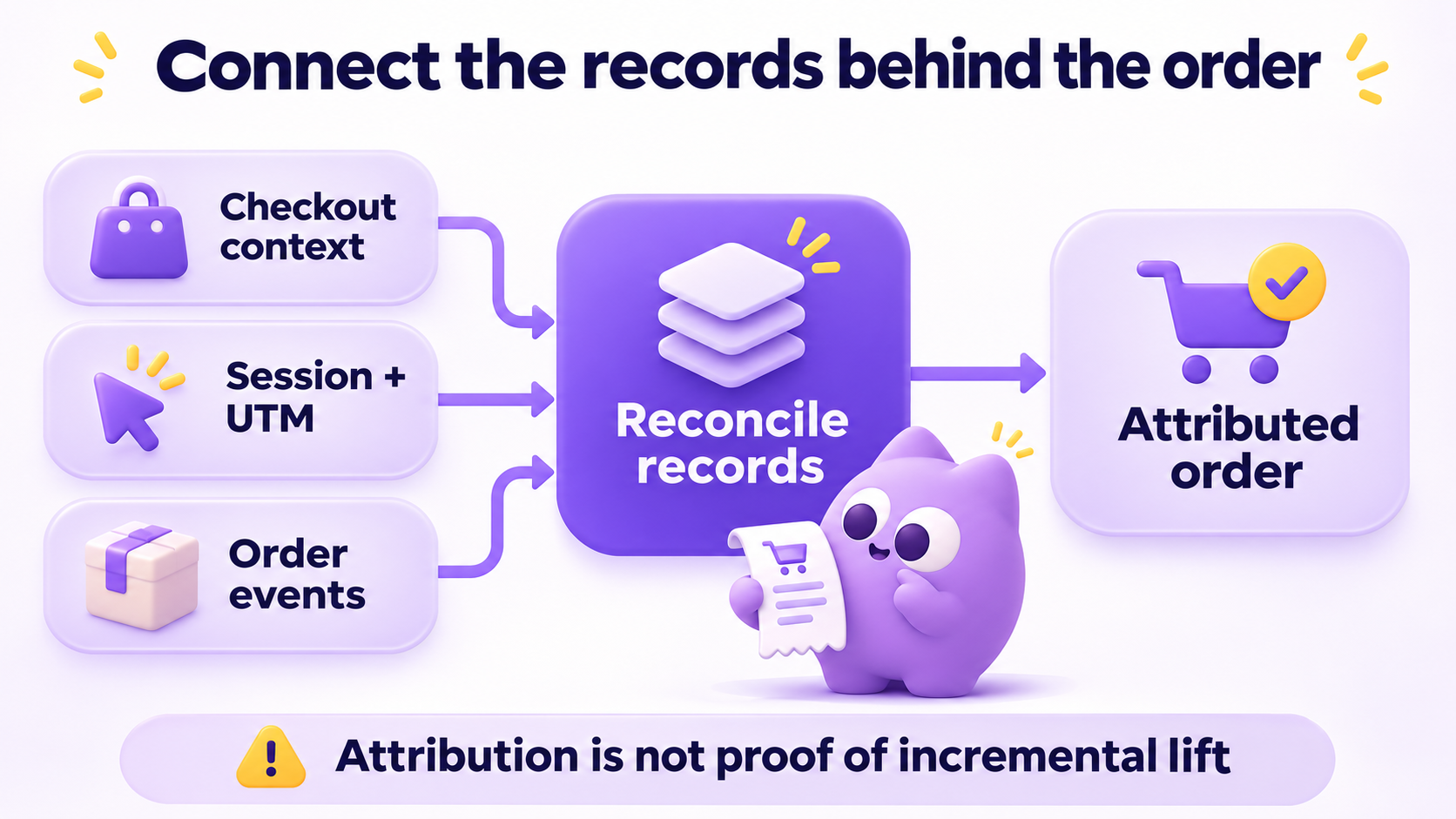
Shoppers do not necessarily purchase inside the first interaction. They may open a recommendation, inspect a product page, and continue to checkout later. Attribution needs a way to connect relevant recorded context with the eventual order.
Upsello’s documented attribution workflow combines checkout-context snapshots, session and UTM associations, and order notifications with reconciliation. These mechanisms support linking recorded marketing activity with orders, including completing information when notifications arrive in a different sequence.
That is an operational attribution process. It is not the same as an experiment showing that a purchase would not have happened without AI.
Report attributed revenue as attributed revenue. To estimate incremental lift, define an eligible audience and compare appropriately matched conditions, ideally with a valid holdout where feasible. Avoid calculating a confident return on investment from attributed revenue alone.
Our existing guide to measuring AI ecommerce conversion beyond chat volume covers the measurement framework. This dashboard workflow complements it by helping operators find the records and trends to investigate.
A Black Friday dashboard review your team can actually use
During Black Friday, a team needs a short review routine. The useful output is a decision about what to inspect or improve, not a slide containing every available metric.
Illustrative scenario: reach rises, replies do not
A DTC store launches a gift campaign. More visitors receive assistance, but the reply rate does not follow. Rather than increasing message frequency immediately, the team reviews the invitation. It asks a broad question that does not mention gift shopping.
The team tests a more relevant opening question, checks that product and delivery information are accurate, and reviews the same eligible population over a defined period. It also reads conversations to see whether the new question helps shoppers express their requirements.
This is a proposed testing scenario, not an Upsello customer result or a promise of higher sales.
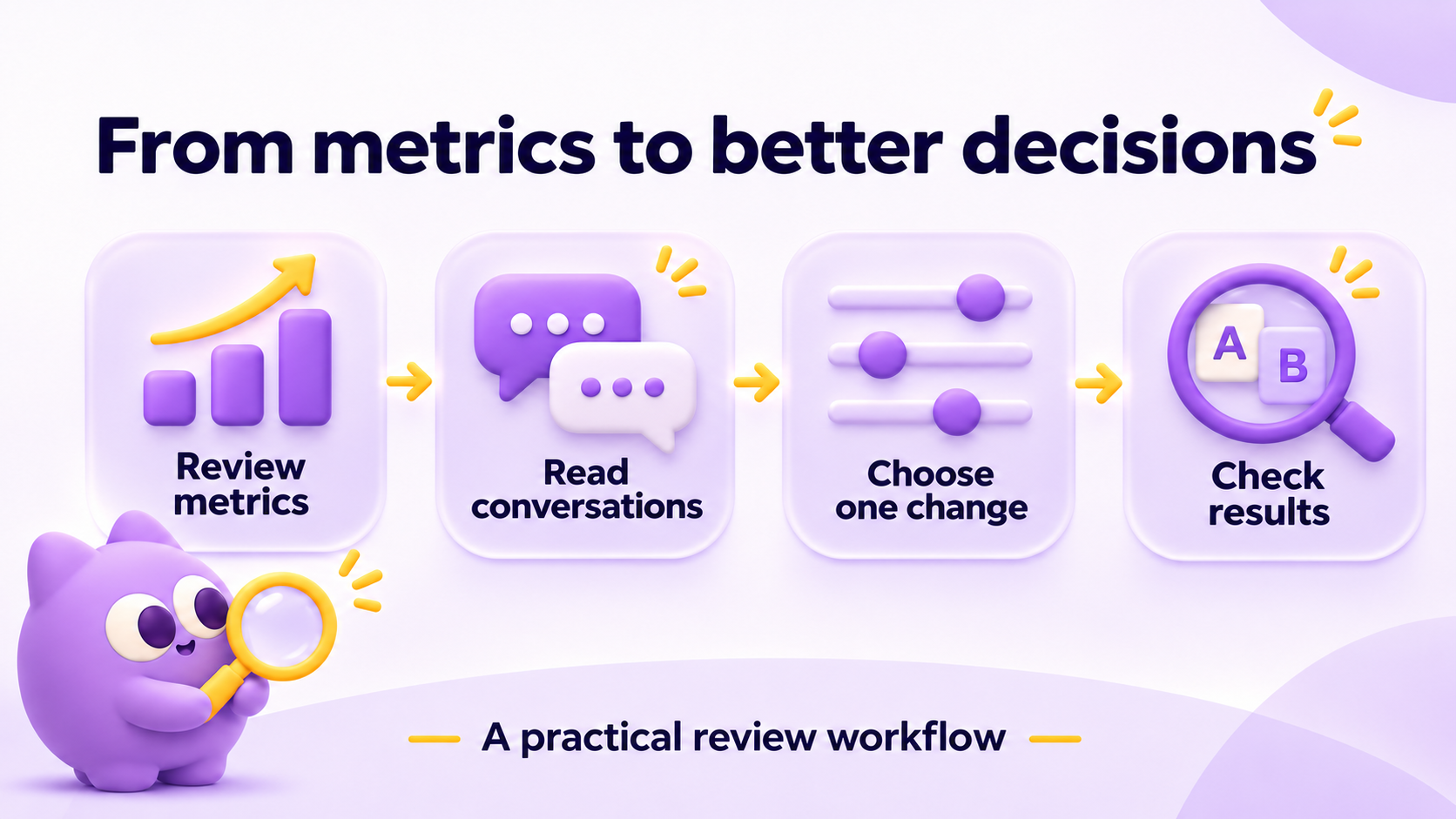
Use three passes: first check the date range and commercial overview; then locate a change in interaction or funnel progression; finally inspect a sample of underlying conversations or orders. Assign one next action and revisit it after an appropriate observation window.
Before changing recommendations or promotions, review sales-agent guardrails. Better reporting does not remove the need for verified prices, offer rules, and human judgment.
How to start reviewing AI marketing performance in Upsello
- Complete the store setup. The documented onboarding flow covers channel connection, agent association, and scenario switches.
- Select the store and date range. Choose the period that matches your question and check any local chart settings.
- Review outcomes and response together. Read attributed orders alongside reach and engagement.
- Find one transition to investigate. Use the funnel and trend views to focus attention.
- Check the supporting context. Read conversations or inspect order information before changing the experience.
- Record the change and review again. Keep the comparison conditions clear.
The dashboard also provides a manual refresh action, operational notifications, and custom date selection. These support routine checking; refreshing the interface does not remove dependencies on event collection or order reconciliation.
Start with one store, one campaign, and one performance question.
Register to explore Upsello for Shopify →
Frequently asked questions
What is an AI marketing dashboard for Shopify?
It is a workspace for reviewing AI-related commercial activity, shopper engagement, trends, and conversion stages. Its practical purpose is to help a team choose what to investigate and improve next.
Which AI shopping assistant metrics should I review first?
Start with attributed revenue and orders, then inspect reach, engagement, and funnel progression for the same relevant period. Check the current field definitions and review conversations before drawing conclusions.
Does AI-attributed revenue equal incremental revenue?
No. Attributed revenue meets the system’s linking rules. Incremental revenue asks what changed because of the intervention, which requires an appropriate comparison.
Should I aim for longer AI conversations?
Not necessarily. A useful conversation resolves the shopper’s question. Additional turns can represent thoughtful comparison or an unresolved problem, so inspect the content.
Can I use the dashboard to review Black Friday?
Yes: use a defined campaign date range, inspect trends and funnel stages, and account for changes in traffic, promotions, and product availability. The dashboard does not guarantee a particular sales result.
About the author
Upsello Team · Growth & customer experience
We build Upsello and write about practical AI selling for Shopify stores. This article uses the product team’s November 6 dashboard specification and the supplied dashboard demonstration. Interface labels can differ across versions; examples are illustrative, not customer performance claims.
Make your next AI marketing decision with context.
Explore Upsello’s shopping assistant and start a focused review of reach, conversation quality, and attributed outcomes.
Explore the Shopify shopping assistant


