

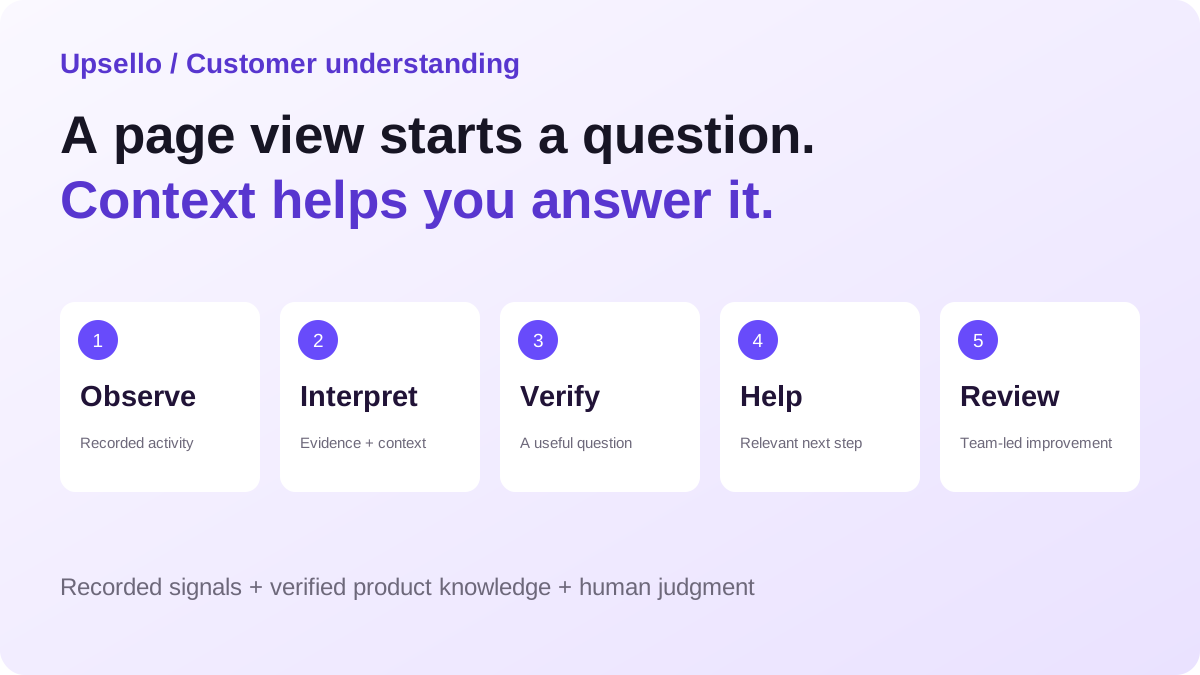
A practical framework for turning shopper signals into useful assistance.
Every store needs a way to understand the buying decision behind the visit. Upsello brings available shopper activity, conversation context, and evidence-backed suggestions into a more useful sales workflow.
Try Upsello for your Shopify store →
Key takeaways
- Customer behavior analytics becomes more useful when it helps a team decide what to ask, explain, or verify next.
- Upsello brings available shopper activity, conversation context, and evidence-backed suggestions into the service workflow.
- A product view is an observation. “This shopper needs a cheaper option” is a hypothesis until the shopper confirms it.
- Start with one buying decision, use verified product knowledge, and measure useful outcomes—not just more conversations.
Your store has traffic. Does it understand the decision?
A shopper opens a $143 cushion, looks at two alternatives, and asks, “Are there any current deals?” A report can count the product views. A generic chatbot can repeat the promotion policy. Your team still has to work out what would help this person buy.
Is the price too high? Are they furnishing a whole room? Is this a gift? Would a lower-priced item solve the problem, or would it miss the reason they liked the original product?
These are different selling opportunities. Treating all of them as “send a discount” makes the store less useful precisely when it could be most helpful.
That is the opportunity behind a customer behavior analysis engine for Shopify: connect what a shopper did with what they said, then make the next interaction more relevant. Upsello’s AI Customer Insights and branded shopping conversations support that workflow. The goal is practical: give each store a clearer view of the buying decision unfolding inside it.
The unit of understanding is the buying decision, not the page view. A decision might be choosing the right size, verifying compatibility, comparing two products, or finding an acceptable alternative within budget.
What is a customer behavior analysis engine?
A customer behavior analysis engine is a workflow that combines observed activity, customer statements, and product knowledge to guide the next useful action. For a Shopify store, that action could be a clarifying question, a relevant recommendation, a policy explanation, or a handoff with context.
In this article, “engine” describes how these capabilities work together. It does not mean that Upsello sees every visit, knows a shopper’s private intentions, or replaces your analytics stack.
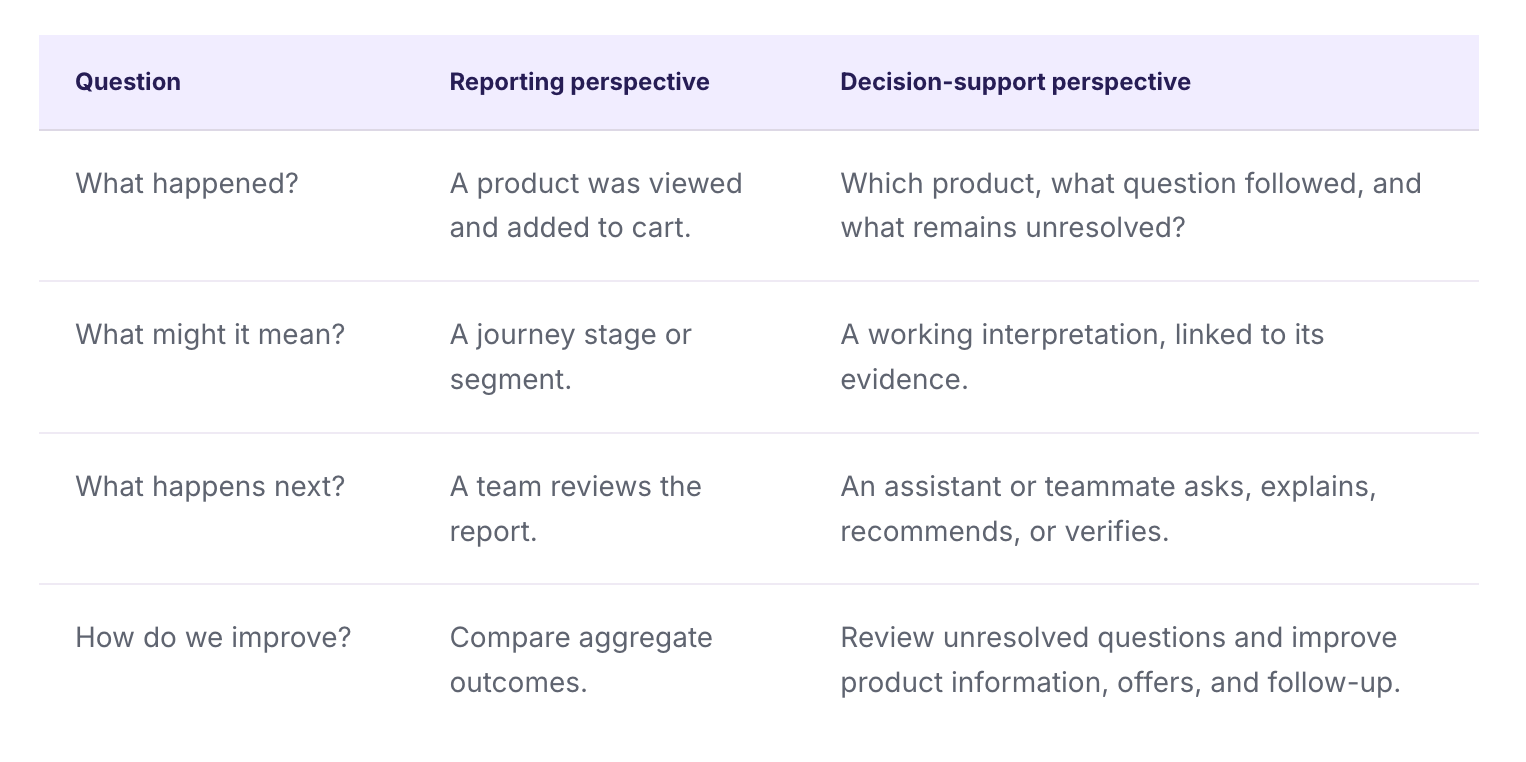
Both perspectives matter. Reporting tells you where to investigate. The conversation helps you understand what a specific shopper needs. A useful implementation connects them without turning every assumption into a fact.
Which shopper signals can your team use?
Upsello’s documented customer-insights workflow can show a time-ordered view of recorded activity when the behavior timeline is enabled. The available context depends on the store’s configuration, connected data, and what was actually captured.
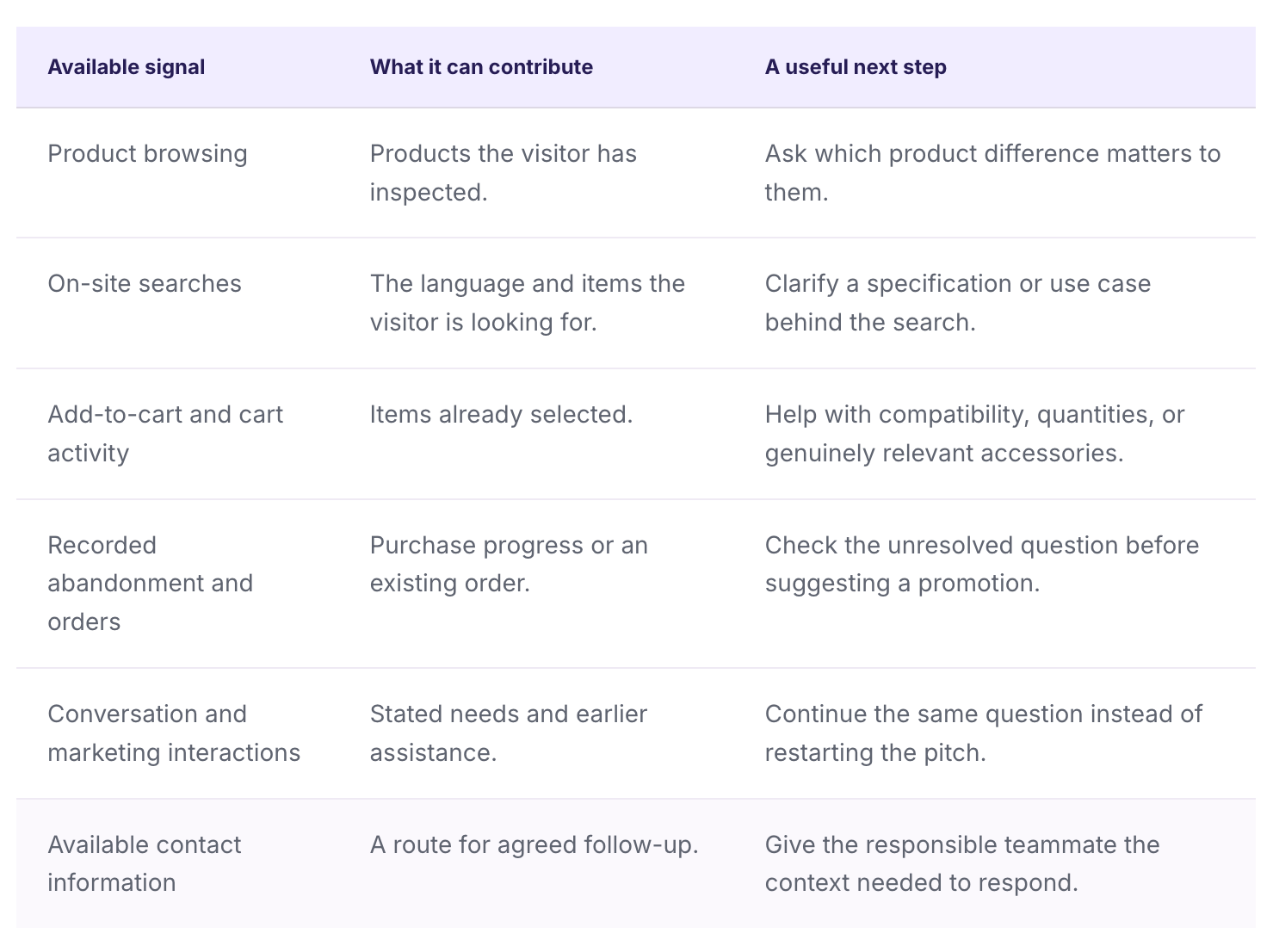
Shopify’s customer-event documentation explains that events can cover actions such as product views, searches, cart updates, and purchases. That platform capability is not a promise that every event is present in every app. Verify the events available in your own Upsello setup.
A missing event also does not prove that nothing happened. Browser restrictions, blockers, and privacy settings can limit collection; Shopify describes these limitations in its app-pixel guide. Use the records you have rather than filling gaps with confident guesses.
Make the evidence visible before acting on the insight
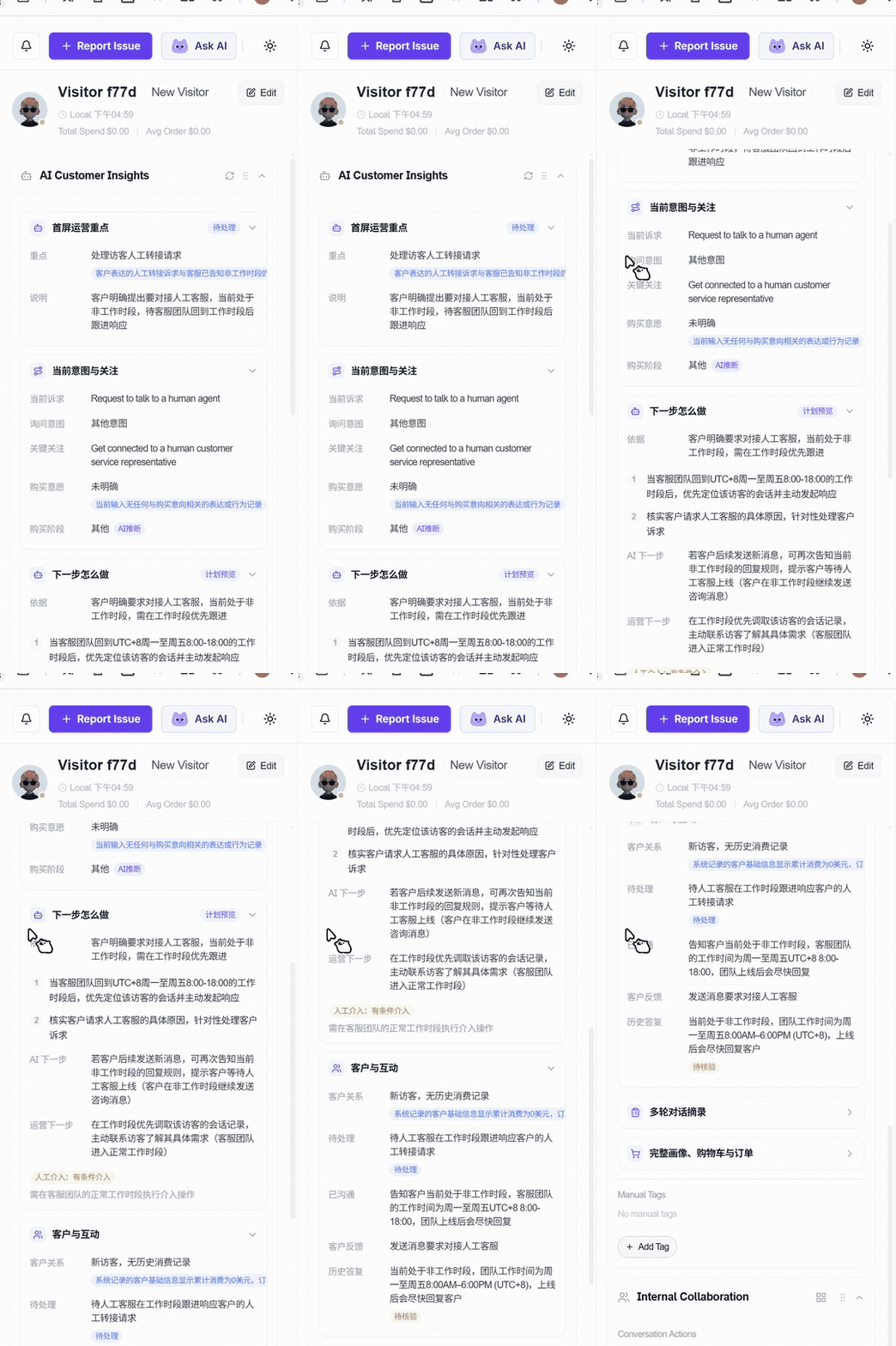
An insight is useful only if the team can understand why it exists. Upsello’s customer-insights sidebar organizes the operational focus, current intent and concerns, and suggested next steps alongside supporting context.
Original product demonstration. Labels and records reflect the recorded demo environment.
Four different kinds of evidence
- Customer statements: what the shopper explicitly said.
- System records: facts available from connected store records.
- Behavior records: observed activity captured in the session.
- AI inference: a suggested interpretation that may need confirmation.
These distinctions help a teammate judge whether to act immediately or ask one more question. Relevant conversation excerpts provide a route back to the original context.
For example, a visitor who views three products has browsed three products. That alone does not establish budget, urgency, or purchase intent. If they then say, “I need something under $60,” budget becomes an explicit constraint. The recommendation can now be grounded in a fact rather than a guess.
The same discipline applies to product answers. A shopper’s need must be matched to verified catalog information and policies. Our guide to how AI shopping assistants use product knowledge bases explains that foundation. Behavior tells you what to investigate; product knowledge helps you answer accurately.
From a behavior signal to a better sales conversation
A practical workflow has five steps: observe, interpret, verify, help, and review. The first four support the current interaction. The fifth helps the team improve the store over time.
Observe the decision in progress
Start with the products, available activity, and words already in the conversation. Keep the scope narrow enough to be useful: “choosing a cushion for a small sofa” is more actionable than “interested in home décor.”
Interpret without overcommitting
Consider a possible barrier, but keep alternatives open. Looking at lower-priced products might indicate a budget concern. It might also indicate a different size, style, or intended use.
Verify with one useful question
A short question can change the quality of everything that follows. Ask about the missing decision variable instead of making the customer complete a long intake interview.
Illustrative conversation · Not a customer testimonial or measured outcome
Shopper: “Are there any current deals?”
Assistant: “Are you looking for a lower-priced single cushion, or a set for the room?”
Shopper: “One cushion, under $60, in a neutral color.”
Assistant: “I’ll compare the neutral options below $60 using their current product details. Is size important for the sofa you have?”
The value is not the number of messages. The customer has given the store a usable requirement, and the next recommendation has a clear reason.
Help through the store’s own experience
Upsello’s Shopping Assistant theme provides a branded advisor entry, a welcome experience, and product-led conversations. A configured marketing card can give an eligible visitor a route into the dialogue. Product cards can show names and prices; where a usable SKU is available, they can support adding the item to cart. Otherwise, the shopper can open the product page.
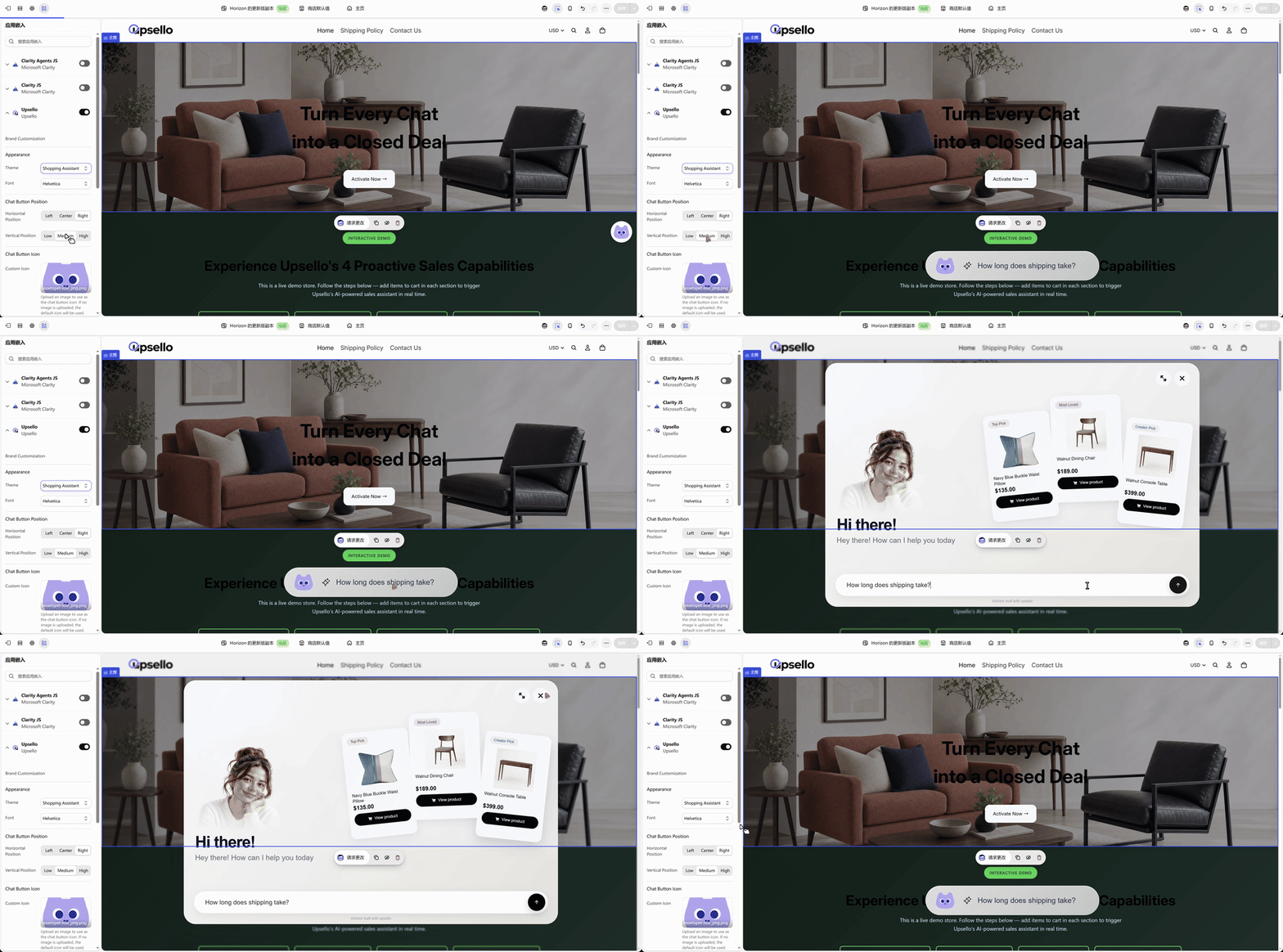
A branded entry point makes shopping help part of the storefront experience.
The customer should retain control. Suggested questions fill the input for the shopper to confirm. Existing trigger and lead-capture rules still matter; a new visual theme is not permission to message every visitor more often.
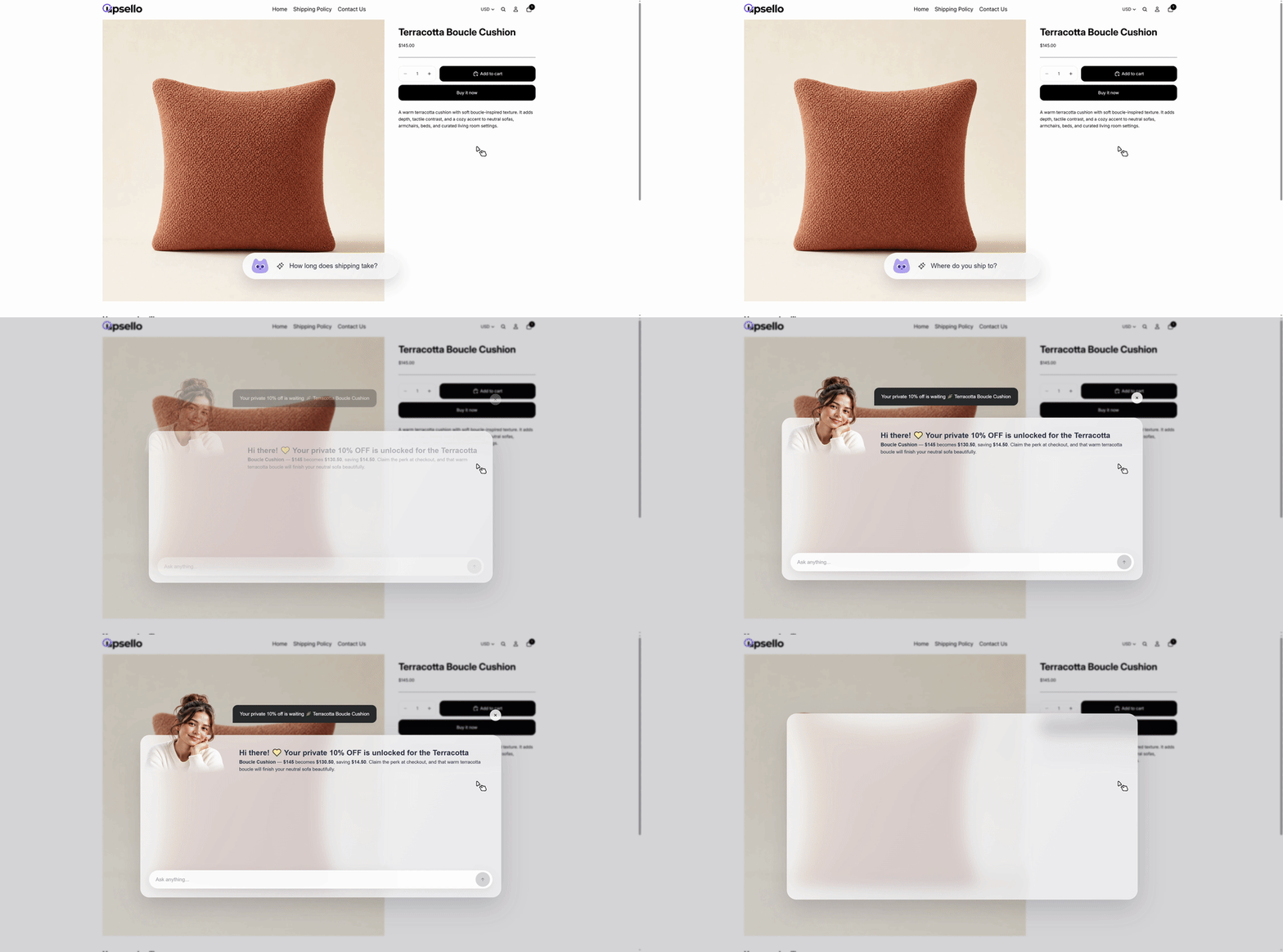
Product demo: a marketing touchpoint leads into a conversation. Availability depends on the configured trigger and theme.
Review what the store still cannot explain
If shoppers repeatedly ask whether a lamp fits a narrow desk, improve the dimensions and photography. If gift buyers keep asking about delivery, make the applicable delivery information easier to find. If an offer needs repeated explanation, simplify its terms.
This is where individual conversations become a growth resource. The team can improve the product page, knowledge base, and campaign using recurring questions. It does not require claiming that the AI autonomously learns or rewrites the store.
Choose one purchase decision your team answers every day.
See how a branded assistant and customer context could support it.
Explore Upsello’s shopping assistant →
Give your team a place to continue, not a transcript to decode
Human involvement should preserve the progress already made. A teammate needs to know the relevant product, the customer’s stated constraint, the unresolved question, and what has already been explained.
The customer-insights sidebar is valuable here because it puts intent, next-step suggestions, and evidence in the service workspace. The operator can check the interpretation against the conversation before continuing.
Imagine a shopper who has explained their device model and intended use but still needs a compatibility check. The teammate’s next task is to verify compatibility—not ask “How can I help?” and begin again. For cases that require judgment or authority, use our AI-to-human handoff guide to define when and how the team takes over.
This also makes gaps visible to the business. Several escalations about the same adapter may reveal a missing compatibility table. The insight is useful beyond the ticket: it can improve acquisition content and reduce uncertainty for the next visitor.
What could this change during Black Friday?
Black Friday brings more reasons to visit and more decisions to make. Price, bundles, availability, delivery, and returns can all matter in the same conversation. More traffic amplifies the cost of misunderstanding the question.
A hypothetical campaign scenario
A gift buyer searches for a compact lamp, compares two models, and asks whether the promotion applies to both. The assistant first clarifies the space and budget, then uses verified product and campaign information to explain the options. If delivery by a particular date cannot be confirmed, the team takes over with that requirement already captured.
The outcome to test is whether this process helps shoppers reach an informed decision with less repeated explanation. It is not a guaranteed conversion lift or a customer result.
Three useful campaign jobs follow: distinguish product confusion from price concern; recommend a relevant bundle only when its contents and offer are verified; preserve the shopper’s question when a human needs to check an exception.
Before campaign traffic arrives, test those jobs against your actual catalog. The pre-launch accuracy checklist is a useful companion. Keep offer boundaries explicit using the principles in our sales-agent guardrails guide.
Measure whether the decision improved
A customer behavior engine should earn its place through useful outcomes. A higher chat count may mean better engagement—or a confusing answer that forced the shopper to ask again.
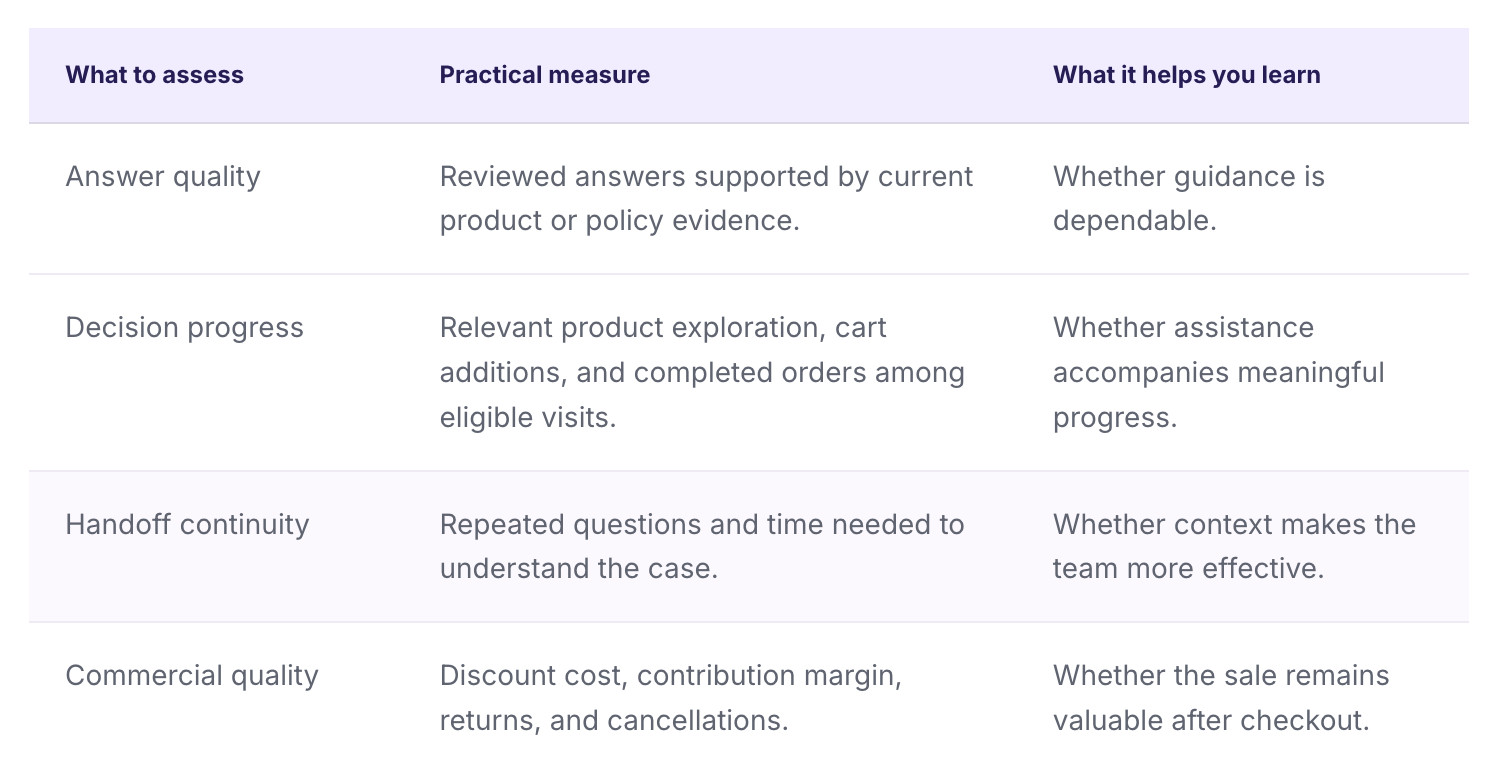
Define the eligible audience and observation period before the test. Where feasible, compare similar eligible visitors with and without the intervention. Orders following a chat show an association; proving incremental impact requires a credible comparison. Our guide to measuring AI ecommerce conversion beyond chat volume develops that approach.
These are recommended evaluation measures, not a claim that every metric is available as a built-in Upsello report. Use the appropriate store, order, and support records for the analysis.
Start with one category and one buying question
- Choose a repeated decision. Pick a category where customers often compare products or need clarification.
- Check the knowledge. Verify the relevant prices, variants, specifications, and policies.
- Confirm the available signals. Check timeline enablement and the activity your setup actually records.
- Design the intervention. Write one helpful question, define when it is appropriate, and decide when a person should take over.
- Review the evidence. Read a sample of conversations and compare outcomes before expanding the workflow.
The most valuable next step may be a better product explanation, a more relevant recommendation, or simply a clear route to a person. Giving every store its own customer behavior analysis engine means making those choices with context.
Frequently asked questions
What is customer behavior analytics for Shopify?
It is the analysis of recorded shopping activity, such as product views, searches, cart actions, and purchases. Adding conversation context helps teams understand the question behind those actions and decide how to help.
How does Upsello use customer context?
Its customer-insights workflow presents current intent and concerns, suggested next steps, and supporting context. When enabled, the behavior timeline can show available recorded visitor activity. The team can review evidence before acting.
Does Upsello know why every visitor leaves?
No. Available activity may be incomplete, and behavior alone does not establish intent. Use AI interpretations as hypotheses and clarify important unknowns through the conversation.
Does this replace Shopify analytics or a customer data platform?
No. The workflow described here focuses on context for shopping conversations and human follow-up. Store analytics, reporting, and other data systems continue to serve their own purposes.
Can AI behavior analysis increase Black Friday sales?
It can help a team address buying questions and recommend more relevant products. The actual commercial effect depends on implementation, traffic, catalog quality, and the offer. Test a defined use case rather than assuming a fixed uplift.
Where should a small DTC team start?
Start with one category and one recurring customer question. Verify the product data, confirm the signals available, and review the quality of recommendations and handoffs before expanding.
About the author
Upsello Team · Growth & customer experience
We build Upsello and write about practical AI selling for Shopify stores. This article draws on Upsello’s documented customer-insights and Shopping Assistant workflows, original product demonstrations, and Shopify’s customer-event documentation. Illustrative conversations and campaign scenarios are identified separately from product facts.
Give your next shopper a more relevant conversation.
Connect product guidance with the context your team needs to continue. Start with one buying question in your store.
Try Upsello for your Shopify store →
Explore the shopping assistant


